Blog Mobile App Development
Google Play Trader Status: Developer Addresses Go Public
On this page· 7 sections
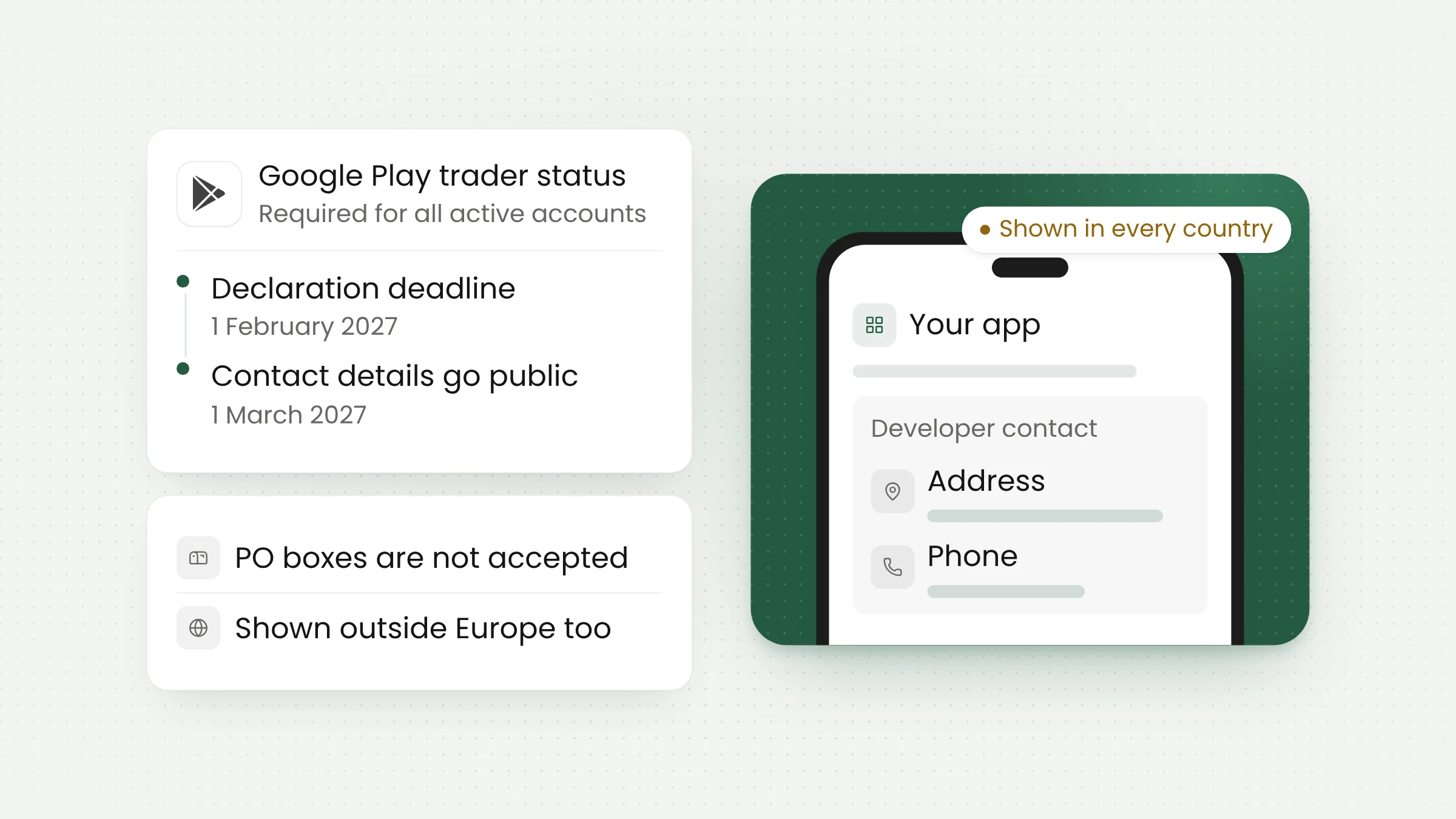
Every active developer account must declare its Google Play trader status by 1 February 2027. From 1 March 2027, contact details for developers who are traders will be visible to Play users in every country. For personal accounts, that means a phone number and an address.
The rule comes from European consumer law, yet it reaches developers everywhere, including small studios and solo developers in Indonesia. This week several technology outlets reported objections from developers who work from home. This article covers what Google’s help pages say, how Apple handles the same law, and the options before the deadline.
What the Google Play trader status rule says
According to the Trader status declaration page in Google Play Console Help, all active developer accounts must state whether they are a trader or a non-trader under the laws of the European Economic Area (EEA) and the United Kingdom. The requirement applies regardless of where apps are targeted or distributed. New accounts make the declaration when they are created.
DigitalToday reports that Google announced the policy change on 29 October 2026. The same announcement carried the call log permission rule we covered in our piece on flash call verification on Google Play.
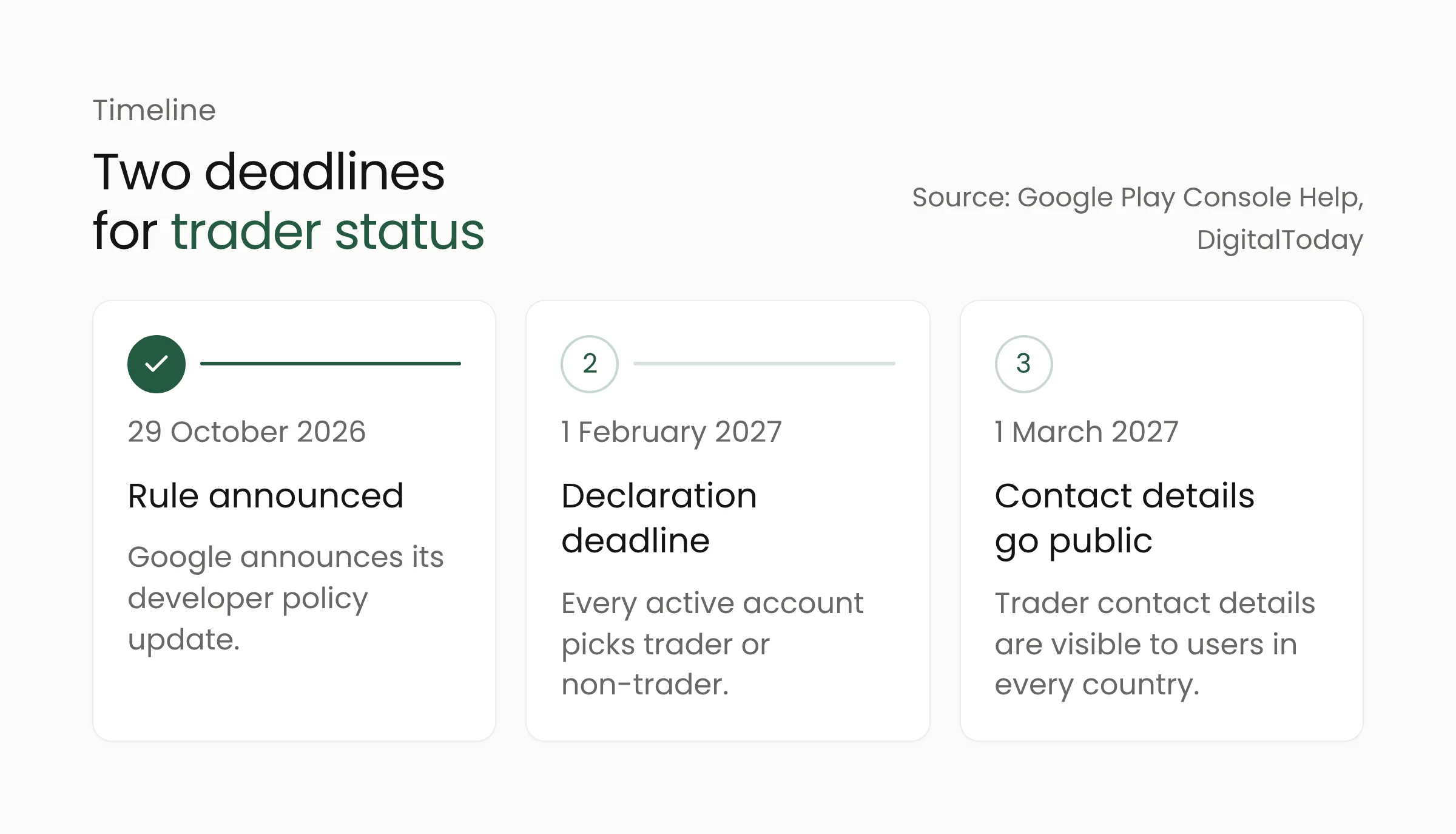
iTech Post names the two laws behind the change as the EU’s Digital Services Act (DSA) and the UK’s Digital Markets, Competition and Consumers Act. Google’s help page refers only to EEA and UK laws. Also on 1 March 2027, Google Play moves to an online marketplace model in the EEA and the UK.
What becomes visible on 1 March 2027
Google’s help page splits the display into two groups. For users in every country, a trader’s app listing will show:
- contact details, and for personal accounts that are traders, a phone number and address;
- the D-U-N-S number, in the “App support” section;
- a link to the app’s Terms of Service, if the developer has supplied one.
Users in the EEA and the UK see two more items. The developer or trader name replaces “Google” in the “Offered by” field, and the listing carries the developer’s self-certification that its products comply with local law.
A D-U-N-S number is a business identifier issued by Dun & Bradstreet. Google requires one for organization accounts, and its page on account types says applying for it is free.
Penalties for missing the deadline
Accounts that have filed no declaration by 1 February 2027 may have app updates blocked and their apps removed from the Play Store globally. Misrepresenting status, for example by choosing non-trader to avoid verification or self-certification, may lead to account suspension or termination worldwide.
Google may also ask a developer to confirm or update a non-trader declaration when account activity looks commercial. Apps may be removed if the developer does not respond within the time given.
How Google defines a trader
Google defines a trader as a natural or legal person acting for purposes related to their trade, business, craft, or profession. Personal hobbies and other non-commercial activity are unlikely to make someone a trader.
The help page lists four indicators drawn from European Commission guidance, and says the list is not exhaustive:
- a profit-seeking motive, such as paid apps, in-app purchases, or advertising revenue earned regularly or commercially;
- a high or consistent volume of transactions;
- managing app development and publishing as a business;
- holding a legal status that enables commercial activity, such as a D-U-N-S number.
Company size is absent from the list. A solo developer earning monthly ad payouts meets the first indicator just as a large studio does.
Google states that this guidance is informational and does not replace legal advice. Responsibility for an accurate declaration rests with the developer.
The exception for apps kept out of the EEA and the UK
Developers who do not distribute apps in the EEA or the UK may declare themselves non-traders.
The declaration itself remains mandatory. Withdrawing from European distribution does not remove the form, it only changes which answer is available. Where a developer declares non-trader status and still distributes in the EEA or the UK, Google will tell consumers there that consumer protection rights do not apply to contracts with that developer.
PO boxes and the contrast with the App Store
The strongest objections come from individual developers who work from home. DigitalToday reports that the address is tied to the payments profile linked to the developer account, and Google’s payments profile help page states, “We don’t allow you to use a PO box address.”
Analytics Insight writes that developers without an office may need to list a home address, rent an office, or pay for a business address service.
Apple applies the DSA more narrowly. Its App Store Connect documentation says trader information is published on the App Store product page when an app is distributed in any of the 27 territories of the EU. Individual developers may enter a PO box if they provide documentation showing their association with that address, such as a receipt or bill.
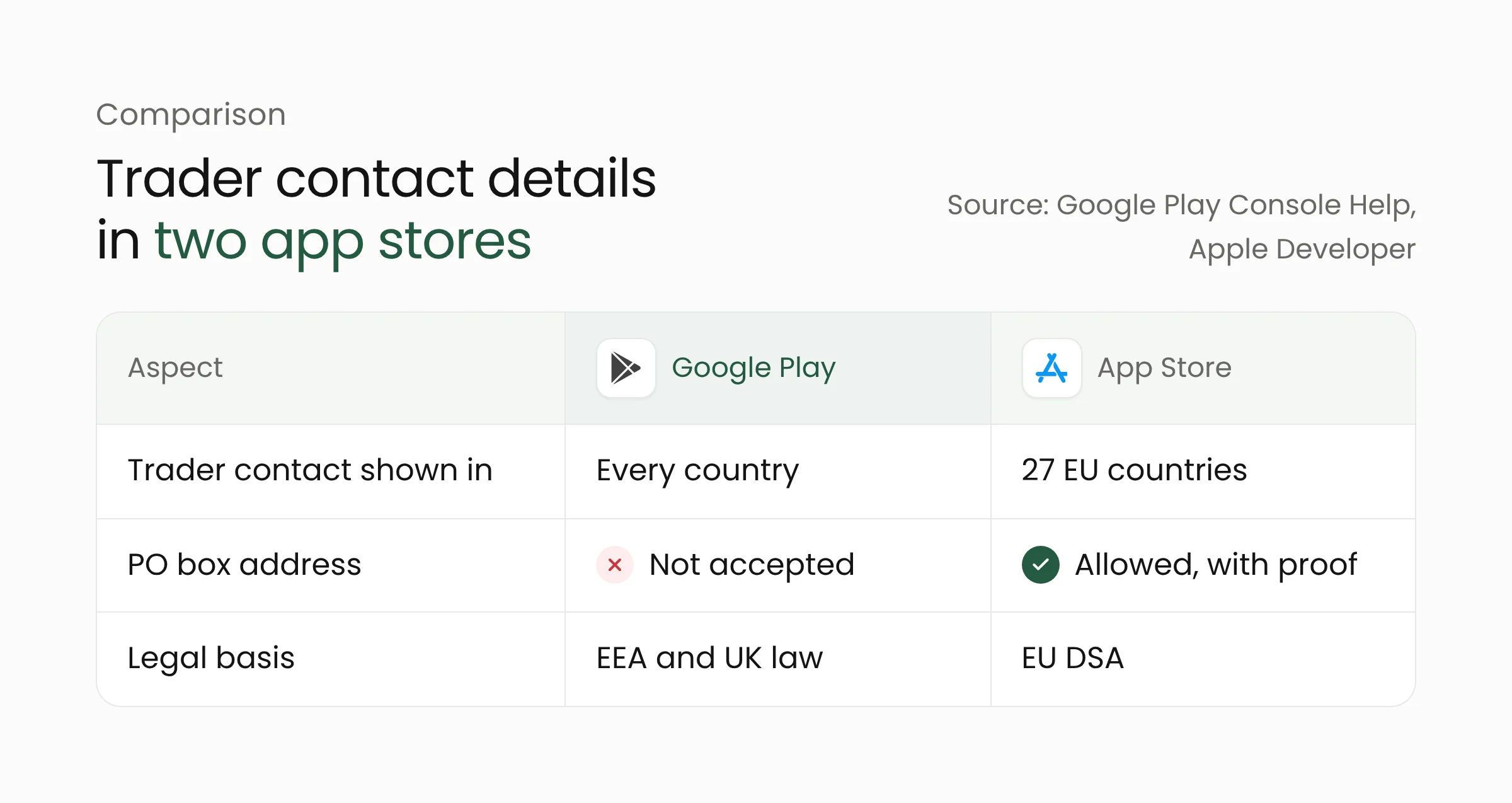
AndroidPure, citing a report by The Elec, notes that the DSA does not require these details to be shown outside the EU. The coverage we read contains no explanation from Google for extending the display to all countries. It is also unclear whether Google will accept a verified PO box as Apple does.
What this means for app developers in Indonesia
The 1 February 2027 deadline covers accounts created in Indonesia, including those holding a single old app. There are 28 days between the declaration deadline and the date contact details appear, so the address question is best settled before the form is filled in.
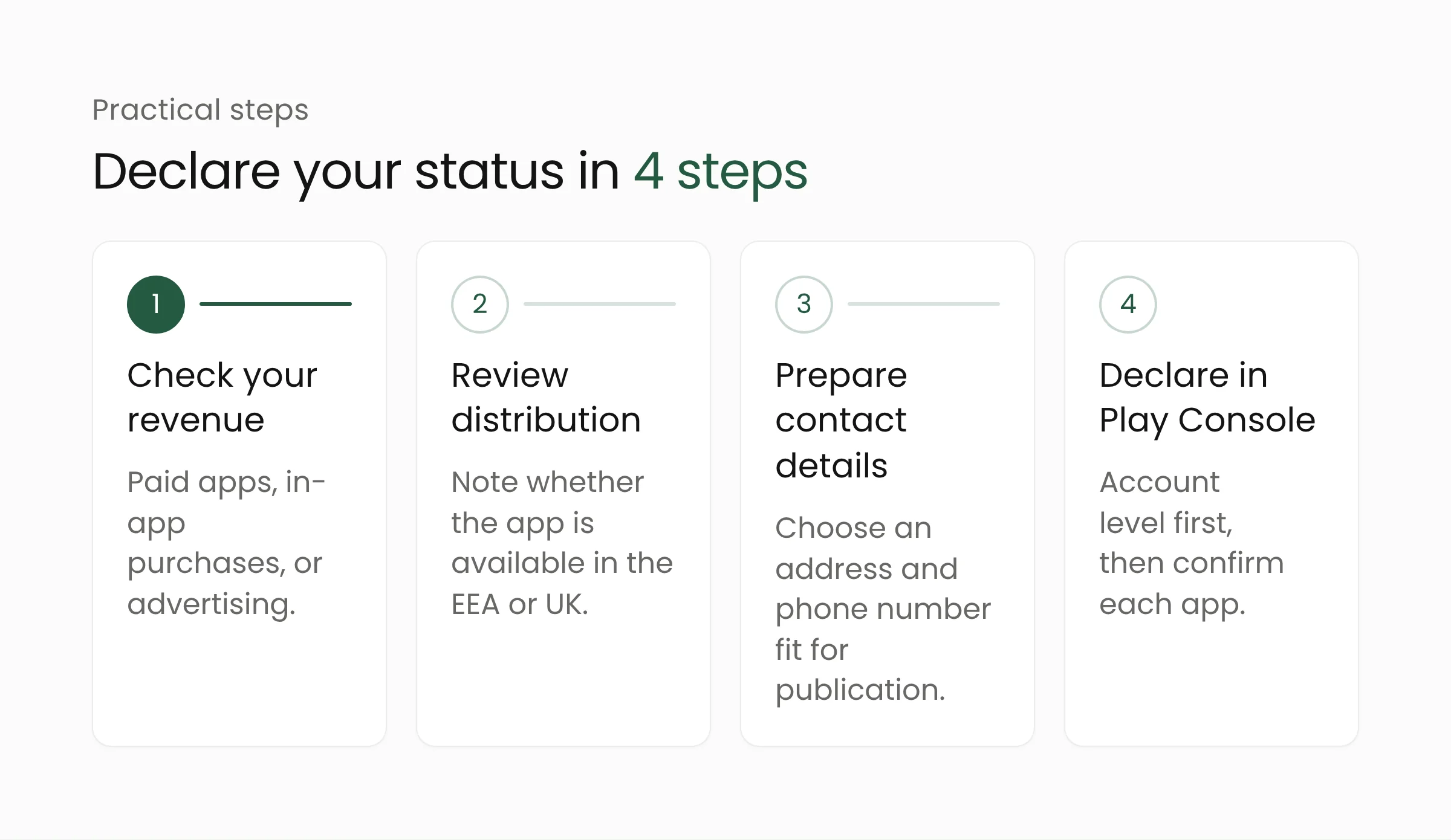
Check each app’s revenue sources. Paid apps, in-app purchases, and advertising are trader indicators. A free app with no ads, built as a hobby, is unlikely to qualify.
Review the list of distribution countries. Many local apps are available worldwide only because the default setting was never changed. If all your users are in Indonesia, closing distribution to the EEA and the UK opens the non-trader option. If you have European users or revenue, weigh their value before deciding.
Decide on the account type and address. Google says a personal account is for personal use, while an organization account is for commercial, professional, or governmental activity. A registered business that still publishes through its founder’s personal account should consider an organization account with an office address. Freelancers who plan to use a home address should discuss it with family or the property owner first.
Prepare a dedicated phone number and Terms of Service. Traders with personal accounts must provide a contact phone number, and it will be public. Google also asks traders to supply a Terms of Service link for each app.
File the declaration in Play Console. At account level, go to Manage account > Account details > About you. Traders then confirm the status of each app under Monitor and improve > Policy and programs > App content.
Agencies, schools, and businesses whose apps were built by a contractor should confirm whose name is on the Play Console account. If an app is published through a freelancer’s personal account, that person’s contact details are the ones that will appear on the listing. In Merakit’s mobile app development service, store account ownership is settled at the start of a project so the app is published under its owner’s name.
The requirement sits close to other Google deadlines, among them the quality standard for foldable phones in April 2027.
Frequently asked questions
Do developers outside Europe have to file the declaration?
Yes. Google requires all active developer accounts to declare trader or non-trader status by 1 February 2027, wherever their apps are distributed. What differs is the status available to them, which depends on commercial activity and distribution countries.
Will a home address always appear on Google Play?
No. The phone number and address are shown for personal accounts with trader status. Developers who qualify as non-traders, for instance because their app is non-commercial or is absent from the EEA and the UK, fall outside that display requirement according to Google’s help page.
Can the status be changed after it is declared?
It can. Google says the declaration may be updated at any time in Play Console when a business model or distribution changes, for example when an app starts carrying ads or stops being sold.
Closing
Google Play trader status asks every account owner for one decision before 1 February 2027, and for personal accounts that decision involves an address and phone number the public will see from 1 March 2027. Checking revenue, distribution countries, and account ownership now leaves enough time to choose carefully. If your organisation’s app needs to move to the right account or be adjusted to the new policy, the Merakit team is glad to review it with you.
Sources
- Trader status declaration, Google Play Console Help, accessed 29 November 2026
- Choose a developer account type, Google Play Console Help, accessed 29 November 2026
- Create a payments profile, Google Payments Center Help, accessed 29 November 2026
- Manage European Union Digital Services Act trader requirements, Apple Developer, accessed 29 November 2026
- Google Play policy requiring developer details draws backlash, DigitalToday, 27 November 2026
- Google Play to Make Android Developer Addresses Public Under New Privacy Policy, iTech Post, 27 November 2026
- No Post Office Box Allowed: Google Play Pushes Developers to Share Home Addresses, Analytics Insight, 27 November 2026
- Google Play to Show Trader Developers’ Phone and Address, AndroidPure, 27 November 2026