Blog Google Play
Google Play Sets April 2027 Deadline for Foldable-Ready Apps
On this page· 7 sections
Google Play will require Android apps to meet a baseline adaptive quality standard for foldable phones from April 2027, and to show foldable screenshots on their store listings. Apps that fall short will be unable to publish new releases or updates. Google announced the rules on November 18, 2026.
Two new requirements for Google Play apps
The announcement came from Mekka Okereke, general manager of Google Play Apps, on the Android Developers Blog. Two requirements take effect together in April 2027. Apps must meet at least Tier 3 of Android’s adaptive app quality guidelines for foldables, and their Play Store listings must carry screenshots taken on foldable devices.
An adaptive app is one whose layout adjusts to the size and shape of the screen. On a foldable, the user moves from a narrow cover screen to a wide inner display simply by opening the device. Apps that are not prepared for this tend to sit in the middle of the display with empty bars on either side, or restart the current page and wipe whatever the user had typed.
Google spelled out the consequence. Apps below Tier 3 will no longer be able to publish or update on Google Play, and may have reduced visibility in the store. The post mentions no exception for updates that only contain bug or security fixes, and it does not describe how Google Play will check each app for compliance.
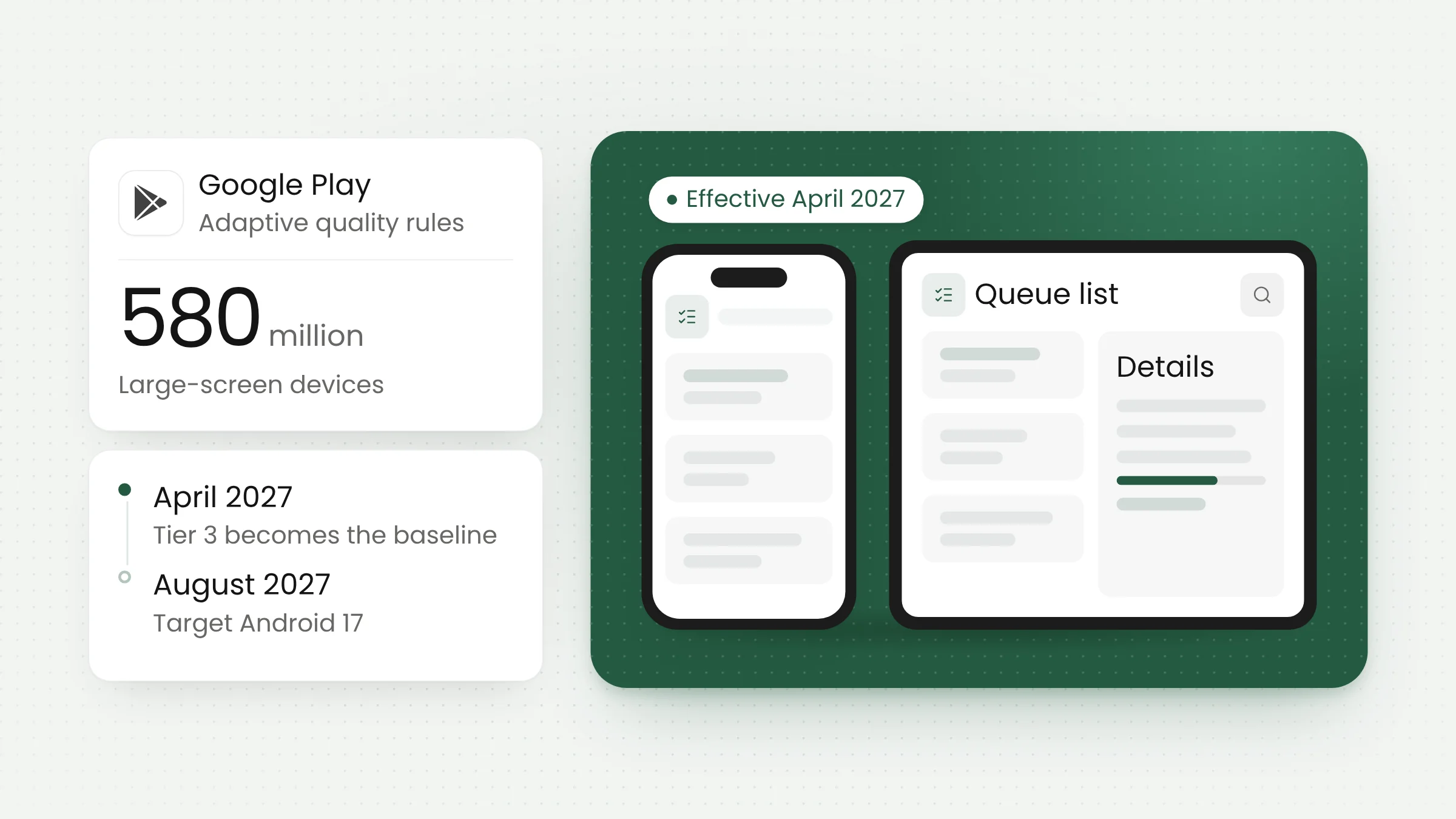
The company’s stated reason is device growth. Google says foldables have moved from an emerging category to premium mainstream hardware, and that the same adaptive guidelines apply to more than 580 million large-screen Android devices in use today. That group includes tablets, Googlebook laptops and Android XR devices.
The direction has been visible for a while. Apple shipped its first foldable in October, and we covered app readiness for the iPhone Duo at the time. With the Play rules, foldable support on Android moves from a recommendation to a condition of distribution.
The three tiers of Android adaptive quality
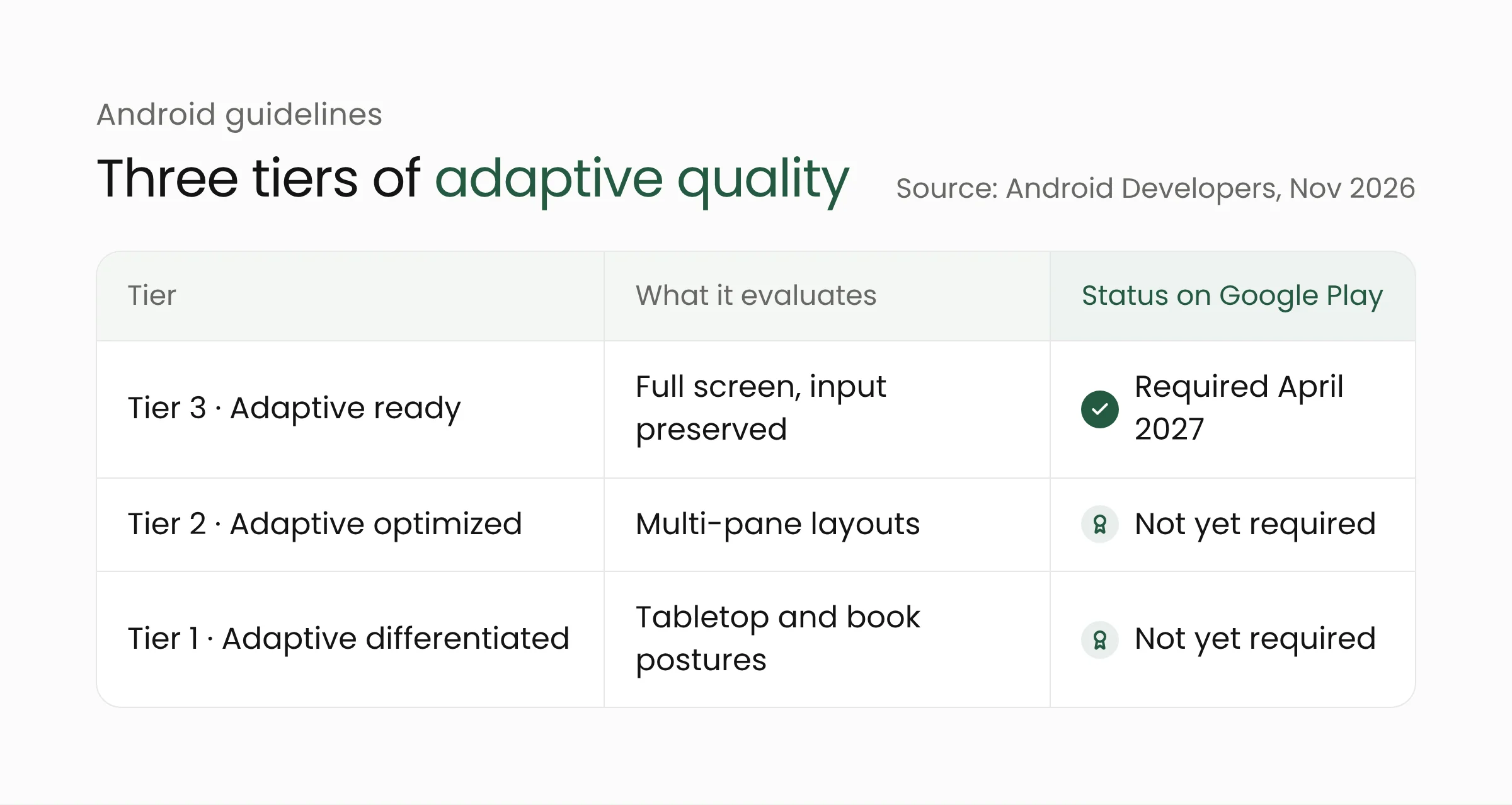
Android’s guidelines sort adaptive quality into three tiers. Only the lowest one becomes mandatory in April 2027, though Google says the framework will expand over time to Tier 2 and Tier 1, and to tablets, Googlebooks and Android XR. It has not given dates for that expansion.
Tier 3, adaptive ready
The Tier 3 guidelines ask apps to fill the available display area. An app must not be letterboxed, meaning shown with empty bars at its sides, and must not run in compatibility mode. Content must not overflow the display area either.
Apps have to keep their state when the device is rotated, folded, unfolded, or when the window is resized. The guidelines give three examples: the scroll position stays where it was, typed text is retained, and media playback resumes from the point it had reached.
Other requirements concern multi-window mode. An app must be fully functional while sharing the screen with another app, keep updating its interface when it is not the focused window, and release the camera or microphone when another app needs them. Camera previews must appear in the correct proportions and orientation in every device state. Tier 3 also covers basic support for an external keyboard, mouse, trackpad and stylus.
Tier 2 and Tier 1
Tier 2 (Adaptive optimized) evaluates responsive multi-pane layouts, such as a list on the left with details on the right, without stretched interface elements. Tier 1 (Adaptive differentiated) evaluates features specific to foldables, including tabletop posture, book posture and running several instances of the same app.
Neither tier is mandatory yet. Since the day of the announcement, apps that meet them can apply for badging and enhanced merchandising on Google Play.
The timeline to August 2027
Google has set three milestones. As of November 18, 2026, developers can upload foldable screenshots through Play Console, and those screenshots will start appearing in Play Store listings over the coming weeks.
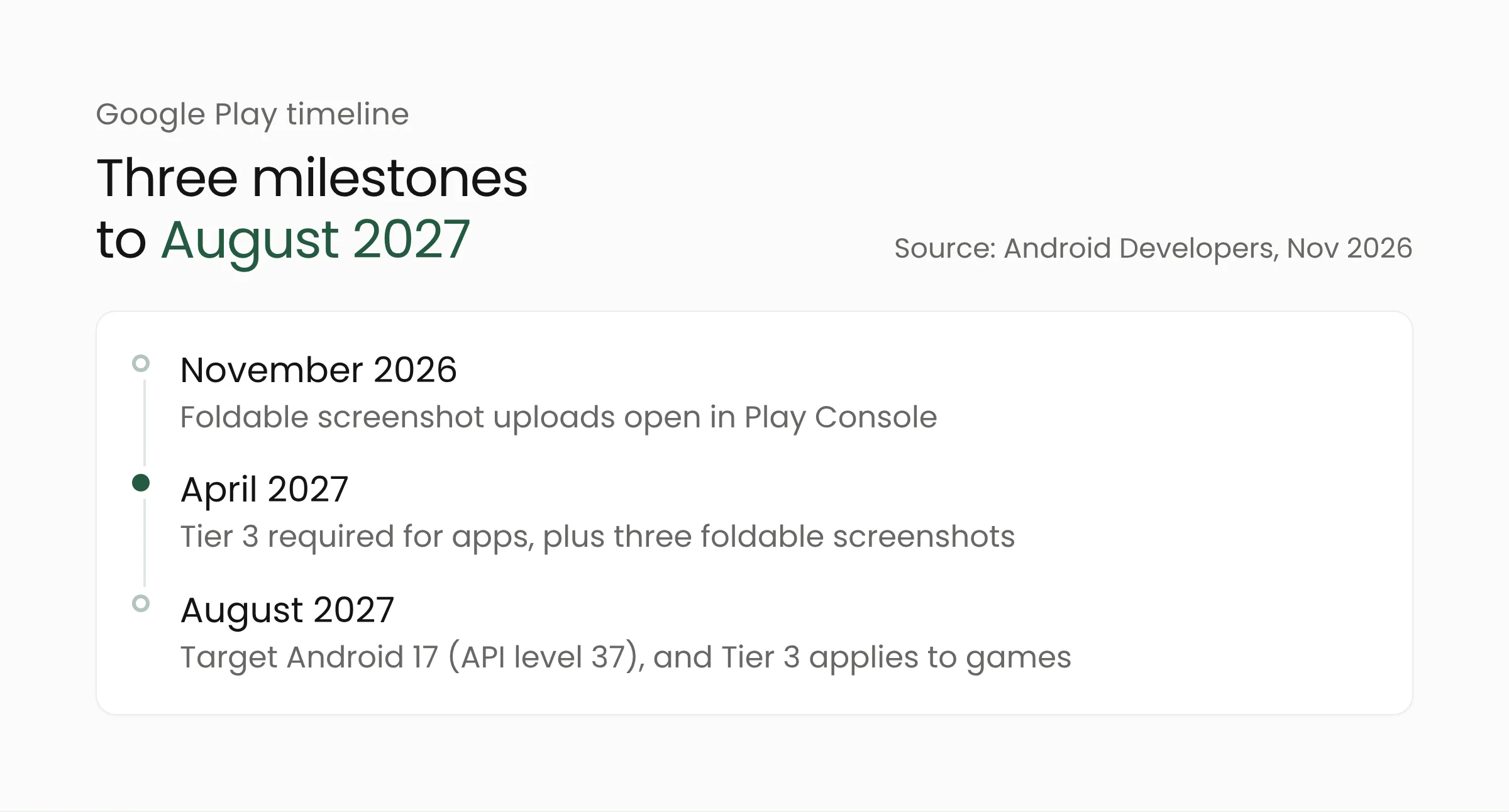
In April 2027, new apps and updates must include three foldable screenshots in addition to the standard two phone screenshots. According to Google, the set has to represent two device types: foldables with a 1:1 inner display, and foldables with a 4:3 inner display along with their 10:16 outer screen. Tier 3 takes effect for non-game apps in the same month.
In August 2027, new and updated apps must target Android 17 (API level 37). In a post from February 2026, Google explained that apps targeting API level 37 can no longer lock orientation or refuse window resizing on large screens, defined as displays whose smaller dimension is at least 600 dp. Manifest settings such as screenOrientation and resizeableActivity are ignored on those devices. Standard phone screens and apps categorized as games are not affected by that change.
The August deadline brings another obligation. We previously wrote about the local network permission declaration in Google Play’s policy update, which falls in the same month, so both pieces of work can be planned into one release cycle.
Games follow a slightly different schedule. In a separate post, Aurash Mahbod of Google Play Games said games must provide at least three foldable screenshots from April 2027, while the games version of Tier 3 applies from August 2027.
What this means for app owners
The rules will be felt most by apps designed only for an upright phone screen. Many service apps in Indonesia and elsewhere were built that way, from mobile banking and point-of-sale tools to hospital patient registration and local government services. Such apps stay available for download after April 2027, but their next update can only ship once the requirements are met.
Organizations whose apps are built by a vendor should write this work into the maintenance contract before the deadline. Four steps can start now.
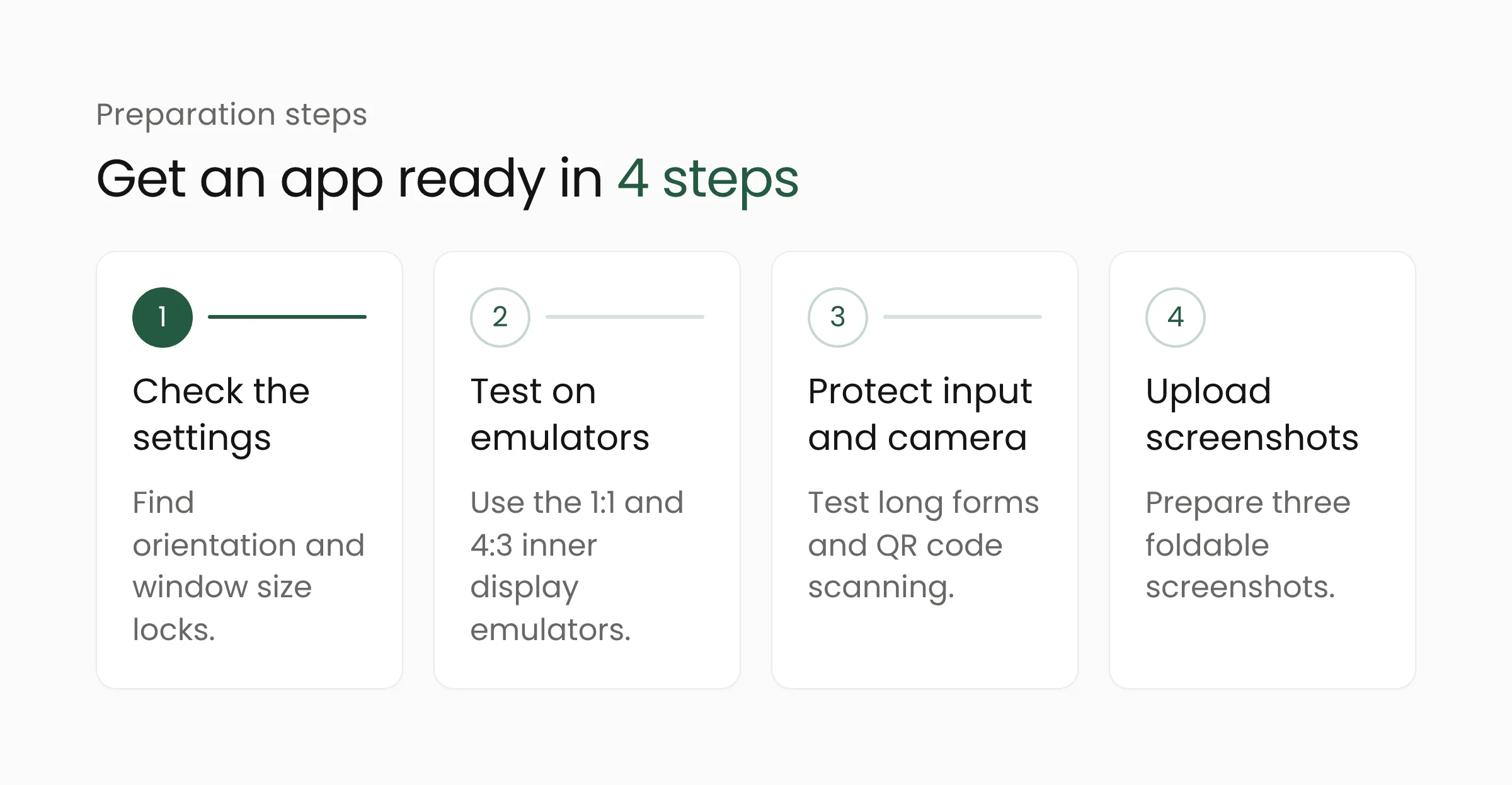
- Check orientation and resizing settings. Ask the development team to look for settings that lock the app to portrait or refuse window resizing. They are the main cause of empty bars on wide displays.
- Test on foldable emulators. The Tier 3 guidelines recommend testing on large-screen devices running Android 12 or higher, including the two foldable emulators (1:1 and 4:3 inner displays) in Android Studio. Rotate, fold and unfold the device on every page and note which ones lose data.
- Start with flows that hold user input or use the camera. Account opening, patient registration and permit application forms tend to be long, so users notice at once when their entries vanish as the phone opens. QR scanning and document photo features need testing because Tier 3 requires camera previews to keep the right proportions.
- Prepare screenshots early. Google says screenshots taken from the foldable emulators are fully compliant. They are uploaded in Play Console under Grow > Store presence > Store listings.
Teams using a cross-platform framework should run the same checks against the framework version they ship. If your app is built with Flutter, the work can be combined with the move to Flutter 3.50 so that testing happens once.
The size of the job depends on how the app was built. One with flexible layouts may need testing and a few adjustments, while one with rigid, fixed screen dimensions will need its pages reworked. A short audit by an in-house team or a mobile app development partner will give a cost estimate before 2027 budgets are set.
Some questions remain open. Google has not said how strictly Tier 3 will be enforced, and 9to5Google carried a reader comment doubting that it will be, adding that Google’s own apps still need work. The doubt is reasonable, but the deadline is in writing, so it is safer to begin preparing without waiting for the details.
Frequently asked questions
Will older apps be removed from Google Play?
No. Google wrote, “Existing un-updated apps will remain downloadable.” The restriction applies when a developer wants to publish a new app or an update, and Google says apps that do not meet the bar may have reduced visibility in the store.
Do developers need to buy a foldable phone to test?
It is not required. Google lists three options: physical devices, physical devices accessed remotely through Android Device Streaming, and emulators in Android Studio. Testing on real hardware is still useful for checking the camera and the hinge in a half-open posture.
Do the rules apply to tablets?
Not yet as a requirement. Enforcement in April 2027 is aimed at foldables. Google says the quality framework will expand to tablets, Googlebooks and Android XR, without naming a date. An app that meets Tier 3 on foldables will generally look better on tablets too, since the guidelines are shared.
Closing
The April 2027 deadline leaves Android app owners about five months to check how their apps behave on folding screens. The work can begin small, by opening the app in a foldable emulator and listing the pages that break. If you need help auditing or adapting an app, the Merakit team is ready to talk.
Sources
- Elevating apps: New adaptive quality standards on Google Play, Android Developers Blog, November 18, 2026
- Elevating games: New large screens and foldables quality standards on Google Play, Android Developers Blog, November 18, 2026
- Tier 3 (Adaptive ready), adaptive app quality guidelines, Android Developers
- Prepare your app for the resizability and orientation changes in Android 17, Android Developers Blog, February 13, 2026
- Google Play wants Android apps to nail foldable basics by April 2027, 9to5Google, November 18, 2026
- Your foldable phone deserves better, and Google is making developers deliver, Android Central, November 19, 2026
- Google Play to require adaptive app support and foldable screenshots from April 2027, FoneArena, November 19, 2026