Blog Windows 11
Windows 11 26H2 Promises Faster 8 GB PCs: What to Check
On this page· 7 sections
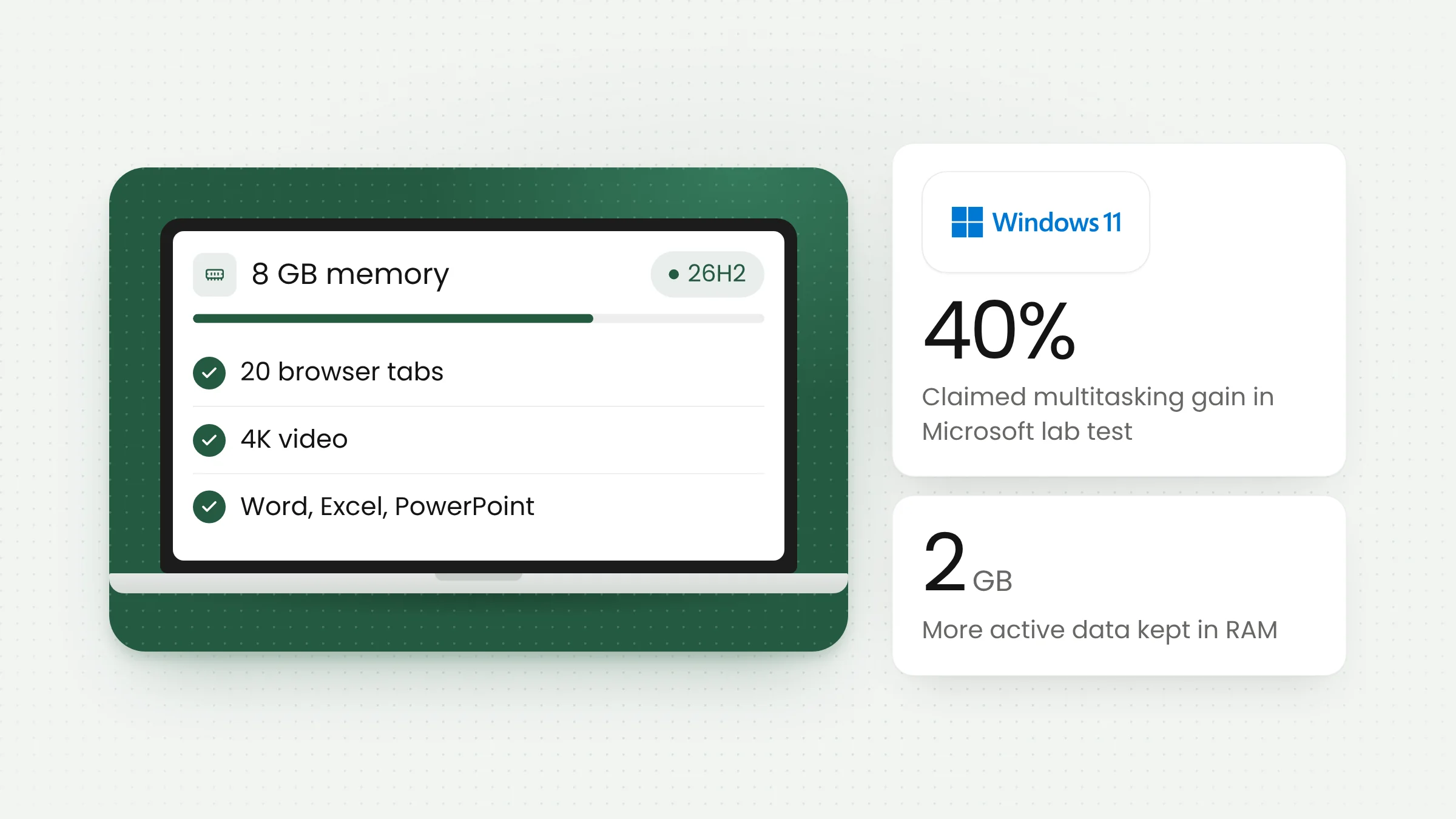
Microsoft says Windows 11 version 26H2 now runs noticeably lighter on PCs with 8 GB of RAM. In an announcement on November 3, 2026, the company said Windows is up to 20% more responsive and multitasking up to 40% faster on 8 GB devices, provided they are on build 26300.9818 or later.
The news matters for many offices in Indonesia. PCs and laptops with 8 GB of memory remain common at service counters, in administrative rooms, and across local government agencies, often with a browser left open all day for web-based public service applications.
What Microsoft announced
The post was written by Pavan Davuluri, Executive Vice President of Windows + Devices, on the Windows Experience Blog. It focuses on a single goal: keeping 8 GB PCs responsive while people work across many apps at once.
Microsoft listed several figures. Start, search, right-click menus, Settings, Snipping Tool, and File Explorer respond up to 20% faster than with the January 2026 update. Edge can open up to 33% faster when it is already running in the background, which requires build 26300.9818 and Edge 150 or later. Teams can now turn on Efficiency Mode by default on 8 GB PCs, which Microsoft says makes it launch up to 20% faster.
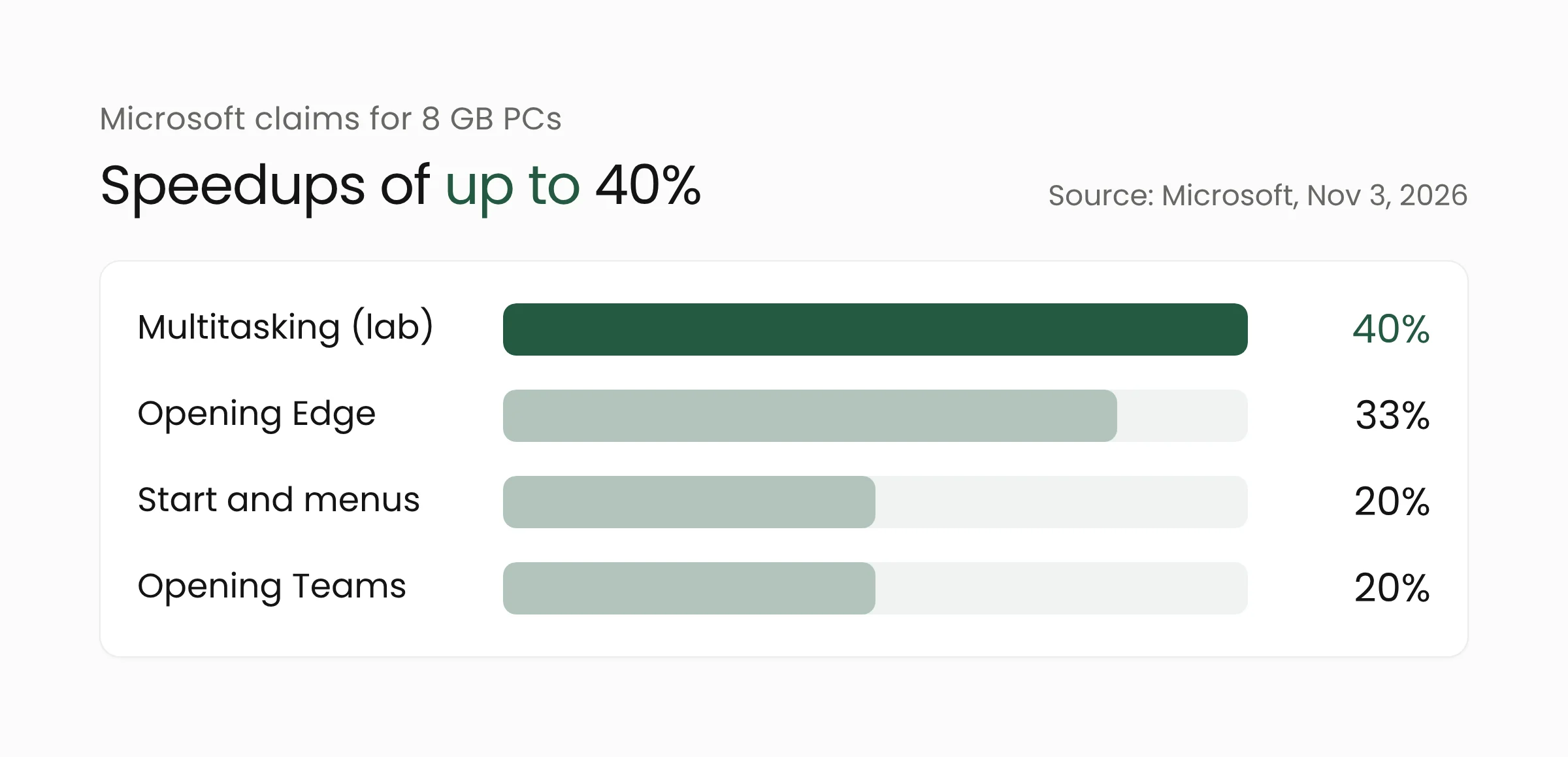
The largest figure, multitasking up to 40% faster, comes from a demanding workflow: 20 Edge tabs, a 4K video, large Word, PowerPoint, and Excel files, Outlook, and File Explorer opened in sequence. Microsoft says that workflow completed up to 40% faster than on January 2026 builds.
Davuluri summed up the approach this way: “The real test is whether your PC stays responsive, not how much memory remains unused.” In other words, Microsoft is measuring success by how smoothly a PC behaves under load, and free memory is not the target.
How Windows now handles 8 GB of memory
When RAM fills up, the operating system moves less-used data to storage, an SSD or hard drive that is much slower than memory. When the user returns to that app or tab, the data has to be fetched again, which is when a PC stutters or a tab reloads.
Memory compression and priority for the active app
Microsoft says Windows now compresses less-active data and keeps it in RAM for longer. As a result, up to 2 GB more active data can stay in memory instead of being moved to storage. According to Windows Latest, Windows also briefly prioritizes the app in use and pauses background work such as search indexing while the user is active.
Microsoft also reports that committed-memory growth fell by up to 900 MB across Windows 11, Edge, and Microsoft 365 apps, including 360 MB in the Microsoft 365 apps.
Edge, Teams, and Widgets get leaner too
Some of the gains come from the apps themselves. Inactive Edge tabs now go to sleep after 15 minutes by default, down from two hours. On PCs with 8 GB of RAM or less, Widgets loads only when opened, which saves roughly 200 MB while it is closed. Microsoft says it tests on more than 20,000 PCs in its labs.
Reading the claims carefully
All of these numbers are Microsoft’s own claims and have not been broadly tested by independent parties. The footnotes to the announcement show that each figure was measured differently, so they should not be compared directly.
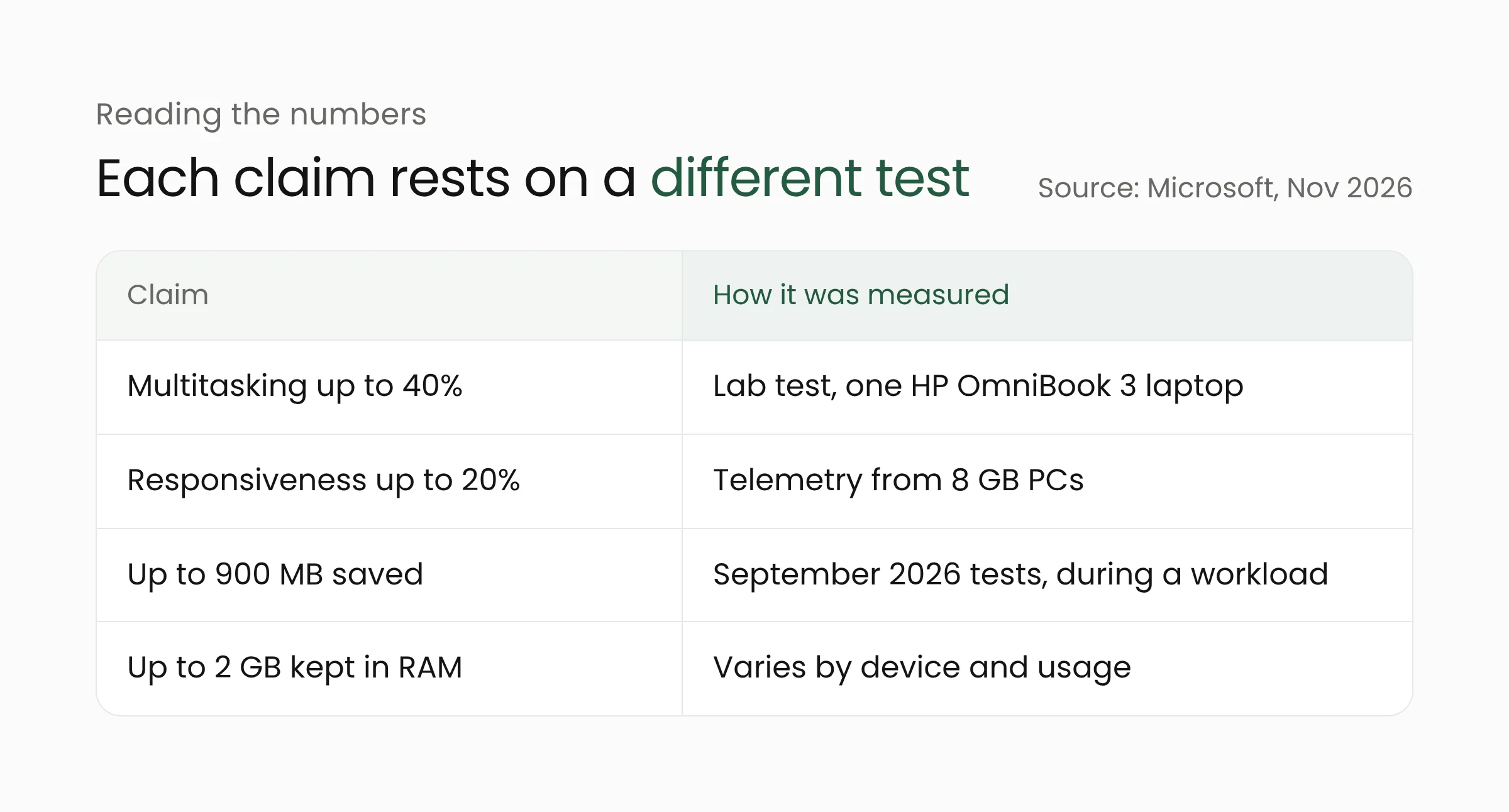
The 40% figure comes from a lab test on one device, an HP OmniBook 3 with 8 GB of RAM and a Snapdragon X Plus processor, and Microsoft notes the results are not a benchmark. The 20% figure comes from telemetry on 8 GB PCs, while the 900 MB saving was measured in September 2026 tests during a running workload. Windows Latest points out that the 900 MB will not simply show up in Task Manager, because it measures memory growth over the course of a workload.
XDA Developers also notes that the numbers are “up to” maximums tied to specific workloads, and that the comparison point is the January 2026 build, so they say nothing about the gap with older Windows versions. Microsoft states that results vary by device, configuration, and usage.
The same announcement includes another figure that should be read separately: a 2026 Dell XPS 13 with 8 GB of RAM delivered up to 94% faster multi-core performance than a 2021 model. That result comes from Cinebench testing by Principled Technologies, commissioned by Microsoft, and reflects a generational hardware difference. It is unrelated to the Windows update.
Build requirements and update timing
The improvements require Windows 11 version 26H2, build 26300.9818 or later. According to Microsoft’s official update history, that build arrived with KB5127936, a preview update released on October 28, 2026. Microsoft is rolling out 26H2 gradually to eligible devices running version 24H2 or 25H2.
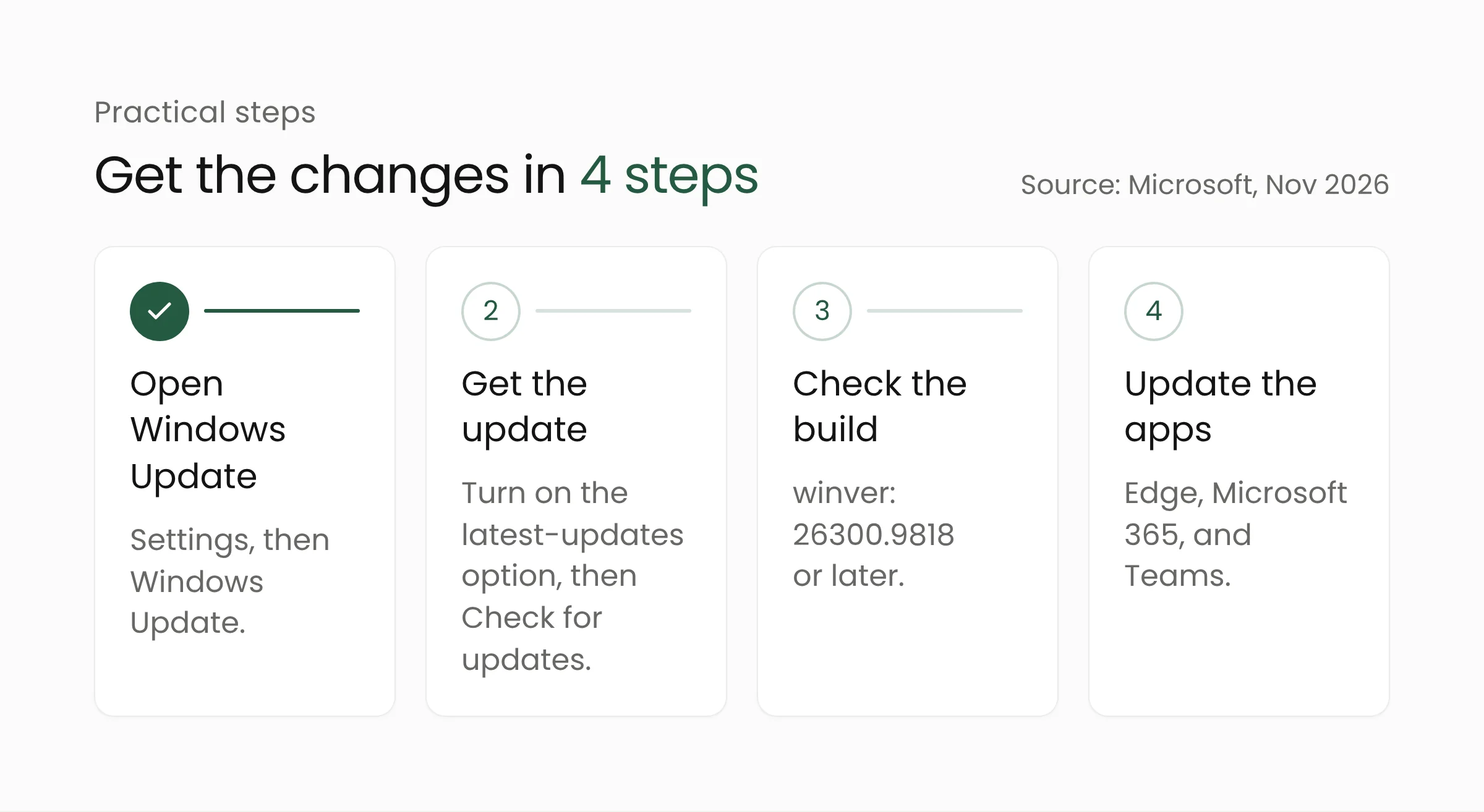
Microsoft recommends the following: open Settings, go to Windows Update, turn on “Get the latest updates as soon as they’re available”, and select “Check for updates”. After that, update Edge, Microsoft 365, and Teams, because some of the improvements arrive through app updates or the Microsoft Store. The build number can be confirmed by running winver.
Organizations that do not install preview updates have no reason to rush. According to Windows Latest, users who skip preview updates should receive the changes with the Patch Tuesday update on November 10, 2026. On support, Microsoft lists 26H2 at 24 months for Home and Pro editions and 36 months for Enterprise and Education editions.
What this means for public service offices
District offices, local agencies, community health centers, and public service halls typically run web-based applications all day, alongside Office documents and meeting apps. That pattern closely resembles Microsoft’s test scenario. The following steps can help IT teams take advantage of the update in a measured way.
Pilot on a small group of devices first. Pick a few 8 GB PCs at the busiest counters, record complaints and app opening times before the update, then compare afterward. Results from your own office are more useful than lab “up to” figures.
Schedule it through the regular update cycle. For offices that skip preview updates, the November 10 Patch Tuesday is a sensible starting point. Make sure Edge, Microsoft 365, and Teams are updated as well, since some of the gains depend on them.
Review web apps that must stay active. Edge tabs now sleep after 15 minutes of inactivity. For most sites this saves memory, but queue systems, monitoring dashboards, or long forms at service counters may need to keep running. Administrators can exempt specific sites with the Edge policy SleepingTabsBlockedForUrls. Development teams should also make sure their apps preserve form input and reconnect sessions correctly after a tab wakes up, which is part of building dependable web applications for office hardware.
Revisit procurement plans. If your own pilot shows 8 GB PCs are sufficient for administrative work, budget can shift toward devices that genuinely need more memory. Microsoft still recommends 16 GB or more for 3D modeling, advanced video editing, and large-scale data processing.
Finish the move off Windows 10. Microsoft ended support for Windows 10 on October 14, 2025, and its official page says ESU updates will only be provided through October 12, 2027. Older PCs that meet the Windows 11 requirements should be part of an upgrade plan. For context on last month’s security updates, see our review of October 2026 Patch Tuesday.
More responsive devices help staff serve residents without unnecessary delays. If your agency is reviewing its work devices and public service applications, the Merakit team can help through our digital government solutions, from mapping application needs to keeping web apps reliable on office PCs.
Frequently asked questions
Does Windows 11 26H2 really make 8 GB PCs 40% faster?
The 40% figure is Microsoft’s claim for one multitasking scenario on one test laptop, an HP OmniBook 3 with 8 GB of RAM. Microsoft says results depend on the device, configuration, and usage, so gains on other PCs may be smaller.
How can I tell whether a PC already has these improvements?
Run winver from the Start menu. The improvements require Windows 11 version 26H2, build 26300.9818 or later, which is available through KB5127936. Edge, Microsoft 365, and Teams also need to be up to date.
Will Windows 10 PCs get these improvements?
Microsoft’s announcement covers only Windows 11 version 26H2. Windows 10 PCs need to be upgraded to Windows 11, if the hardware is eligible, to receive these changes.
Sources
- Windows Experience Blog: Raising the bar for 8 GB Windows 11 PCs: what’s improved and how to get it (November 3, 2026)
- Microsoft Support: Windows 11, version 26H2 update history (accessed November 4, 2026)
- Windows Latest: Microsoft admits Windows 11 was moving your open apps to slower storage on 8GB RAM PCs (November 3, 2026)
- XDA Developers: Windows 11’s latest update makes 8GB PCs 20% more responsive, and multitasking up to 40% faster (November 3, 2026)
- Microsoft: Windows 10 end of support (accessed November 4, 2026)
- Microsoft Learn: SleepingTabsBlockedForUrls (accessed November 4, 2026)