Blog Cybersecurity
Drupal CVE-2026-136716 Exploited: Update, Run update.php
On this page· 7 sections
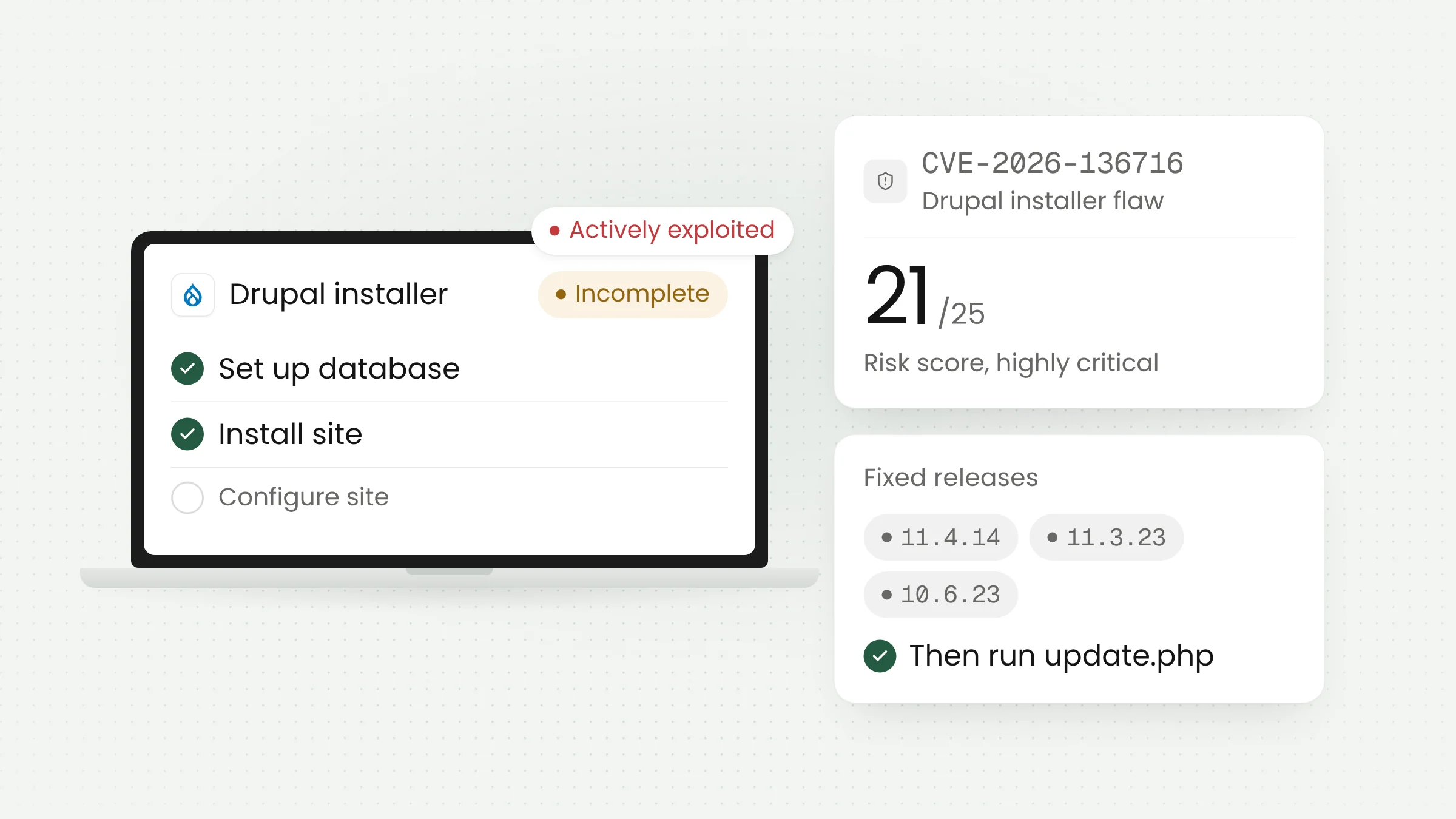
The Drupal Security Team published a second installer advisory on November 25, 2026. Drupal CVE-2026-136716 is already being exploited and lets attackers take over sites left in an incomplete install state. Fixed releases are 11.4.14, 11.3.23, and 10.6.23, and site owners must run update.php after updating.
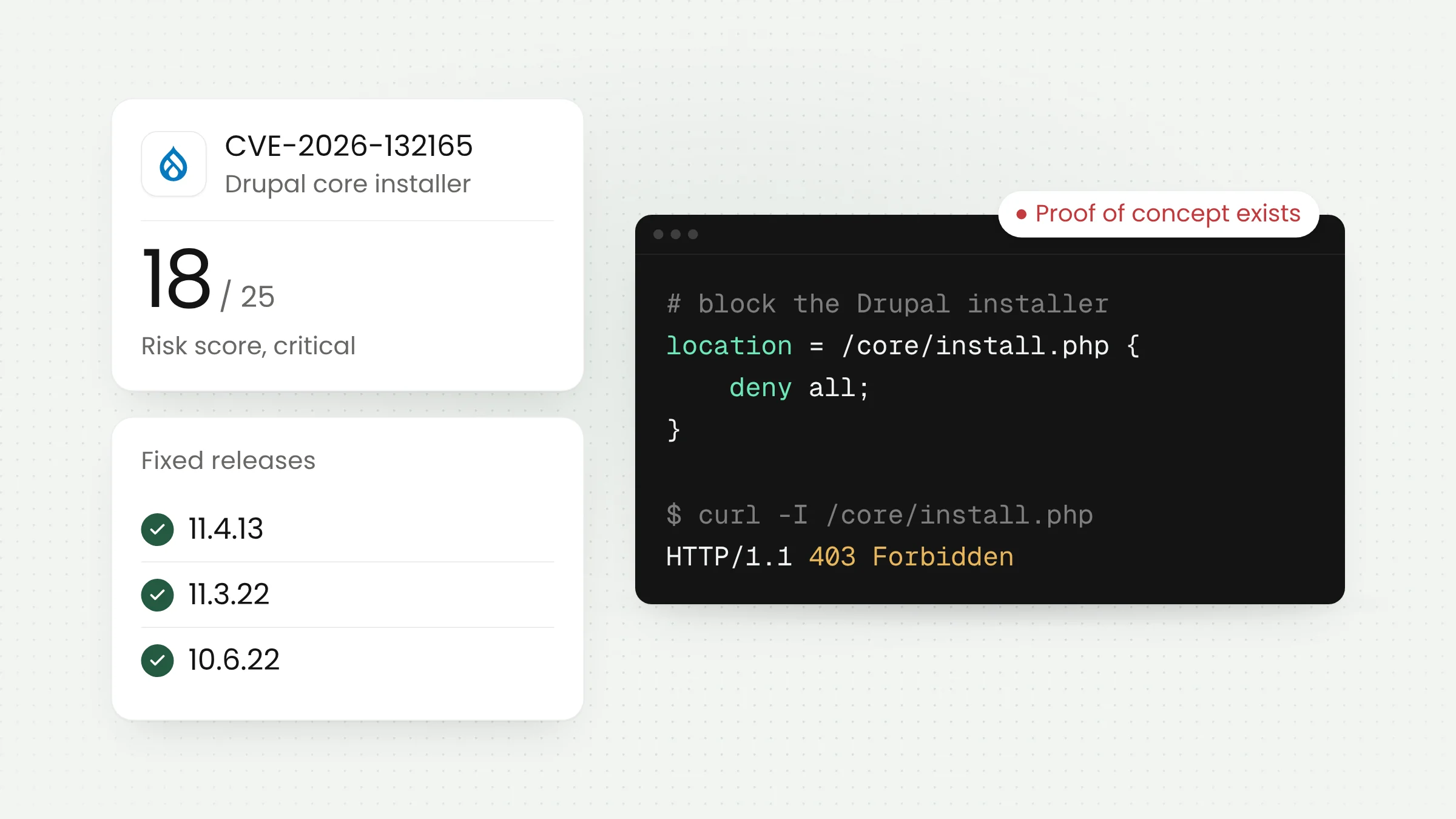
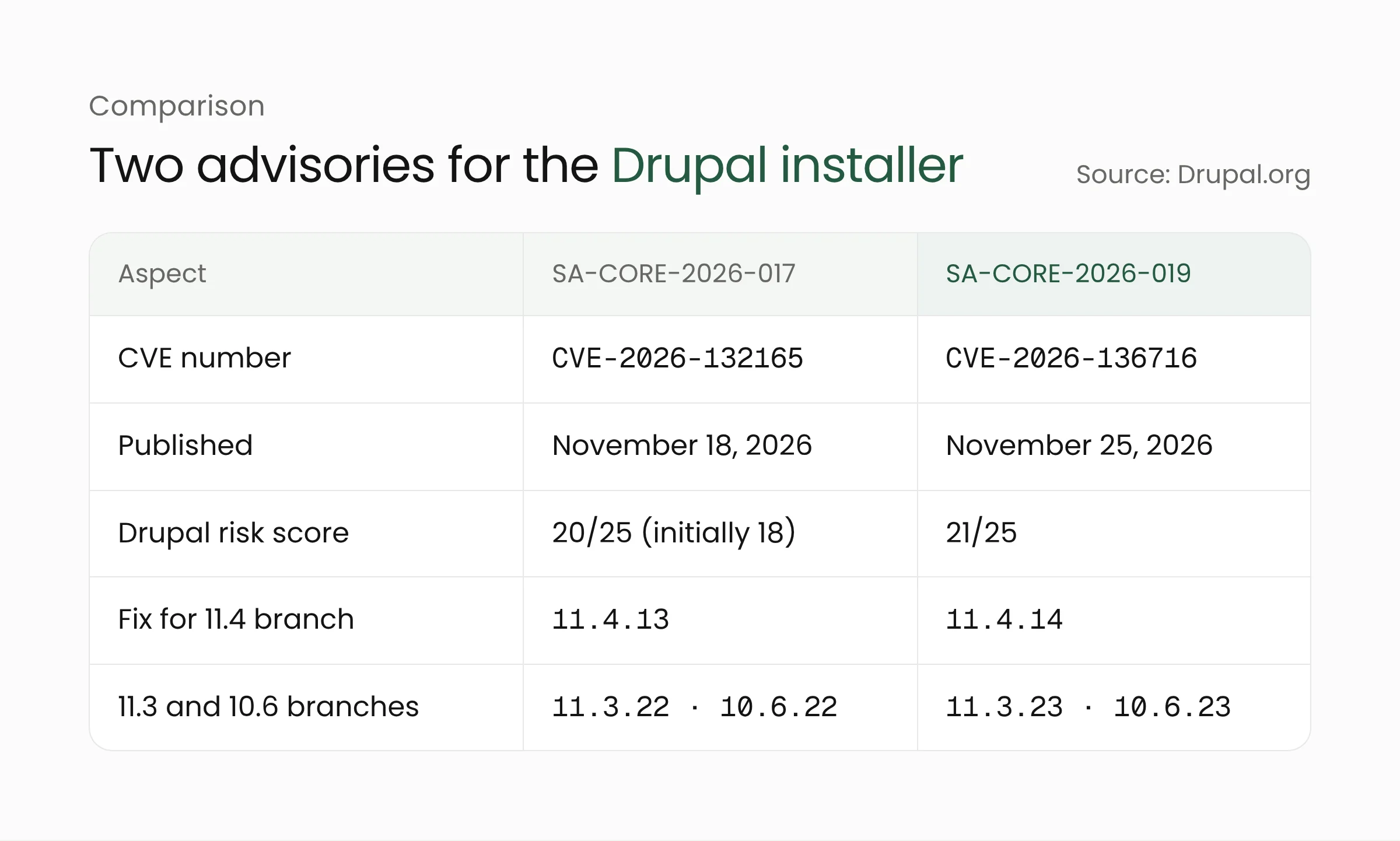
A week ago we covered the Drupal installer flaw CVE-2026-132165 and how to lock down install.php. No attacks had been reported at that point. Since then the first flaw has been used in real attacks, and its fix turned out to leave one path open.
The November 18 fix left one path open
Every copy of Drupal ships with install.php, a page used once when the site is first set up. Advisory SA-CORE-2026-017, published on November 18, closed several ways of abusing that file on running sites.
The new advisory, SA-CORE-2026-019, covers what remained. Certain sites in unusual or incomplete install states can still be taken over, and that includes production sites. Drupal classifies the issue as an access bypass with a risk score of 21 out of 25, which places it in the “highly critical” band, one step above “critical” on Drupal’s scale.
The score breakdown explains the rating. The attack is easy to carry out (AC:Basic) and needs no account (A:None). All data can be exposed and modified (CI:All, II:All), and an exploit exists (E:Exploit). The single mitigating factor is reach, since only uncommon configurations are affected (TD:Uncommon).
Two details make this flaw awkward to handle. According to the advisory, the admin interface does not show whether a site is in the vulnerable state. A site that has already been compromised may also no longer be in that state, so a check performed after the fact can come back clean when the site is not.
Sites that have already secured the installer are not vulnerable. The advisory says so directly.
Affected versions and fixed releases
The advisory lists the affected range as every version below 10.6.23, versions 11.0.0 up to but excluding 11.3.23, and versions 11.4.0 up to but excluding 11.4.14. A site that moved to 11.4.13, 11.3.22, or 10.6.22 last week is therefore still on the affected list.
Fixes are available for the three supported branches:
- Drupal 11.4.x: update to 11.4.14
- Drupal 11.3.x: update to 11.3.23
- Drupal 10.6.x: update to 10.6.23
Drupal 11.2.x and below and 10.5.x and below are end-of-life and receive no fix. Drupal 8 and 9 reached end-of-life long ago.
The second step in the advisory is easy to miss. After the code update, site owners must run update.php, because the repair for existing production sites in the vulnerable state is delivered by an update hook, a piece of code that only runs during database updates. Pulling new files with Composer and stopping there does not close the hole on an affected site.
The 11.4.14 release notes carry two more items worth a technical team’s attention. The release corrects a theme registry error introduced in 11.4.13 that affected sites with some contributed modules, including Search API. The notes also point out that Symfony has issued a security update that is not part of this release, so that dependency should be updated alongside core.
Drupal 7 is absent from the advisory
The advisory does not mention Drupal 7, whose community support has ended. HeroDevs, a company that sells paid Drupal 7 support, says it reproduced the same weakness on Drupal 7.103 with an incomplete install. It also says it has seen no reports of attacks on Drupal 7 sites. This is a vendor claim that has not been tested independently, though it is reason enough to block the installer on any Drupal 7 site still in service.
Exploitation status as of November 26
SA-CORE-2026-019 puts it in one sentence: “This is being exploited in the wild.” Drupal adds that any site that left its installer reachable from the internet after SA-CORE-2026-017 may already have been compromised.
The first advisory has been revised as well. The Drupal Security Team received a report that CVE-2026-132165 was exploited on live sites as early as November 19, 2026, at 19:00 UTC. That is roughly a day after the fix. Its risk score rose from 18 to 20 out of 25, and its exploit status moved from proof of concept to exploit.
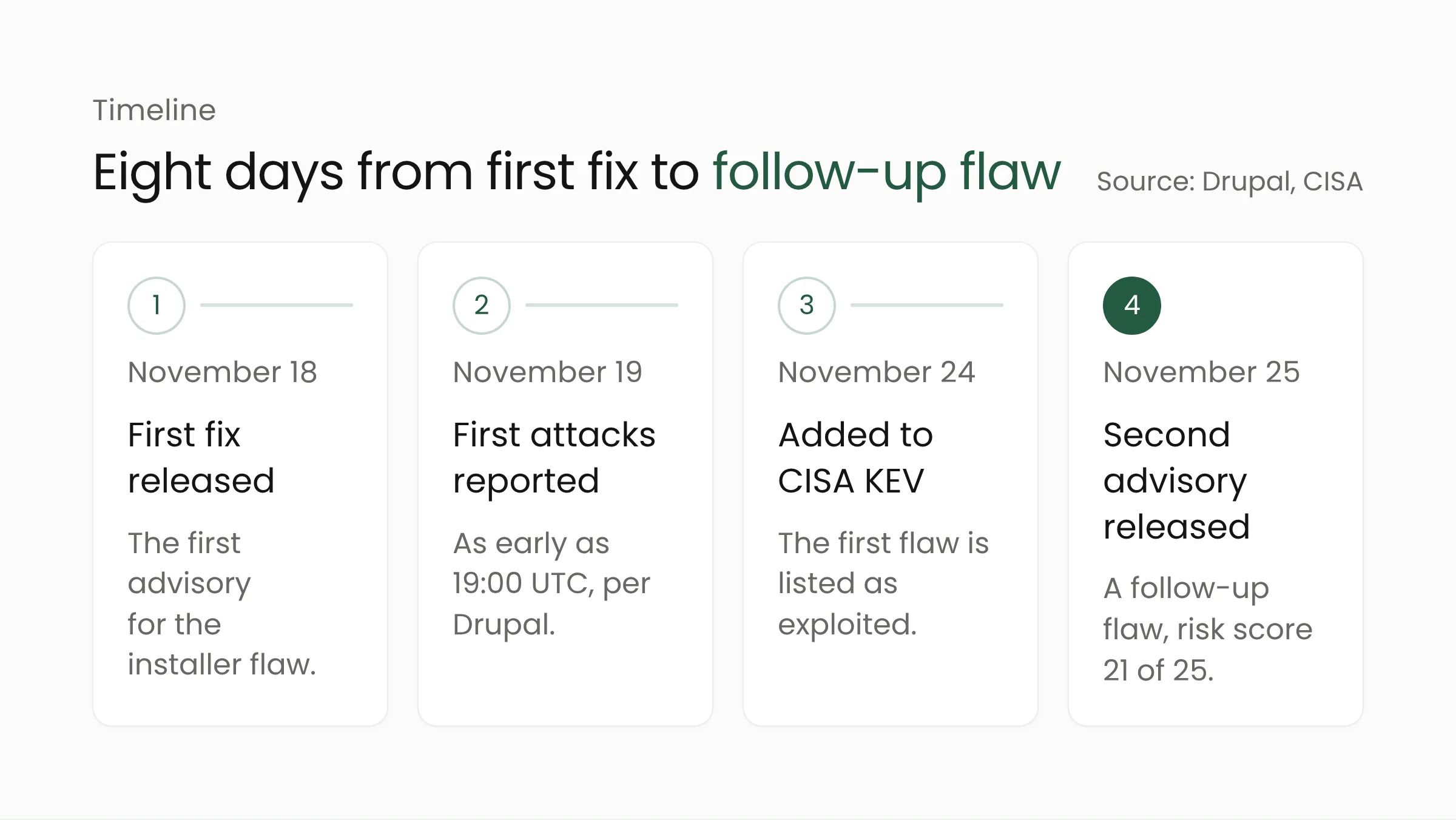
The US cybersecurity agency CISA added CVE-2026-132165 to its Known Exploited Vulnerabilities catalog in its November 24 alert. The follow-up flaw, CVE-2026-136716, was absent from the ten entries CISA added on November 25. The statement that it is being exploited comes from Drupal itself, and the Canadian Centre for Cyber Security relayed it in advisory AV26-1209 the same day.
Drupal has not published the number of affected sites or any attribution. The advisory also states that both issues are covered by Drupal Steward, a web application firewall service for Drupal sites. Sites using Steward’s recommended mitigations are protected from known attack vectors and are still asked to update core.
What this means for Drupal site owners
Agency portals, faculty sites, hospital pages, and association websites are often run by a small team or by a vendor whose contract has ended. The sequence below fits into a single working day.
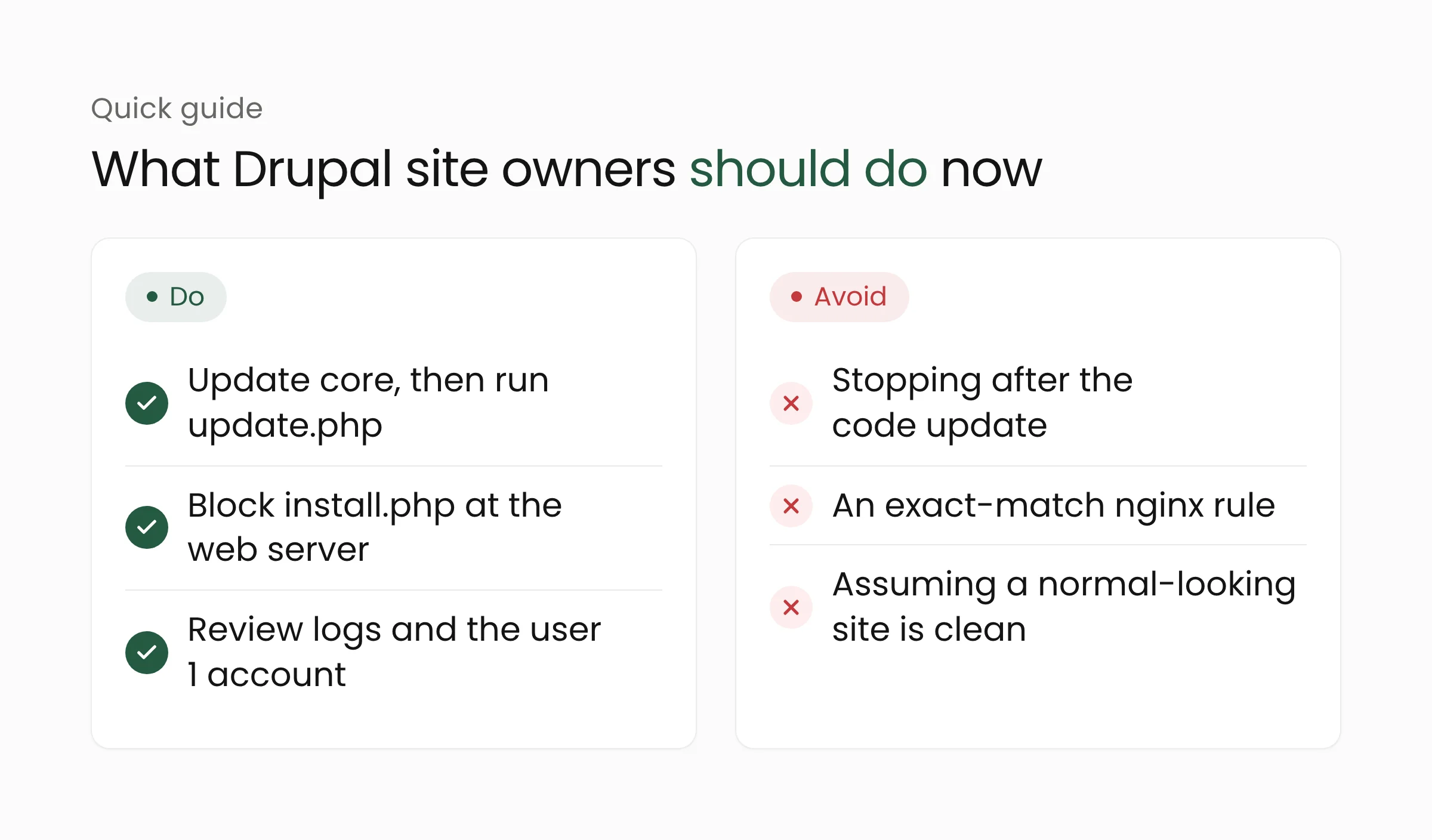
Update core, then run update.php
Check the installed version under Reports > Status report or with drush status. Drupal’s release notes give this Composer command for an existing site:
composer update "drupal/core-*" --with-all-dependenciesThen run database updates through /update.php or drush updatedb. In an automated deployment, confirm that this step is part of the script, because the SA-CORE-2026-019 update hook does not run without it.
Block the installer at the web server
Drupal revised its guide to securing the installer on November 25 and strongly recommends it for all sites, new and existing. On Apache, the rule goes into the virtual host configuration:
<Location "/core/install.php">
  Require all denied
</Location>
On nginx, the guide uses a prefix match:
location ^~ /core/install.php {
  return 404;
}
This section carries a correction to our earlier article, which showed an exact match, location = /core/install.php. The official guide now explicitly tells administrators to avoid that form. On some servers an exact match does not block a URL such as /core/install.php/foo, and the installer still runs. If you deployed the rule from our November 20 article, replace it with the ^~ form.
For shared hosting without access to server configuration, the guide offers an .htaccess rule. Composer overwrites manual edits to that file, so the rule has to be appended through the scaffold settings. Deleting core/install.php is another option, although Composer restores the file on every core update. Blocking the installer does not affect update.php.
Verify the result with the three commands from the same guide:
curl -I https://example.com/core/install.php
curl -IL https://example.com/install.php
curl -I https://example.com/core/install.php/foo
All three should end with a 403 or 404 response. A 200 means the block is not working.
Look for signs of compromise
The advisory asks site owners to check logs for unauthorized access, in particular unexpected changes to or by the user 1 account. User 1 is the first administrator account, created during installation. Confirm that its email address is one you control, and consider resetting its password.
If there are signs of a breach, Drupal points to its recovery guide for hacked sites. Preserve the logs and a copy of the database before restoring anything.
Map your older sites
Sites on end-of-life branches receive no fix. Blocking the installer contains the risk for the time being, and a migration to a supported branch needs a date. Where the internal team is small, web development work such as a module and theme inventory can be shared with an outside partner while a cybersecurity team reviews the logs.
Frequently asked questions
I updated to 11.4.13 last week. Do I need to update again?
Yes. The affected range in SA-CORE-2026-019 covers every 11.4 version before 11.4.14, along with 11.3 before 11.3.23 and 10.6 before 10.6.23. Move to the latest release on your branch, then run update.php.
How can I tell whether my site is in the vulnerable state?
According to the advisory, the state is not apparent in the user interface. For that reason Drupal asks every site on an affected version to install the update and run update.php without waiting for certainty. Sites that have secured the installer are not vulnerable.
Is blocking install.php enough on its own?
Blocking closes this attack path, and Drupal states that sites with a secured installer are not vulnerable. The update is still needed, since a server rule can be lost in a migration or configuration change, and the same release carries other fixes.
Closing
Two advisories in eight days show that a single update does not always settle every problem in the same file. For CVE-2026-136716, the job is finished once three things are true: core is on a fixed release, update.php has run, and install.php answers with 403 or 404. If your organization runs many Drupal sites and wants help working through them one by one, the Merakit team is glad to talk.
Sources
- Drupal core, Highly critical, Access bypass, SA-CORE-2026-019 (Drupal Security Team, November 25, 2026)
- Drupal core, Remote code execution, SA-CORE-2026-017 (Drupal Security Team, November 18, 2026, updated with exploitation report)
- Drupal 11.4.14 (release notes, November 25, 2026)
- Securing the installer (install.php) (Drupal documentation, updated November 25, 2026)
- CISA Adds Three Known Exploited Vulnerabilities to Catalog (CISA, November 24, 2026)
- Drupal security advisory (AV26-1209) (Canadian Centre for Cyber Security, November 25, 2026)
- Is Drupal 7 Affected by CVE-2026-136716? (HeroDevs, November 25, 2026)