Blog Notion Agents
Notion Agents Now Work 24 Hours, With New AI Credits
On this page· 7 sections
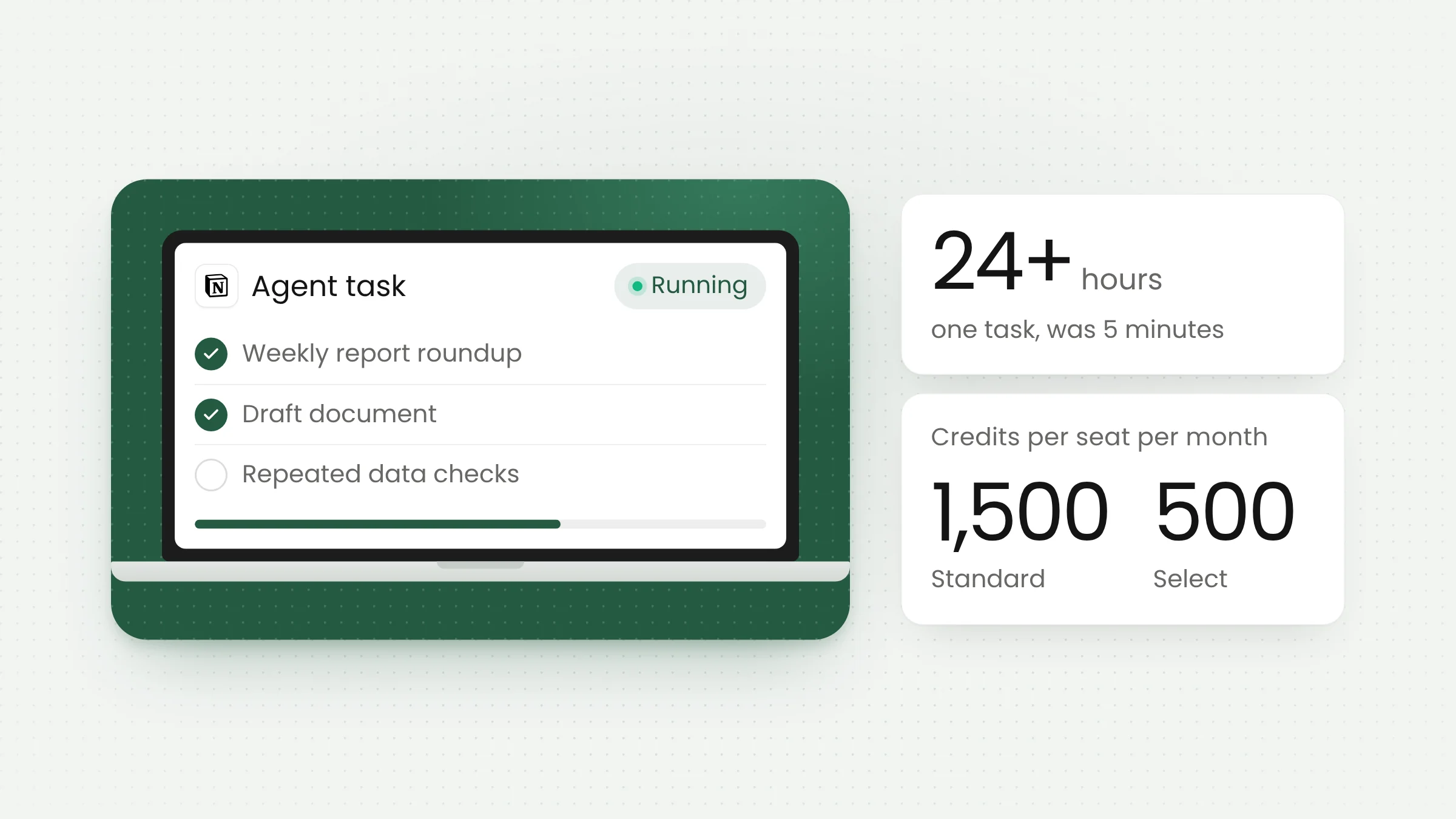
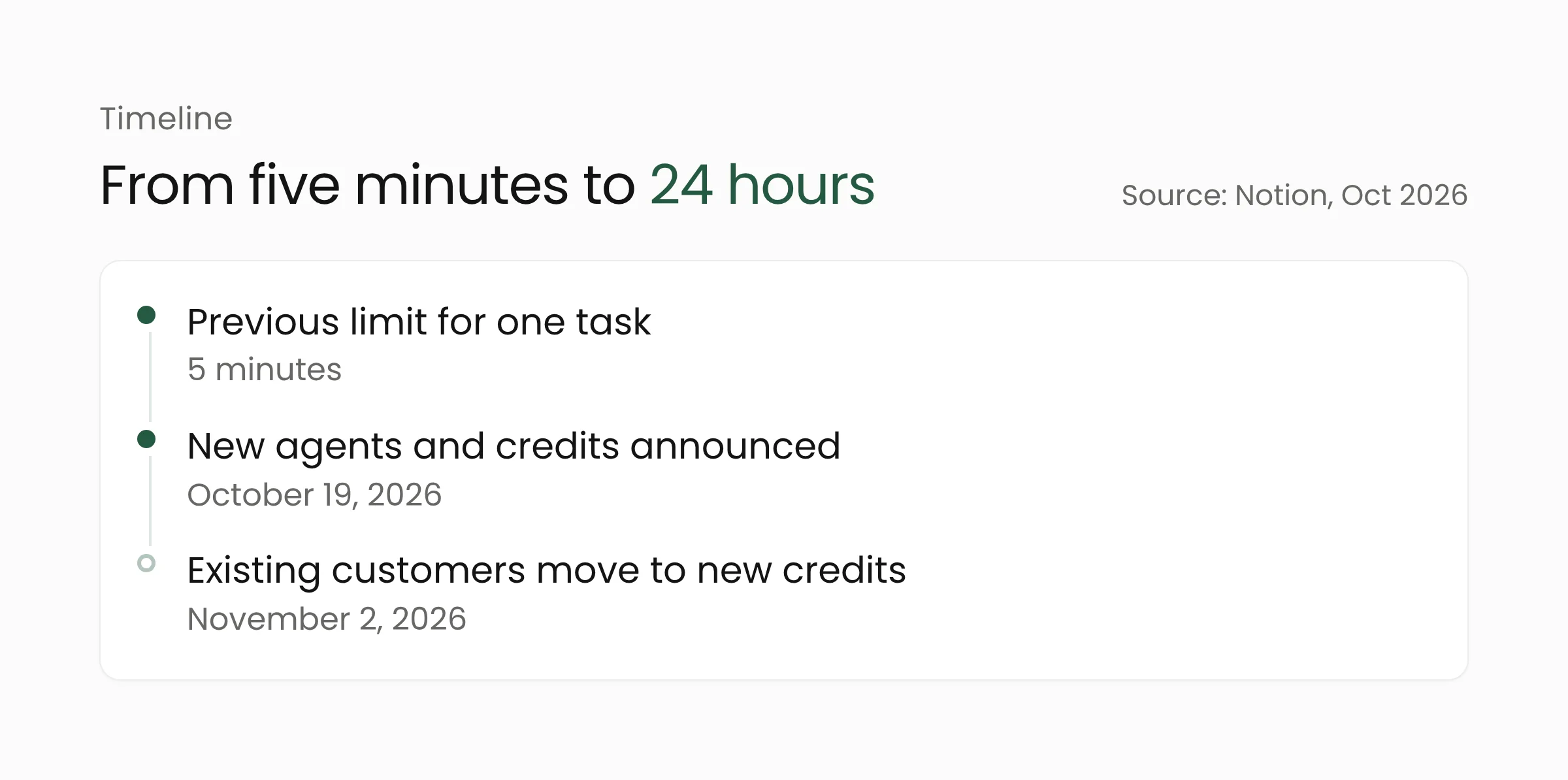
Notion Agents can now work on a single task for more than 24 hours, up from a previous limit of five minutes. Notion announced the update on October 19, 2026, together with an Auto model router it says cuts costs by about 90 percent and a new AI credit system. For organizations starting to use AI agents, the change touches both capability and budget.
What Notion announced
The announcement came from Notion co-founder Akshay Kothari on the official Notion blog and is summarized in the Notion release notes. An AI agent here is an assistant that carries out a series of steps on a user’s instruction, such as gathering information, drafting documents and updating work pages, without being guided at every step.
Notion calls this the sixth generation of its agent framework. Agent sessions now run on a dedicated service with a queue of jobs, so work continues when the system restarts. Agents also get their own computer and browser, and can write short scripts for repetitive steps. Notion says scripts are faster and cheaper than running the same steps through model tokens.
For long conversations, an agent compacts its history and moves large tool results out of working memory. Notion also added a “Review for me” mode, in which a separate model checks whether an action is safe before the agent carries it out. The company says agents now connect to hundreds of tools through MCP and connectors, up from a few dozen earlier this summer.
Notion also claims infrastructure uptime above 99.9 percent, agents that run up to 50 percent faster in the web and mobile apps, and Custom Agent runs that cost about 30 percent less in its testing. All of these figures come from Notion itself.
Auto and the 90 percent claim
Auto is a router that picks a model for each task. Simple requests go to fast, efficient models, while harder work goes to more capable ones. If a model is not making progress, Auto reroutes the task. Notion adds that newly approved model providers can be used without manual tracking.
According to Notion, across more than 20 common use cases Auto delivered results similar to Opus 5.5 and Astra at about 90 percent lower average cost, which it says makes credits go about 10 times further. Notion added seven new models over the past month with Anthropic, OpenAI and open-weight providers.
The 90 percent figure comes from Notion’s own testing. Forkast notes that the methodology and task list are not detailed and that the figure has not been independently verified. Results elsewhere may differ, especially if most tasks demand high-level reasoning.
Two pools of credits
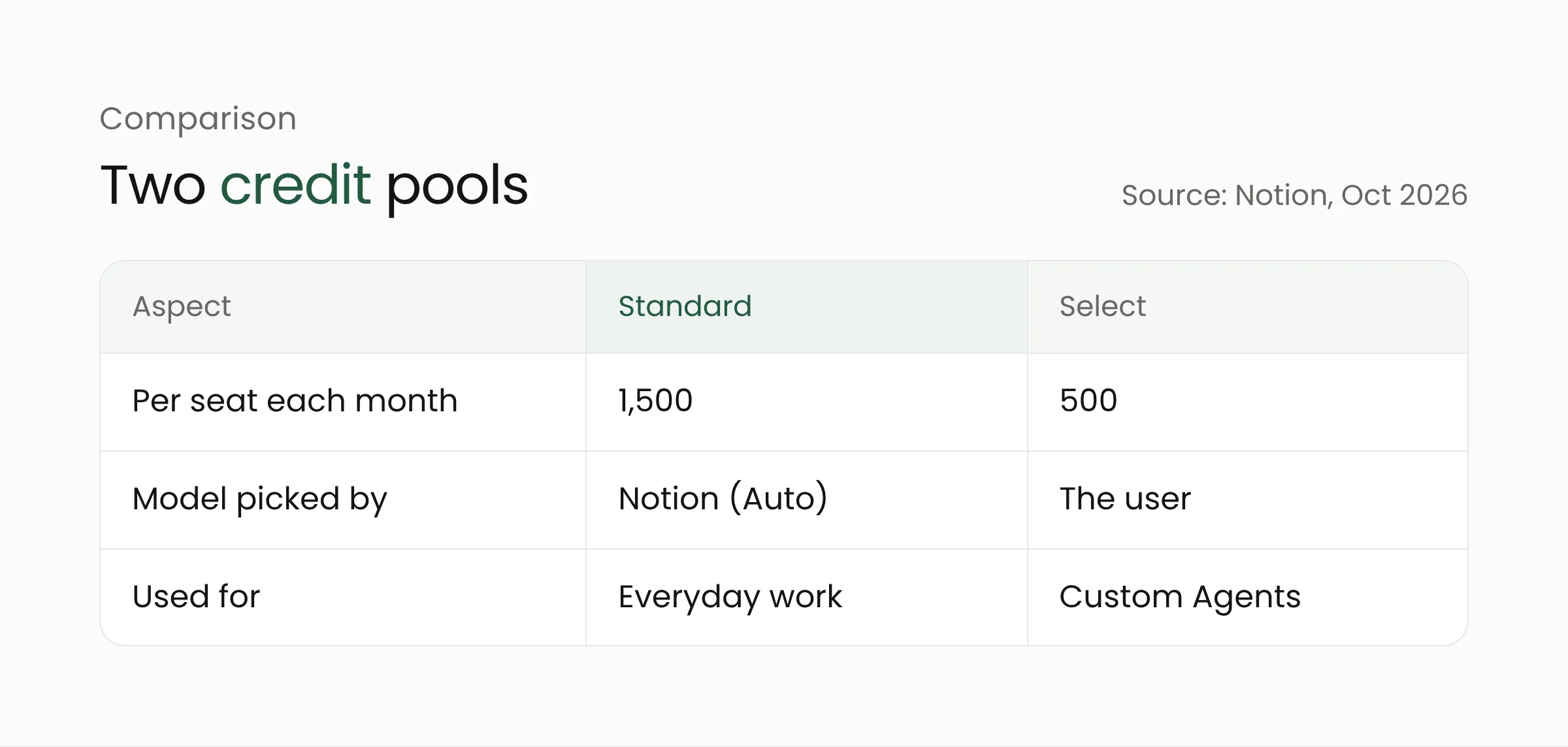
Notion has also changed how AI usage is counted. Each Business and Enterprise seat receives 1,500 Standard credits a month for work where Notion picks the model, and 500 Select credits a month for work where the user picks the model or runs a Custom Agent. Notion says the two pools are separate so that everyday use through Auto stays protected.
Admins can buy additional credits for the workspace and allocate them, including for shared Custom Agents and high-credit models. Notion expects most users not to run out of their monthly credits.
The timing differs by customer. The new system took effect on October 19, 2026 for new customers. Existing customers move on November 2, 2026, and admins will receive an email with details. Users can also connect a ChatGPT Plus, Pro or Go subscription to their personal Notion Agent, though not yet to Custom Agents. Bringing your own API key is still in alpha for Enterprise customers.
An admin control center called AI Command Center is still listed as coming soon. According to Notion, it will show credit usage by member, feature and agent, send alerts near limits, set spending limits for members and agents, control model access, and decide who can create, pause or archive Custom Agents.
What this means for your organization
The growing share of work handed to AI agents also changes the infrastructure on the developer side, as covered in our article on Anthropic’s Scion. The points below apply to schools, government offices, hospitals and companies weighing AI agents in a shared workspace.
First, choose tasks that suit a long-running agent. Weekly report roundups, drafting documents from many sources and repetitive data checks are reasonable examples. Tasks that change important records, message outside parties or involve money should still pass through human approval.
Second, set rules before agents spread. A task that can run for more than a day means users are not always watching the screen, so reviewing the output needs to be scheduled. “Review for me” adds a layer of checking, but the checker is another model, and the sources we read contain no independent assessment of how effective it is. Decide who may create agents, which tools may be connected and how much credit each team gets. Because AI Command Center is not yet available, early usage will need to be recorded manually. Every tool connected through MCP gives the agent access to data, so grant only the permissions needed.
Third, test the cost claim on your own workload. Take about 20 real tasks from your team, run them through Auto and through a model of your choice, then compare quality and credits used. This kind of measurement is routine work in data analytics, and the result is more reliable than a vendor’s average.
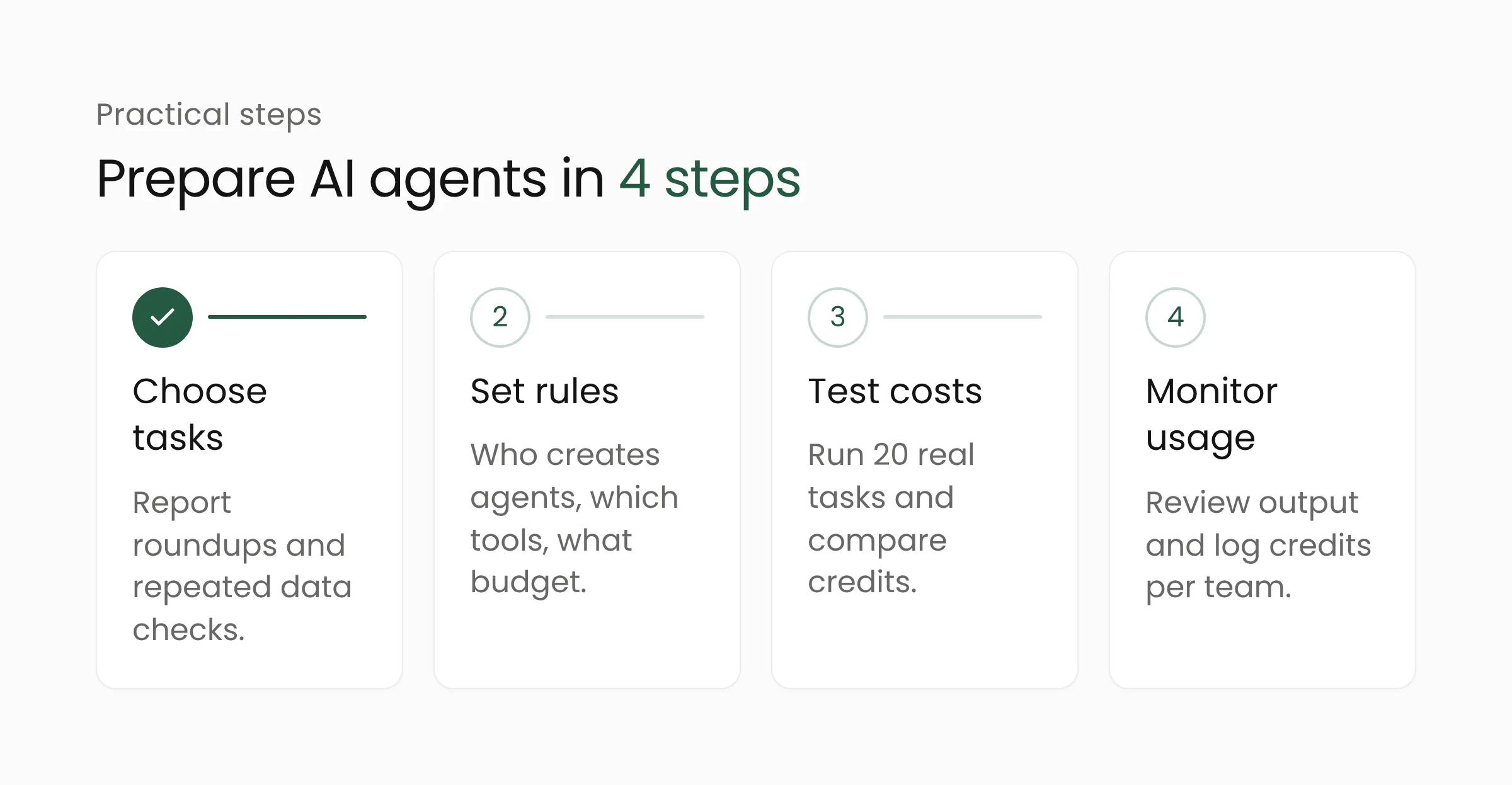
Fourth, watch the migration date. Existing customers whose contracts have not renewed move to the new credit system on November 2, 2026. Admins should read Notion’s email and recalculate each team’s credit needs before then.
Fifth, for agencies working on digital government services, an agent that works for hours needs an auditable activity trail. Ask the vendor what is logged, where the data is stored and who can stop an agent mid-task.
Merakit builds artificial intelligence services, including agent workflow design and access controls. The question worth answering first is which tasks in your organization truly deserve to be handed to an agent, and who reviews the output.
Frequently asked questions
How long can Notion Agents work on a single task?
According to Notion, more than 24 hours, up from five minutes in the previous version. Sessions run on a dedicated service with a job queue, so a task can continue after the system restarts.
What is the difference between Standard and Select credits?
Standard credits cover work where Notion picks the model through Auto, 1,500 per Business or Enterprise seat each month. Select credits, 500 a month, are used when the user picks a model or runs a Custom Agent. Admins can buy more.
Is the 90 percent savings claim proven?
Not independently. The figure comes from Notion’s testing across more than 20 use cases, and Forkast notes the methodology is not detailed. Test it on your own tasks before using it as a budget basis.
Conclusion
Agents that work for hours give organizations new opportunities and a new duty to manage access, budgets and review. If you are preparing AI agents for a team, contact the Merakit team to discuss suitable tasks and the controls to put in place from the start.
Sources
- Notion: Agents, rebuilt to do more for less (October 19, 2026)
- Notion: Release notes for October 19, 2026 (October 19, 2026)
- Forkast: Notion Launches Gen-6 Agent Harness to Enable 24-Hour Autonomous Workflows (October 22, 2026)