Blog Cybersecurity
OpenSSH sshole Flaw on Alpine Linux and How to Close It
On this page· 7 sections
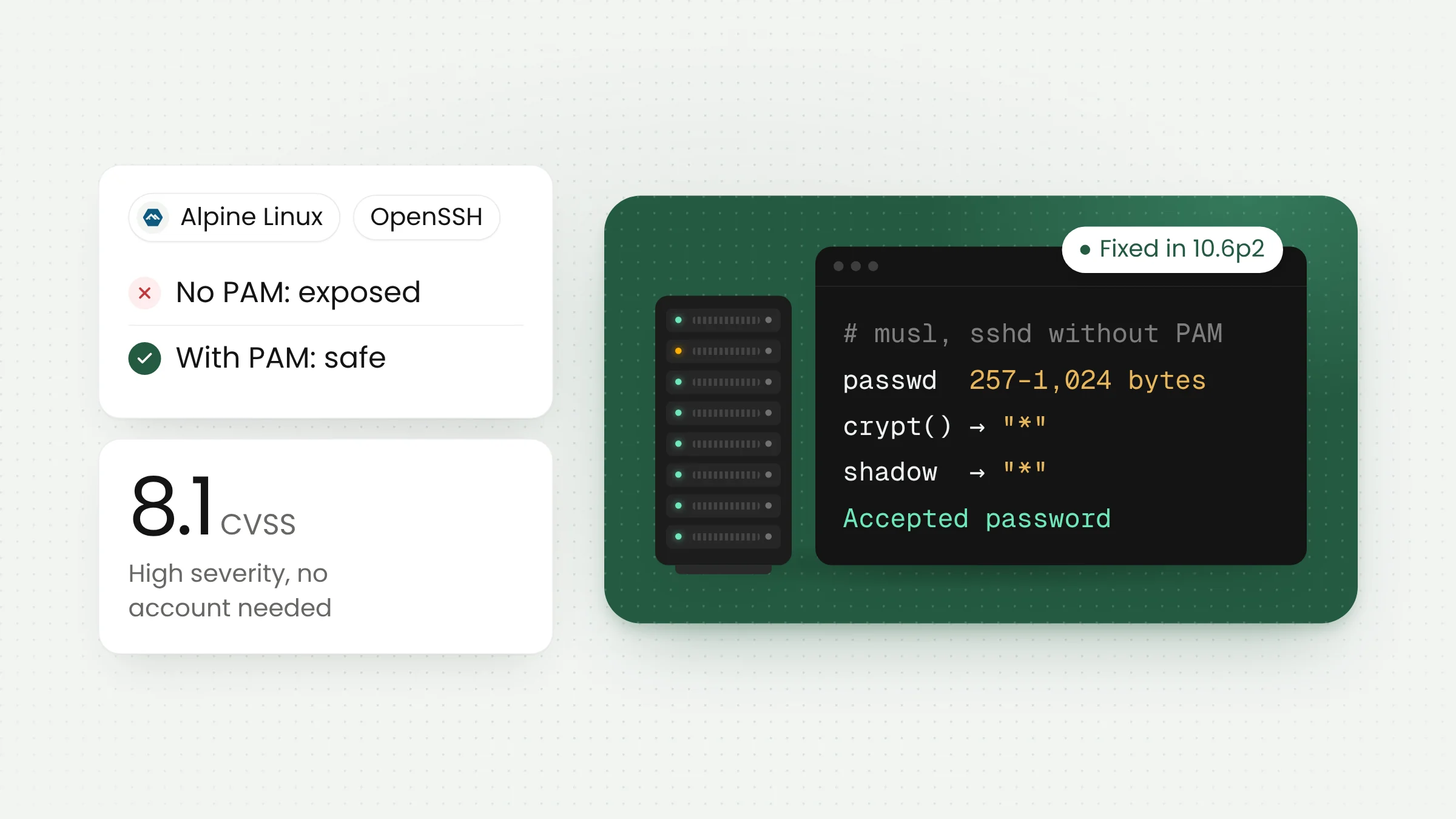
An OpenSSH flaw nicknamed sshole (CVE-2026-123158) lets an attacker log in over SSH to accounts that are not supposed to accept passwords at all, simply by sending a very long password. It affects musl-based Linux systems running without PAM, most notably Alpine Linux. Fixes shipped in OpenSSH 10.6p2 and Alpine packages on November 5, 2026.
How the sshole flaw works
OpenSSH runs the SSH service, the remote login door found on almost every Linux server. Its server component is called sshd. On most Linux distributions, sshd checks passwords through PAM, the system’s pluggable authentication layer. Alpine Linux takes a different route: its default openssh-server package is built without PAM, so sshd verifies passwords itself using the crypt() function from the musl C library.
According to the official Alpine Linux advisory, musl’s crypt() returns an asterisk (*) as an error value when a password is longer than 256 bytes. The same asterisk is what the system stores for accounts that have no password, such as users who may only log in with an SSH key. When an attacker sends a password between 257 and 1,024 bytes, the error value matches the stored field and the login is accepted.
That makes accounts without passwords the easiest ones to open. The Alpine advisory lists several examples: root in base images since roughly version 3.16, key-only users, users coming from directory services, and the alpine user in official cloud images.
The researcher who found the bug, Özgün Kültekin of Wakefield, traced it to two old changes. In his research write-up, he notes that musl’s crypt() behavior dates back to 2012, and that OpenSSH changed how it handles invalid users in 2016 to fix CVE-2016-6210. He ran roughly 17,600 login attempts across builds using glibc and musl, with and without PAM. Only musl without PAM accepted logins it should have rejected.
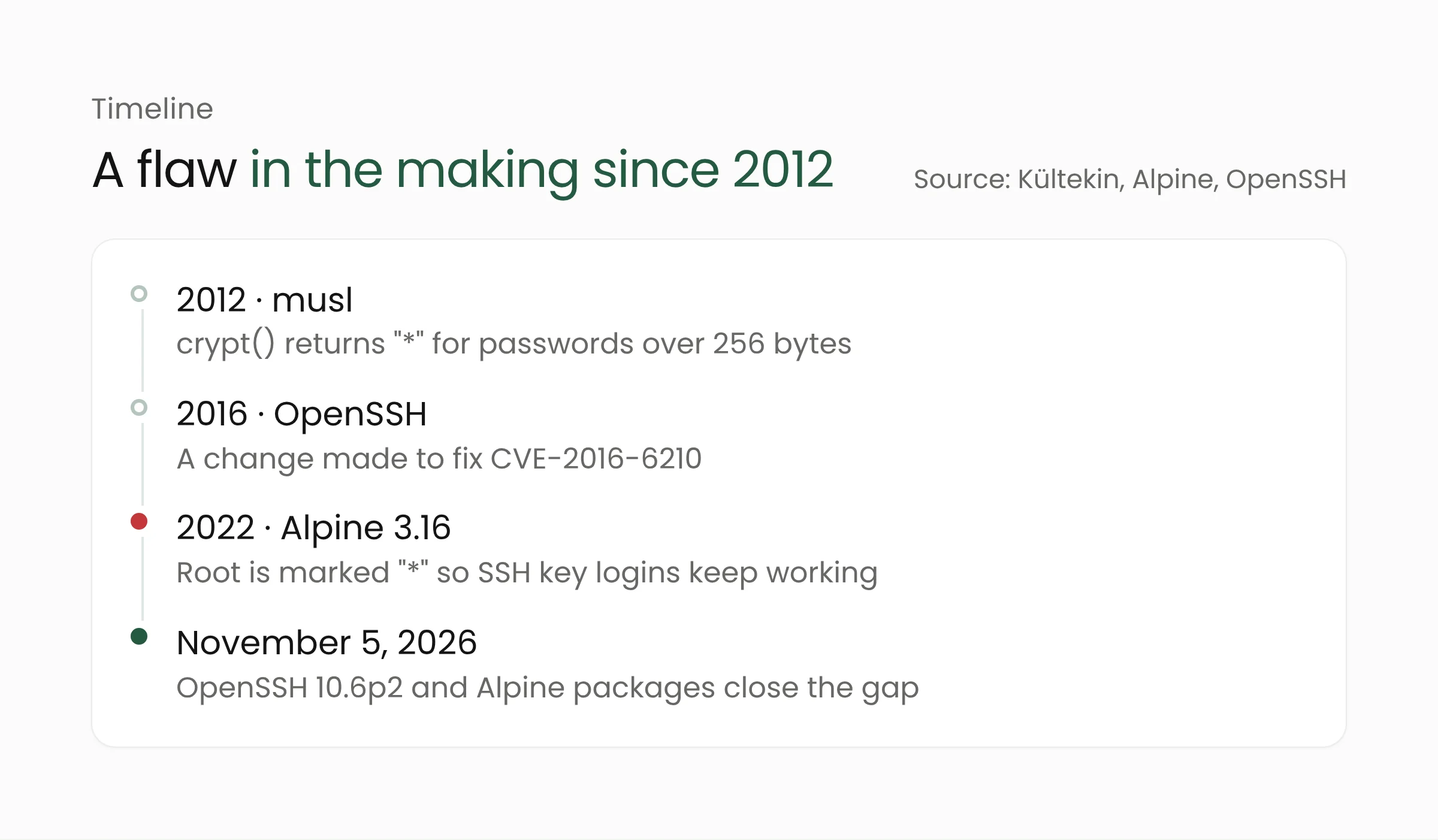
The OpenSSH developers wrote in the 10.6p2 release notes: “We consider the root cause of this bug to be outside sshd, but it is exploitable via sshd and can be avoided there.” The fix therefore lives in sshd, so systems are protected without waiting for a change in musl.
Exploitation status and severity
The CVE record published by MITRE on November 5, 2026, assigns a CVSS 3.1 score of 8.1, rated high, with high attack complexity and no account required. In the same record, CISA rates its exploitation status at the proof-of-concept level, meaning the attack method has been demonstrated and documented. As of November 7, 2026, the flaw was not in CISA’s Known Exploited Vulnerabilities (KEV) catalog.
Reports on real-world attacks differ. When Orca Security published its research on November 5, no exploitation outside the lab had been reported. A day later, The Hacker News reported that threat intelligence firm Previdian saw the first exploitation attempt less than nine hours after the CVE went public. Previdian logged eight attempts and confirmed that the attacker gained root access on a honeypot, a decoy server running Alpine Linux and OpenSSH.
The fixes also came quickly. According to Cycode, OpenSSH and Alpine both shipped fixes on the same day, November 5, 2026. Cycode adds that the OpenSSH maintainers no longer use long embargoes, because AI tools can rediscover reported bugs within hours. For administrators, the gap between disclosure and the first attack can be very short.
Which systems are affected
According to the Alpine advisory, a server is exposed when all of the following are true:
- it runs the
openssh-serverpackage (without PAM), oropenssh-server-pamwithUsePAM no; PasswordAuthenticationis set toyes, the OpenSSH default;- at least one account has
*in its password field; - at least one local account has a
$5$or$6$password hash.
The last condition is easy to meet without noticing, for example when an administrator creates a single password account for emergencies. Official Alpine cloud images (qcow2, VHD, and AMI) from 3.18.11 through 3.24.3 ship an alpine user with a starred password field and passwordless doas, Alpine’s equivalent of sudo. The advisory says these images are safe on first boot but become exploitable as soon as any $6$ hash exists on the machine.
Per the Alpine advisory and research from Orca Security, the following are not affected: glibc distributions such as Debian, Ubuntu, and Fedora; sshd with PAM enabled; the Dropbear SSH server; non-Linux systems; and containers that do not run sshd. Orca says OpenWrt, Buildroot, and Yocto builds, as well as container images running sshd, may also be affected. All of them use musl, so network gear and IoT devices that expose SSH deserve a check too.
Fixed OpenSSH and Alpine versions
OpenSSH fixed the flaw in version 10.6p2. Alpine backported the fix to every branch from 3.16 through edge, including branches that are no longer supported. The Alpine point releases that already include the fix are 3.21.10, 3.22.8, 3.23.8, and 3.24.4.
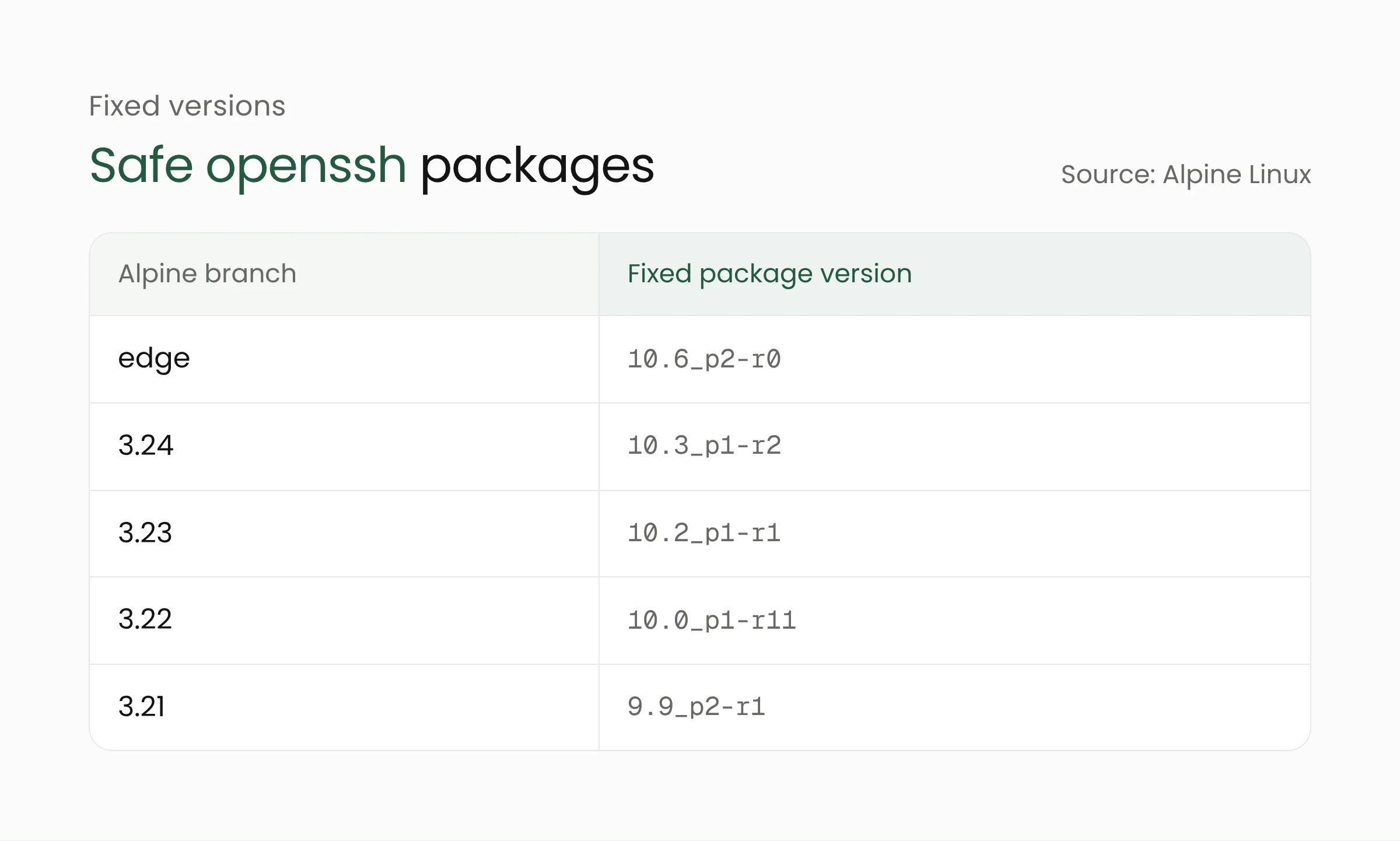
For older branches, the fixed package versions are 9.7_p1-r6 (3.20), 9.6_p1-r3 (3.19), 9.3_p2-r4 (3.18), 9.1_p1-r7 (3.17), and 9.0_p1-r6 (3.16). Cycode notes that Alpine releases older than 3.16 receive no fixed package, so turning off password logins is the only remedy there.
Teams using Docker images should also review any image that runs sshd. Cycode found that several popular images, including Gitea, Gogs, the Jenkins SSH agent, and linuxserver openssh-server, disable password logins by default unless that setting is changed. In-house images based on Alpine that install openssh-server need to be rebuilt.
What this means for IT teams and server administrators
Alpine is popular because it is small, which is why it often runs on low-cost VPS instances, university and government servers, bastion hosts, and container images. Servers like these are frequently set up once and rarely revisited. The following steps can be done today.
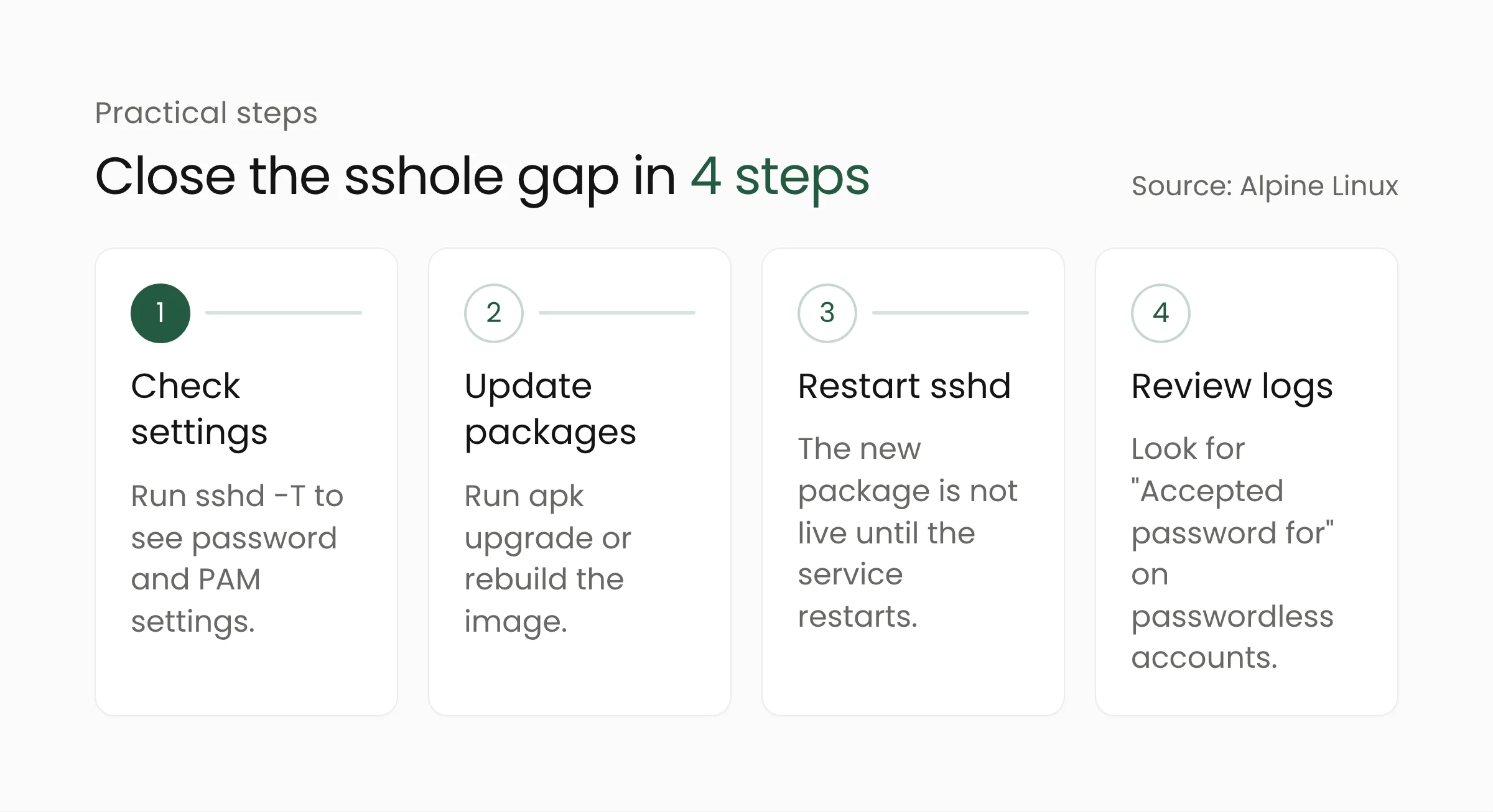
Check sshd settings on every server
Run sshd -T | grep -i -E 'passwordauthentication|usepam' as root. A server is not exposed if password logins are set to no or PAM is on. Also list any other musl-based systems that expose SSH, such as OpenWrt routers or custom IoT devices.
Update the package and restart sshd
On Alpine, run a full apk upgrade, then restart the service with rc-service sshd restart. The Alpine advisory stresses that upgrading the package alone does not replace the sshd process that is already running. For containers, rebuild the image and redeploy from the new one.
Turn off password logins if you cannot update yet
Set PasswordAuthentication no in the sshd configuration, for example through a drop-in file in /etc/ssh/sshd_config.d/, then restart sshd. Confirm that key-based login works and keep your current session open before applying the change, so you do not lock yourself out. It is also sound practice for any server reachable from the internet.
Look for signs of compromise
Search /var/log/messages for Accepted password for entries on accounts that should have no password, such as alpine, root, or key-only users. Review doas usage, recently created users, and the contents of authorized_keys files. The Alpine advisory says to treat the machine as compromised if a suspicious login cannot be ruled out.
Teams that manage many servers can use this case to build an asset inventory and a regular patching schedule. We covered a similar pattern with the exploited Node-RED flaw, where internet-facing services were the first targets. If needed, Merakit’s cybersecurity services team can help map servers that expose SSH and set up a vulnerability response process.
Frequently asked questions
Are my Ubuntu or Debian servers affected?
No, according to the Alpine advisory and Orca’s research. glibc-based distributions such as Ubuntu, Debian, and Fedora use a different C library, and sshd there usually checks passwords through PAM. You should still install OpenSSH updates when your distribution releases them.
Are ordinary Alpine containers affected?
Only if the container runs sshd with password logins enabled. The Alpine advisory says containers that do not run sshd are not affected. Most web application containers do not expose SSH, but images used as remote access machines should be checked.
Is installing the latest openssh package enough?
Not on its own. After the package is updated, sshd must be restarted so the new version is running. Servers that were exposed should also have their logs reviewed, since attack attempts were reported within hours of disclosure.
Conclusion
The sshole flaw only opens under a specific combination of settings, but that combination is Alpine Linux’s default. Updating OpenSSH, restarting sshd, and turning off password logins on internet-facing servers closes the gap. For infrastructure running in the cloud, Merakit’s cloud computing team can help organize server images and the update process around them.
Sources
- OpenSSH, 10.6p2 release notes (November 5, 2026)
- Alpine Linux, openssh-server password authentication bypass advisory (November 5, 2026)
- CVE-2026-123158 record, CVE Program (November 5, 2026)
- Orca Security, *sshole: OpenSSH Authentication Bypass Gives Attackers Root on Alpine Linux (November 5, 2026)
- Cycode via Security Boulevard, sshole (CVE-2026-123158) (November 5, 2026)
- The Hacker News, Hackers Target OpenSSH SSHole Flaw Within Hours of Disclosure (November 6, 2026)
- Özgün Kültekin, *sshole research write-up (November 2026)