Blog Windows Server
Windows Server 2016 Support Ends in January 2027
On this page· 7 sections
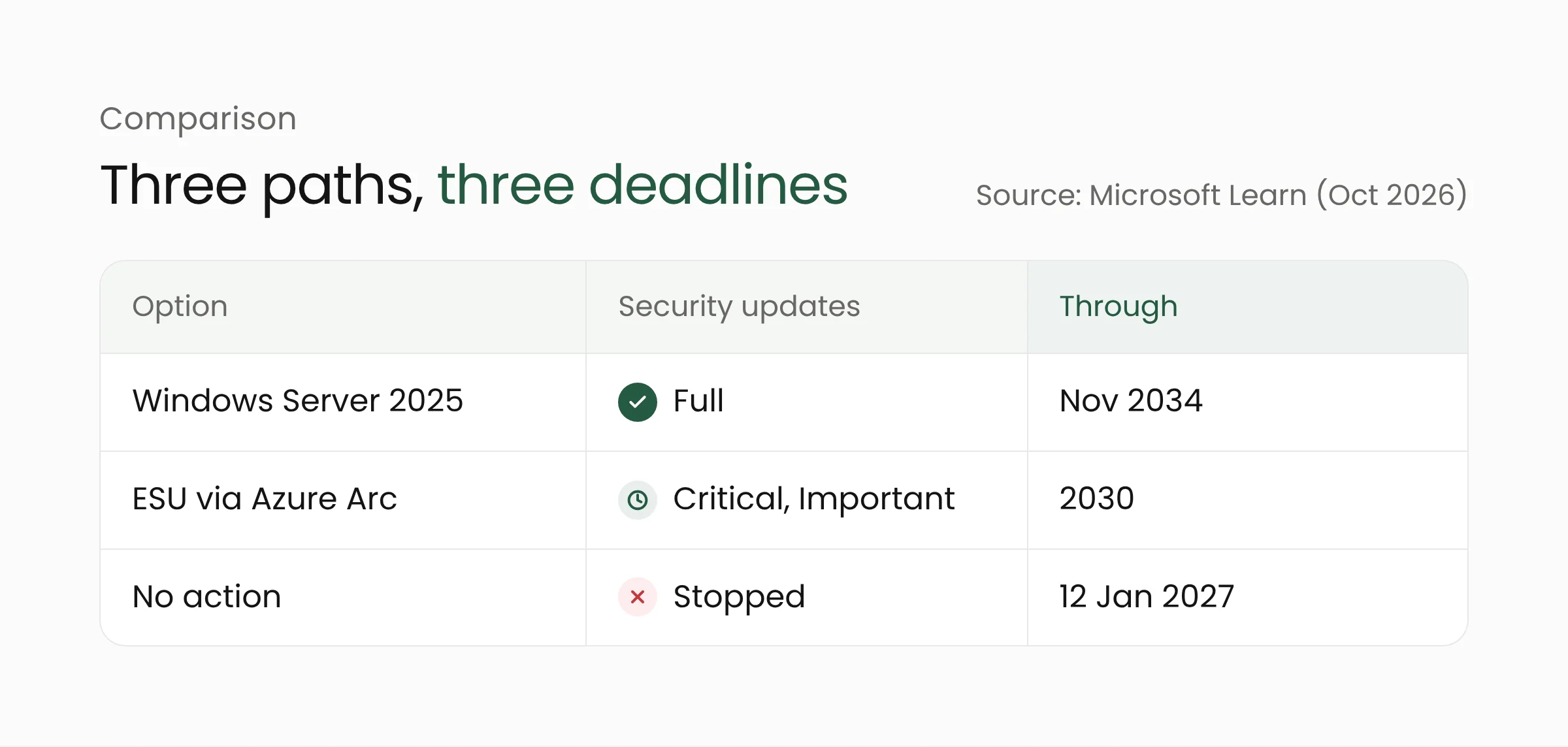
Microsoft has confirmed that extended support for Windows Server 2016 ends on 12 January 2027. The January 2027 security update will be the last, so servers still running this version need a new home. Administrators can move to Windows Server 2025 or buy Extended Security Updates through Azure Arc.
What Microsoft announced
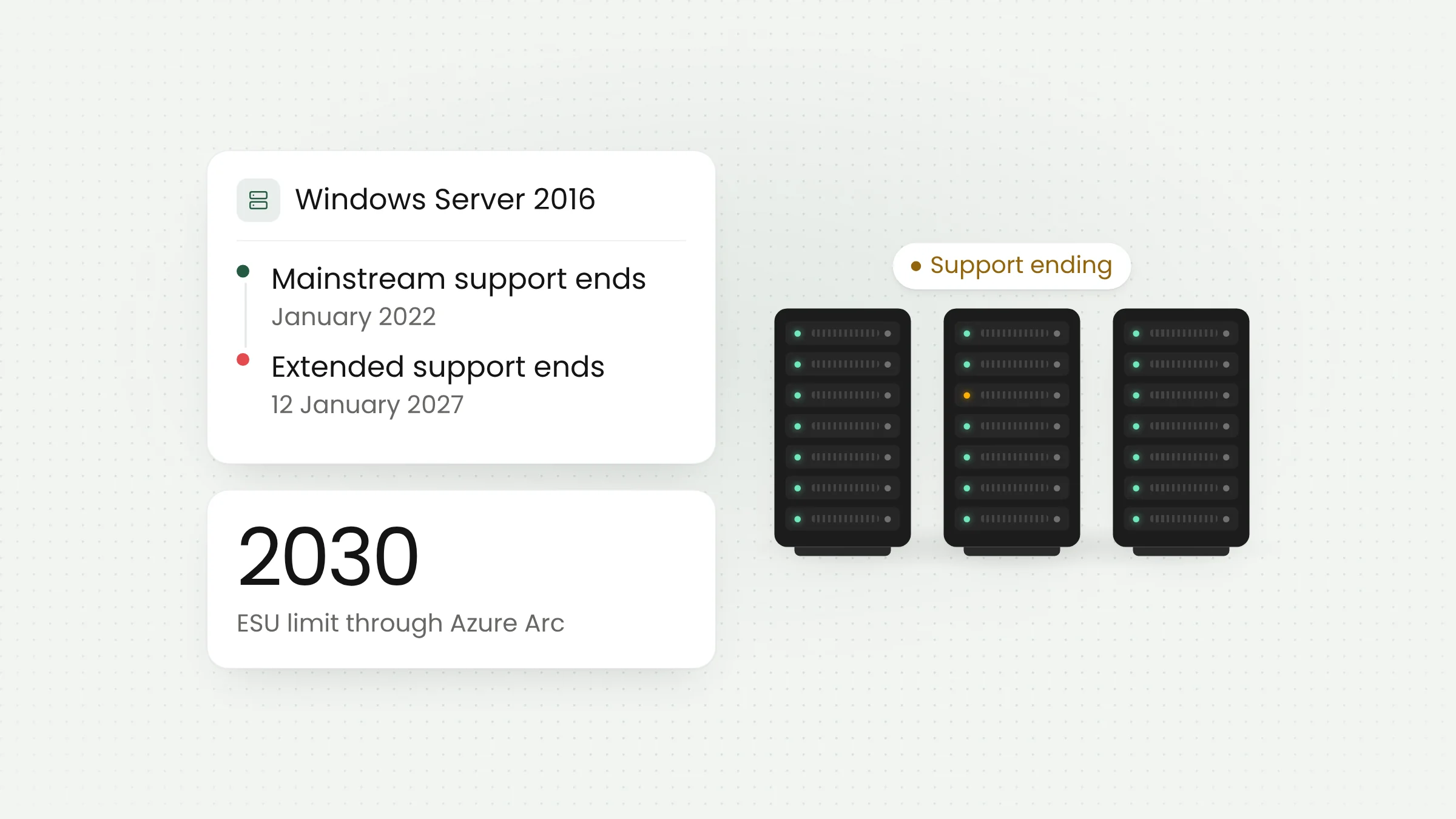
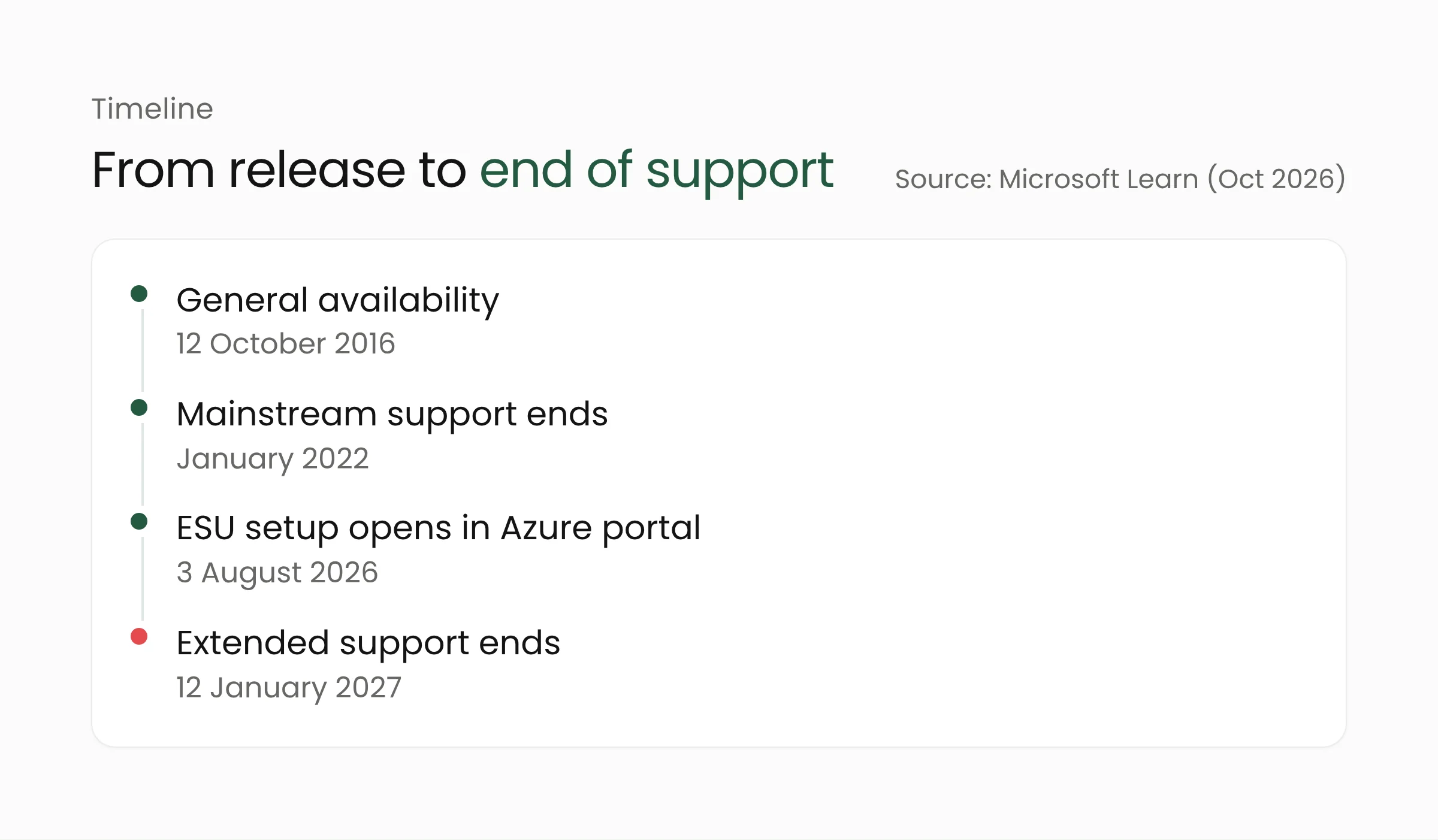
According to BleepingComputer on 23 October 2026, Windows Server 2016 became generally available on 12 October 2016. Mainstream support ended in January 2022, and the extended support that remains runs out on 12 January 2027. Every edition is affected: Datacenter, Essentials, MultiPoint Premium, and Standard. For Essentials, support for features such as Remote Web Access ends on the same date.
Microsoft says the January 2027 update is the final one for this version, in its words: “The January 2027 Windows security update will be the last update available for this version.” Servers keep running after that date, but flaws found later are no longer fixed through the regular monthly updates.
The plan is not new. In a Windows Server blog post published on 25 February 2026, the Windows Server team recommended upgrading to Windows Server 2025 and introduced Extended Security Updates (ESU) for the 2016 release, delivered through Azure Arc.
Three options before January 2027
Move to Windows Server 2025
This is the path Microsoft recommends. According to the Microsoft lifecycle page, Windows Server 2025 became available in November 2024, with mainstream support through November 2029 and extended support through November 2034. Microsoft describes it as its most secure, cloud-connected Windows Server, with hotpatching and centralized hybrid management. These are vendor claims that we have not tested ourselves.
To try it without commitment, Microsoft offers a 180-day evaluation through the Microsoft Evaluation Center. A trial is a practical way to confirm that internal applications still run on the new version.
Stay put with extended security updates
ESU buys time for organizations that are not ready to move. According to the Azure Arc documentation, ESU for Windows Server 2016 provides Critical and Important security updates for up to three years, through 2030. New features, customer-requested nonsecurity hotfixes, and design changes are not included.
Azure Arc is a Microsoft service that connects servers outside Azure, such as those in your own server room, to the Azure management portal. Servers can be enrolled for ESU this way without being moved to Azure. ESU delivery needs no activation keys, and enrolled servers get free access to Azure Update Manager, Change Tracking and Inventory, and Azure Policy Guest Configuration, which help track update status and configuration changes.
The documentation lists several requirements:
- The server must be connected to Azure Arc with Azure Connected Machine agent version 1.62 or later.
- The supported editions are Standard and Datacenter.
- Purchase requires Software Assurance through a volume licensing program such as an Enterprise Agreement, or licensing through SPLA or a server subscription.
- Setup is available in the Azure portal from 3 August 2026, and billing starts on 13 January 2027 on a pay-as-you-go basis.
- Virtual machines on Azure VMware Solution and Azure Local receive ESU for free and should not enroll through Arc.
- Servers in virtual desktop infrastructure (VDI) do not use Arc. They use Multiple Activation Keys (MAK).
The sources we read do not list ESU prices, so ask your licensing provider for costs.
Migrate to Azure
The Windows Server blog frames this period as a chance to upgrade to Windows Server 2025 or to consider migrating to Azure, and it links the Azure Migration and Modernization Program for help. This option suits organizations that already plan to reduce physical servers, and it should be weighed against long-term running costs.
A lesson from Windows Server 2012
The same pattern just played out for the previous generation. The Azure Arc documentation records that Windows Server 2012 and 2012 R2 reached end of support on 10 October 2023, and the three-year ESU period ended on 13 October 2026. ESU licenses enabled through Arc were deactivated at midnight UTC on 14 October 2026. Organizations still running that version no longer receive security updates from Microsoft.
For Windows Server 2016 administrators, this is a concrete reminder. Any 2012 server that remains is now as unsupported as a server can be, and belongs at the top of the priority list.
It also shows that ESU has an end date. Treating it as a final destination only postpones the migration, and the same work is still waiting in 2030.
What this means for agencies, schools, and hospitals
Organizations that run internal applications on their own servers, such as administration systems, databases, or file services, need to know which servers still run Windows Server 2016. Government agencies and schools that keep staff or student records on local servers fall into this group, and so do hospitals that hold operational data in a server room.
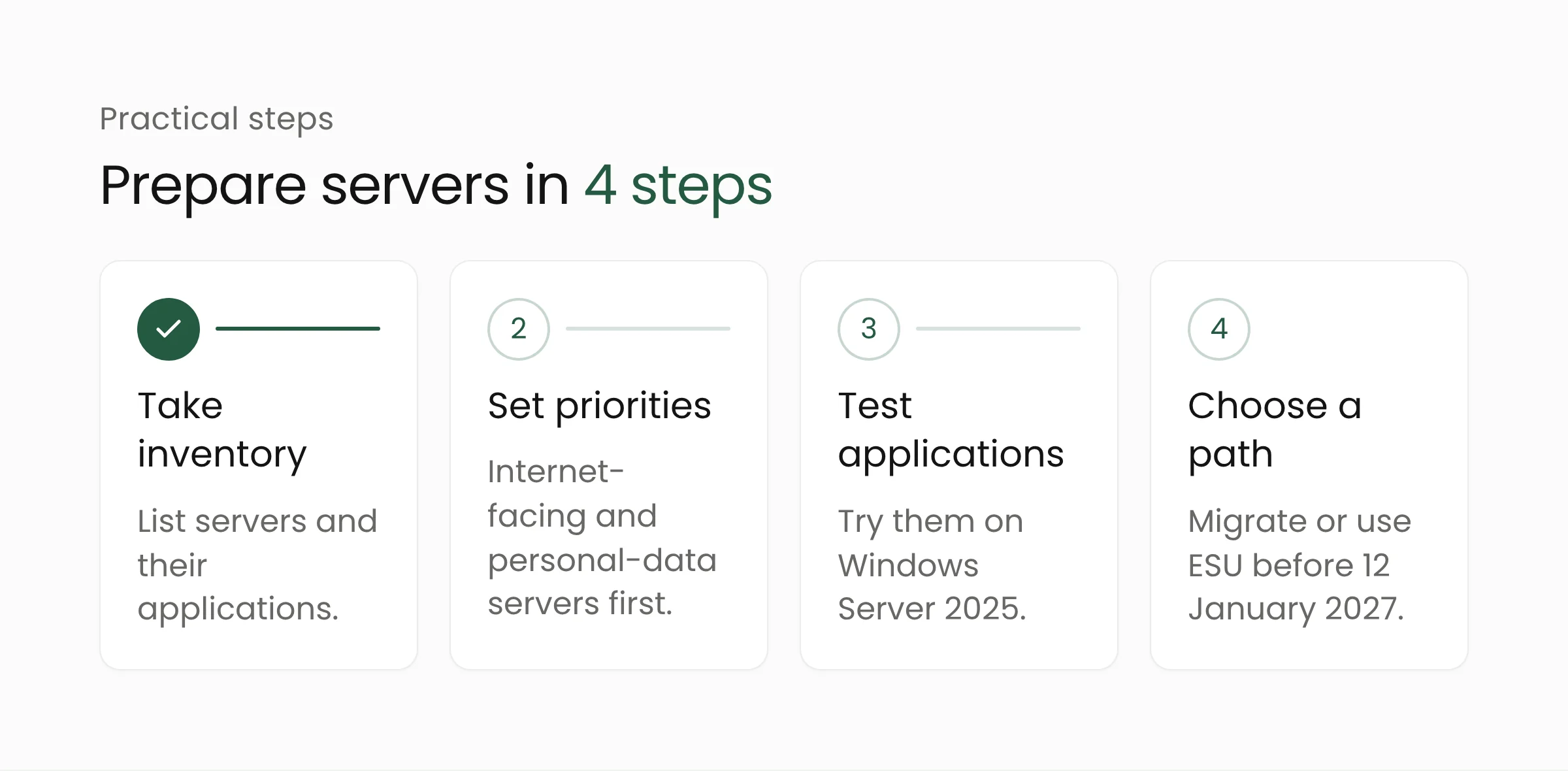
Steps you can start now:
- Take inventory. On each server, the PowerShell command
Get-ComputerInfoshows the installed Windows product name. Record the applications running on it and who owns them. - Set priorities. Move servers that face the internet or hold personal data first, because unpatched flaws are riskiest there.
- Test applications. Run internal applications on Windows Server 2025 in a trial environment. Old applications are often the obstacle that only shows up during testing.
- Choose a path and a deadline. If migration cannot finish before 12 January 2027, prepare ESU and first check the status of your Software Assurance licensing.
Teams often need help mapping workloads and designing the move. Merakit’s cloud computing services help assess whether a workload should stay on local servers or move, and its digital government solutions cover agencies with layered systems. While servers remain in operation, security monitoring still matters, and cybersecurity services can complement the transition. For an example of update risk on Windows Server, read about the October Windows Server update that disrupted Exchange.
Frequently asked questions
Do servers stop working after 12 January 2027?
No source says servers will stop. What ends is the monthly security update, and the January 2027 update is the last one. Risk grows over time as new flaws go unpatched.
Is ESU free?
Generally it is paid. The Azure Arc documentation says billing starts on 13 January 2027 on a pay-as-you-go basis, except for virtual machines on Azure VMware Solution and Azure Local, which receive ESU for free. Prices are not listed in the sources we read.
What about Windows Server 2016 Essentials?
Support for Essentials features, including Remote Web Access, ends on 12 January 2027. The Azure Arc ESU documentation names Standard and Datacenter as the supported editions, so Essentials owners should confirm their options with their licensing provider.
Conclusion
The time left before 12 January 2027 is enough for inventory and application testing, but not enough to postpone the decision. Start with a list of servers and applications, then pick the path that fits your budget and your team’s readiness. If you want to talk through a migration plan, the Merakit team can help through the service pages above.
Sources
- BleepingComputer: Microsoft: Windows Server 2016 reaches end of support in January (23 October 2026)
- Microsoft Windows Server Blog: Planning ahead for Windows Server 2016 end of support (25 February 2026)
- Microsoft Learn: Prepare to deliver Extended Security Updates for Windows Server through Azure Arc (updated October 2026)
- Microsoft Lifecycle: Windows Server 2025