Blog Cybersecurity
Chrome Zero-Day CVE-2026-125350 Exploited, Update Chrome Now
On this page· 7 sections
Google patched Chrome zero-day CVE-2026-125350 on November 9, 2026, after learning that attackers were already exploiting it. The flaw sits in Chrome’s XML component and lets a crafted web page run code inside the browser. Users and IT teams should make sure Chrome is on version 157.0.8103.50 or later.
How the CVE-2026-125350 Chrome flaw works
In its November 9, 2026 Chrome release notes, Google lists CVE-2026-125350 as a use-after-free bug in XML and rates it High. A use-after-free bug happens when a program keeps using a block of memory after it has been released. If an attacker can refill that memory with data of their choosing, the program can be tricked into running instructions it was never meant to run.
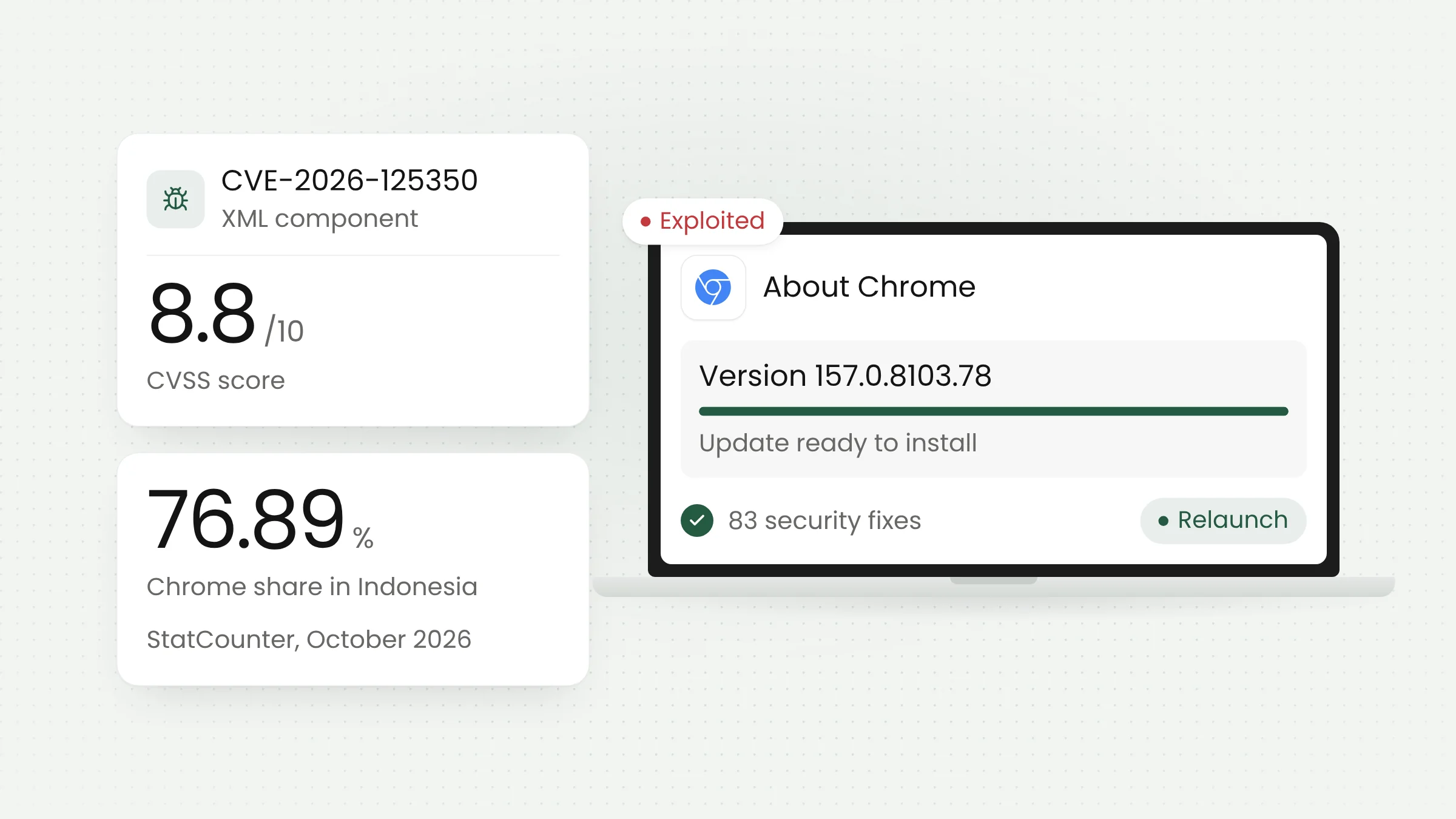
The XML component parses XML documents that web pages load. According to the NVD entry for CVE-2026-125350, the US government’s vulnerability database, the flaw allows a remote attacker to execute arbitrary code inside the sandbox through a crafted HTML page. The CVSS score listed there is 8.8 out of 10.
In practice, a victim only has to open a page the attacker has prepared. Links to such a page can arrive through any channel, including text messages, email, or a compromised website. Nothing has to be downloaded or installed.
The sandbox is a restricted space in which Chrome runs web content, kept apart from the files and programs on the computer. Code running inside it does not get control of the device straight away. Google has not said whether the attacks it found chained this bug with another one to break out of the sandbox, so the update should still be treated as urgent.
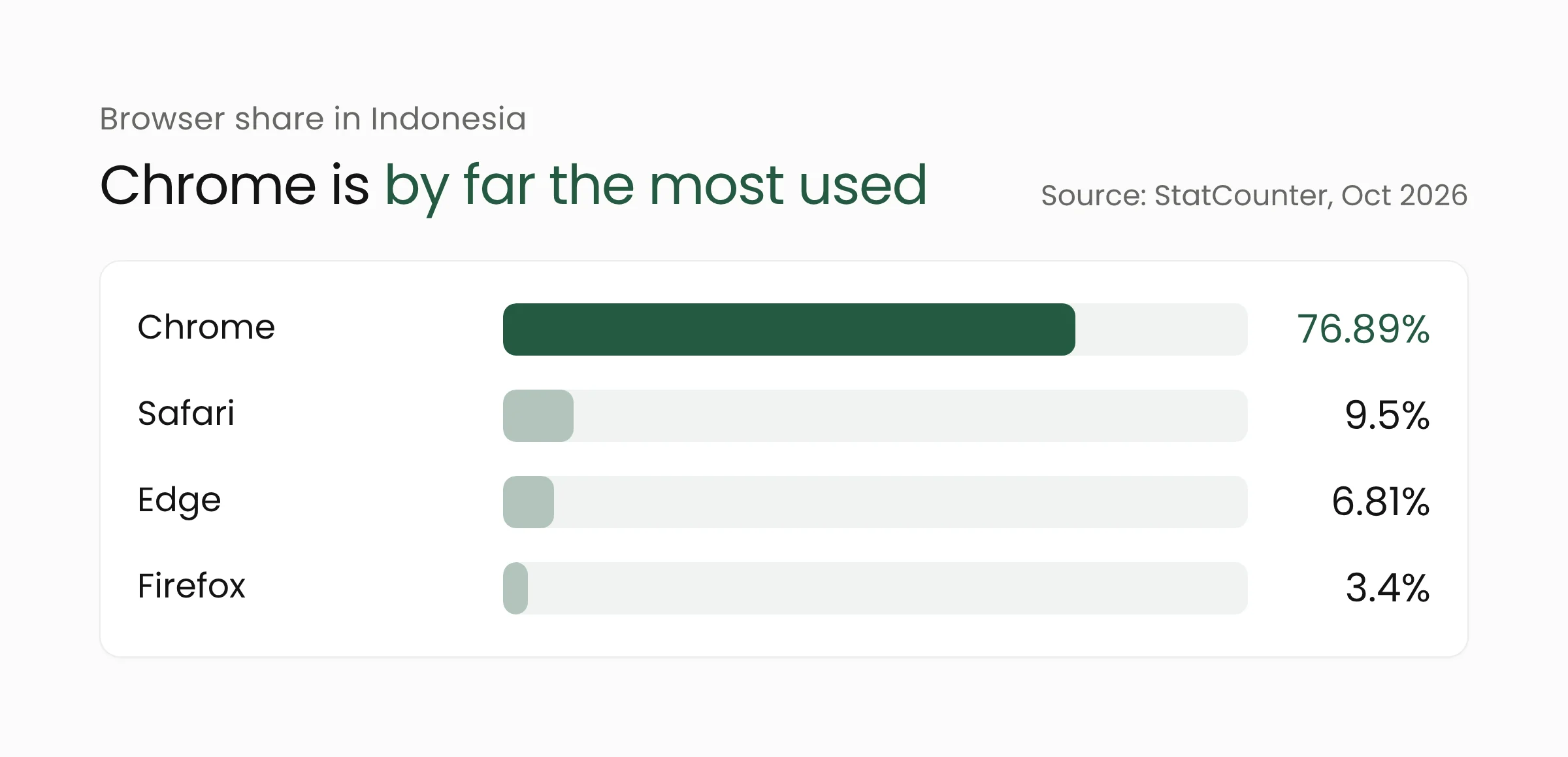
The risk is close to home for Indonesian users because Chrome is by far the most used browser in the country. StatCounter data for October 2026 puts Chrome’s share in Indonesia at 76.89 percent across all device types, well ahead of Safari at 9.5 percent and Edge at 6.81 percent.
Exploitation status and the year’s eighth zero-day
One sentence in Google’s release notes is what makes this update urgent: “Google is aware that an exploit for CVE-2026-125350 exists in the wild.” A flaw that attackers use before or as its fix ships is called a zero-day. BleepingComputer counts this as the eighth Chrome zero-day exploited in attacks in 2026. The previous seven were patched between February and September.
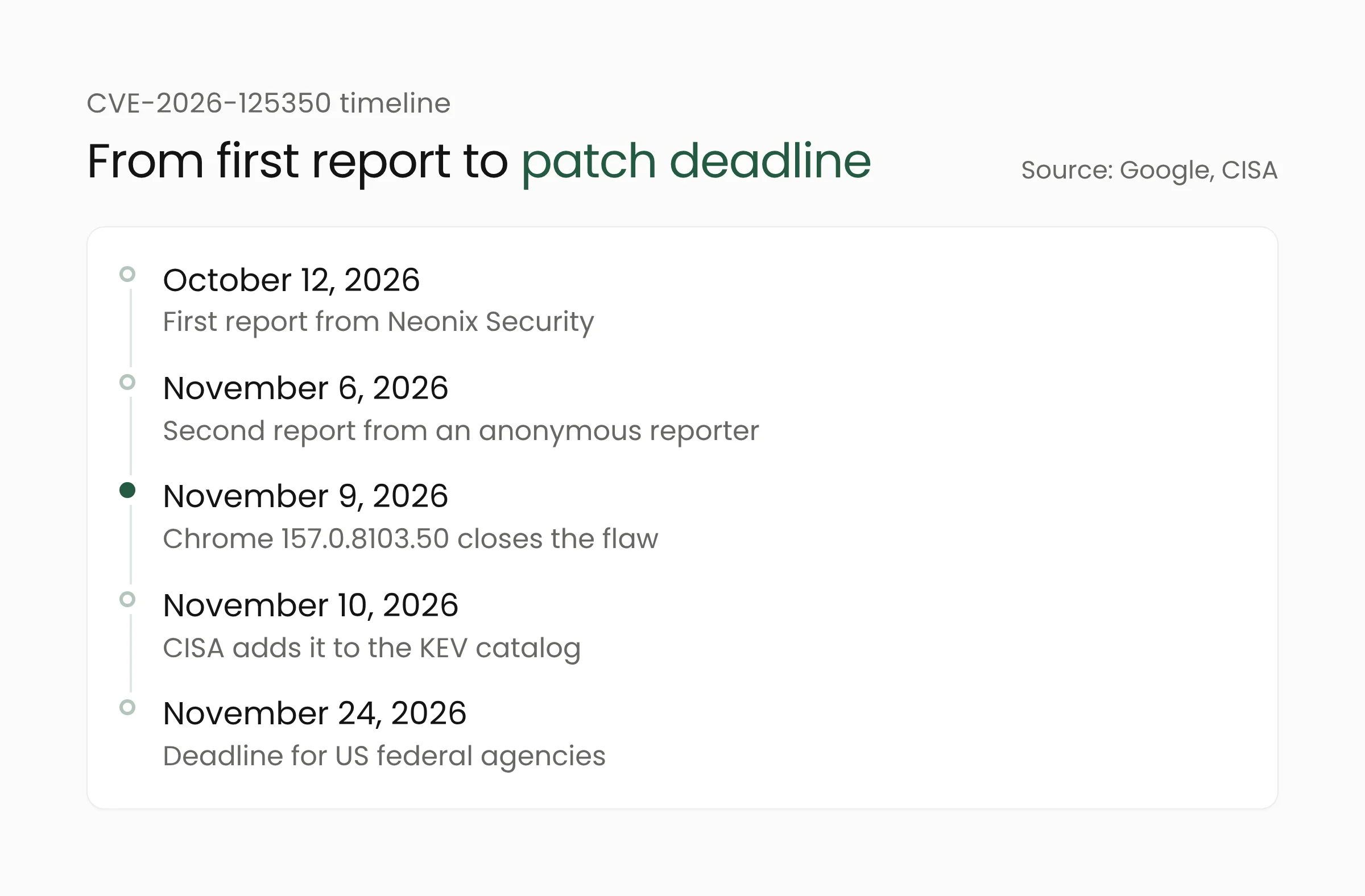
Google credits two reports for the bug. The first came from Arni Hardarson of Neonix Security on October 12, 2026, and the second from an anonymous reporter on November 6, 2026. Google has not shared details of the attacks, including who is behind them or who was targeted. Access to the bug details may also stay restricted until most users have installed the fix.
On November 10, 2026, CISA, the US cybersecurity agency, added CVE-2026-125350 to its Known Exploited Vulnerabilities (KEV) catalog, a list of flaws with confirmed use in attacks. US federal agencies must fix it by November 24, 2026. That deadline only binds agencies in the United States, but IT teams elsewhere can use it as a benchmark.
Safe Chrome versions and the follow-up update
Chrome on desktop
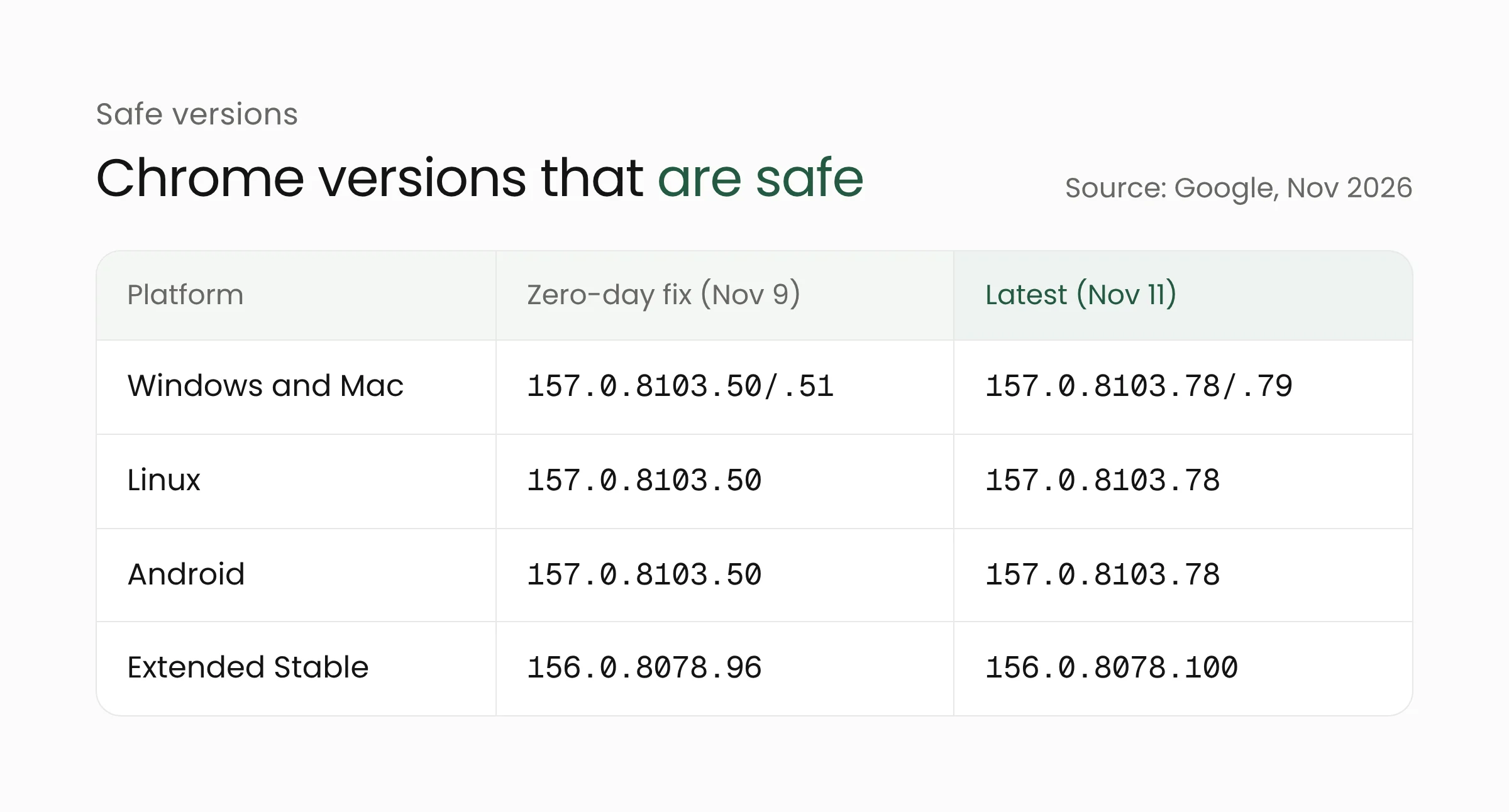
The fix for CVE-2026-125350 shipped in Chrome 157.0.8103.50/.51 for Windows and Mac and 157.0.8103.50 for Linux. The November 9 release carried nine security fixes in total. Organizations on the Extended Stable channel, which updates on a longer schedule aimed at businesses, received the same fix in version 156.0.8078.96 for Windows and Mac.
Two days later, on November 11, 2026, Google shipped another Stable update that moves Windows and Mac to 157.0.8103.78/.79 and Linux to 157.0.8103.78. That release closes 83 security holes, five of them rated Critical. Google did not say any of them were being exploited. Extended Stable moved to 156.0.8078.100 with 72 security fixes.
Chrome on Android
Google released Chrome 157.0.8103.50 for Android on November 9, 2026. According to Google, Android releases contain the same security fixes as the matching desktop releases unless otherwise noted. Version 157.0.8103.78 for Android followed on November 11 and is reaching Google Play over several days.
Microsoft Edge and other Chromium browsers
Edge, Brave, and Opera are built on Chromium, the open-source project that also underpins Chrome. CISA also lists the flaw under the product name Google Chromium. Patch timing for browsers other than Chrome depends on each vendor.
On November 9, Microsoft wrote in its Edge security release notes that it was aware of the recent exploits and was working on a security fix. On November 11, it released Edge for Android version 157.0.4341.53, which includes the fix for CVE-2026-125350. As of November 12, 2026, the same page did not yet list a desktop Edge version with the fix, so Edge users on computers should keep checking for updates.
What this means for offices and small businesses
In many offices and small businesses, the browser has become the main work tool. Email, web-based point-of-sale apps, business internet banking, and sales dashboards all run in Chrome. A single computer that has not been updated can become a way into those accounts.
Update and restart Chrome today
Chrome downloads updates on its own, but the new version only takes effect after the browser restarts. Many people leave Chrome open for days, which holds the update back. Open the three-dot menu, choose Help, then About Google Chrome, or type chrome://settings/help in the address bar. Chrome will look for the latest version, download it, and ask you to relaunch.
Check the version number on every device
After the relaunch, the same page shows the version number. On computers, 157.0.8103.50 and later include the zero-day fix, while 157.0.8103.78 and later also include the 83 fixes from November 11. On Android phones, open Google Play, search for Chrome, and tap Update if the button appears.
Manage updates centrally across many computers
IT teams responsible for many machines should not rely on every employee restarting the browser. The RelaunchNotification policy in Chrome Enterprise can tell users, or require them, to relaunch Chrome within a set period after an update becomes available. Keep a record of any other Chromium-based browsers staff use, because their patch schedules do not always match Chrome’s.
Remind staff about outside links
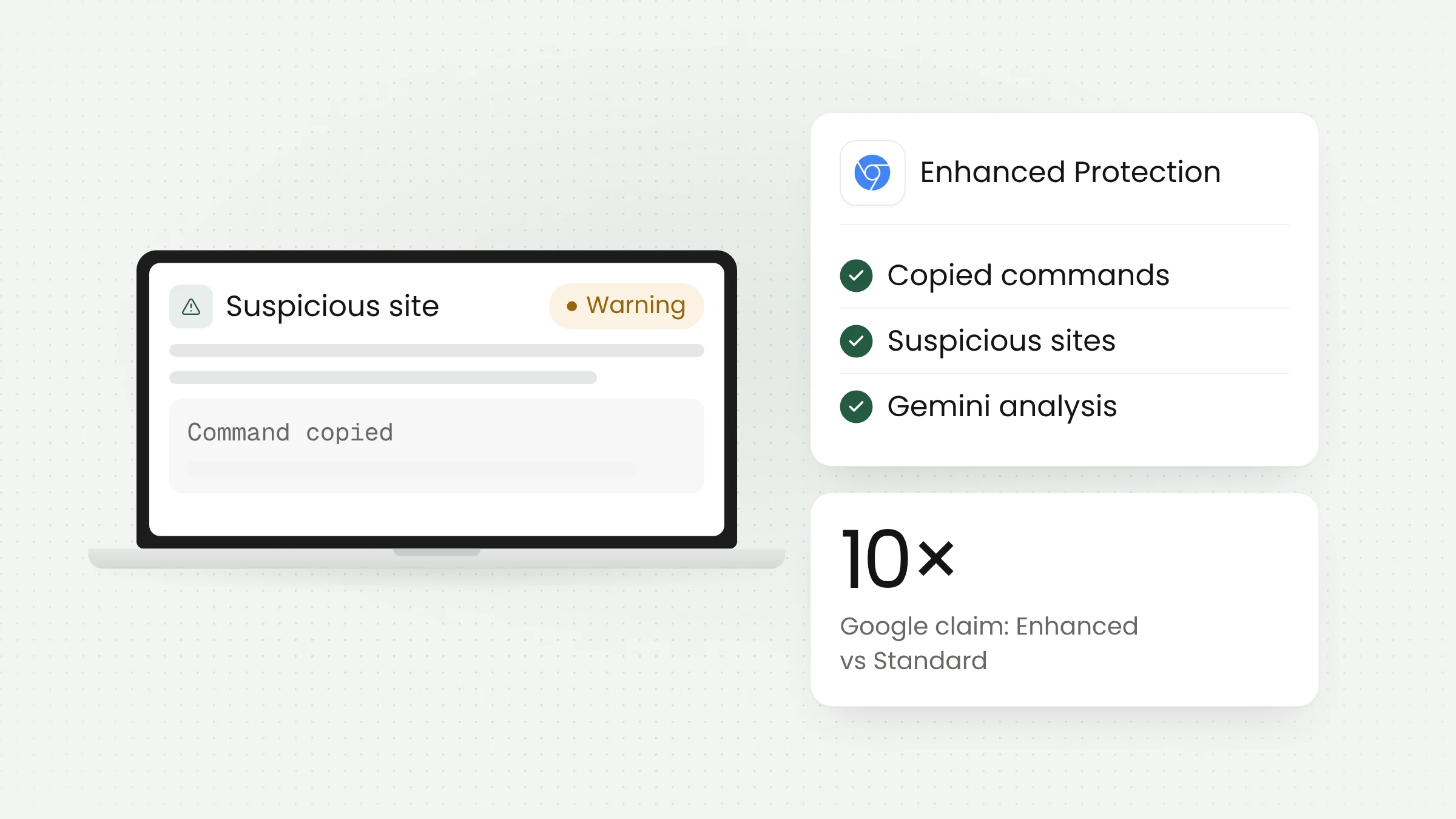
Until every device is updated, ask staff to take more care with links from unknown senders, especially on computers used for financial transactions. The same habit helps against other browser scams, such as the copy-paste trick covered in our piece on Chrome’s ClickFix warnings.
These steps are easier to carry out when an office already has a device inventory, a named person in charge of updates, and written deadlines. If those are missing, cybersecurity services can help set up an update monitoring process that fits the size of the organization.
Frequently asked questions
Does Chrome update itself automatically?
Yes. Chrome downloads updates in the background, but the new version is only used after the browser restarts. Google also rolls updates out gradually over days or weeks, so checking manually on the About Google Chrome page speeds things up.
Is Chrome on Android affected?
Google released Chrome 157.0.8103.50 for Android on the same day as the desktop release and says Android releases carry the same security fixes. Update Chrome through Google Play until it reads 157.0.8103.50 or later.
What about Microsoft Edge?
Edge is built on Chromium. Microsoft has released Edge for Android version 157.0.4341.53 with the fix for CVE-2026-125350. On computers, open edge://settings/help to check for and install the latest update, and keep an eye on the Edge security release notes.
Closing thoughts
CVE-2026-125350 can be closed with a simple step: update Chrome and restart it. The harder part is making sure that step actually happens on every work computer and phone, including devices that are rarely switched off. If your organization wants to put this kind of update monitoring in place, the Merakit team is ready to talk.
Sources
- Google Chrome Releases: Stable Channel Update for Desktop, November 9, 2026
- Google Chrome Releases: Stable Channel Update for Desktop, November 11, 2026
- Google Chrome Releases: Chrome for Android Update, November 9, 2026
- Google Chrome Releases: Extended Stable Update for Desktop, November 11, 2026
- NVD: CVE-2026-125350
- CISA: CISA Adds Six Known Exploited Vulnerabilities to Catalog, November 10, 2026
- BleepingComputer: Google patches eighth Chrome zero-day exploited in attacks this year, November 10, 2026
- Microsoft Learn: Release notes for Microsoft Edge Security Updates
- StatCounter: Browser Market Share Indonesia, October 2026