Blog Web Development
GitHub Blocked in Indonesia for 4 Hours, Steps for Dev Teams
On this page· 7 sections
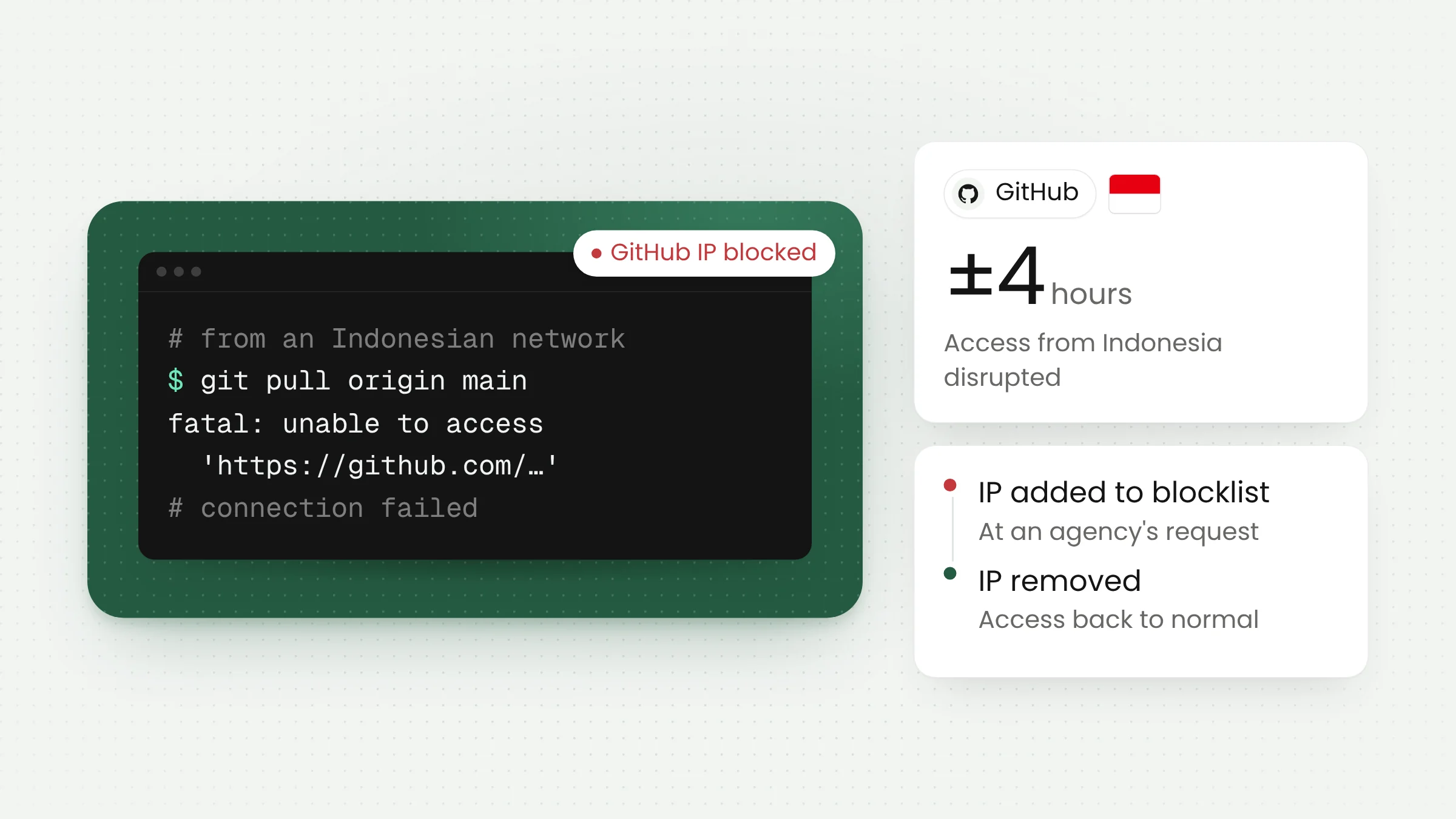
GitHub was blocked in Indonesia for roughly four hours late last week. According to the Ministry of Communication and Digital Affairs (Komdigi), the block was unintended. An IP address that GitHub also used had been added to the ministry’s blocking system at the request of a government agency.
Access returned once the address was removed from the blocklist. The disruption was short, yet it showed how much of the work done by Indonesian software teams runs through a single platform, and how a decision taken at the network layer can halt that work without warning.
How the GitHub disruption unfolded
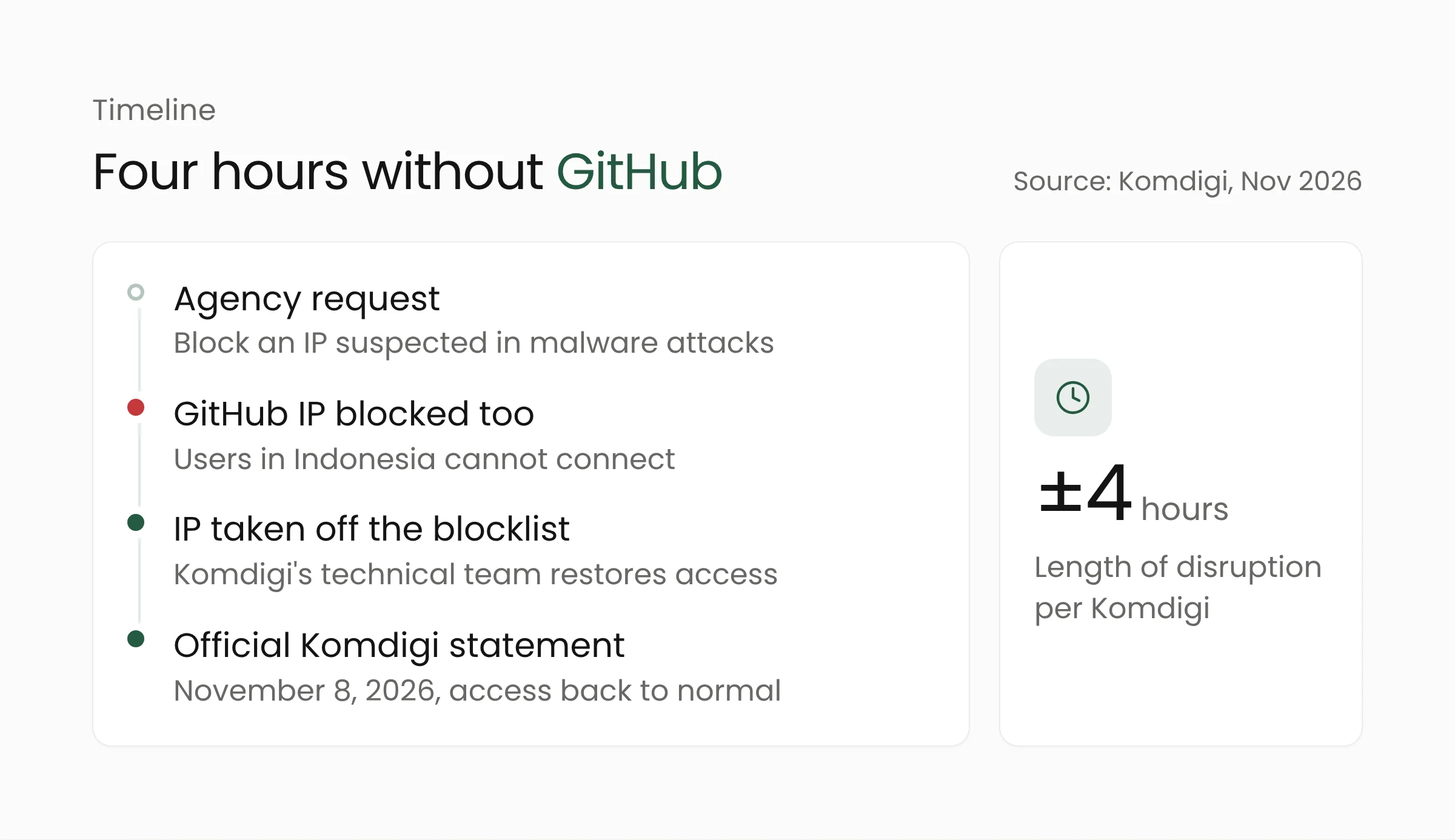
Komdigi explained the incident in an official statement dated November 8, 2026, which was reported by detikInet, CNBC Indonesia and JawaPos. The block began with a request from a government agency to block an IP address it suspected of being used in malware attacks against its network infrastructure.
Komdigi acted on the request. An internal review later found that one of the IP addresses in the blocking system was also used by GitHub, which cut off users in Indonesia. In a statement quoted by Uzone, the ministry said “tim teknis Komdigi segera melakukan normalisasi dengan mengeluarkan alamat IP dimaksud dari sistem pemblokiran”, meaning its technical team restored access by taking the address off the blocking system.
The outage lasted about four hours. detikInet and JawaPos place it on Friday, November 6, 2026, while Uzone reports Saturday, November 7. Komdigi said it will keep reviewing its IP verification and blocking procedures so that cybersecurity measures do not disrupt public access to legitimate digital services.
Several details remain undisclosed. Komdigi did not name the agency that requested the block, the IP address involved, or the number of affected users. None of the reports cited above included a comment from GitHub.
Why one IP address can cut off a large service
IP-based blocking works at the network layer. All traffic to the address is dropped, whatever site or service sits behind it. The method is quick to apply during an attack, but it is a blunt tool when an address is shared by many services.
A platform the size of GitHub uses many address ranges for different functions, including its website, API, Git connections, webhooks and GitHub Actions. GitHub publishes these ranges through its Meta API. Its official documentation notes that the list is not intended to be exhaustive and that the addresses change from time to time.
The same documentation explains that GitHub-hosted runners, the machines that execute GitHub Actions workflows, use dynamically assigned IP addresses from shared infrastructure. Activity from other users of that infrastructure can affect the reputation scores that third-party lists assign to those addresses, and GitHub says it does not control those lists.
Komdigi did not say which type of GitHub address was blocked, so it is not possible to confirm which mechanism applied in this case. The broader pattern is still useful. An address that looks suspicious from the victim’s side may share infrastructure with a widely used legitimate service, and blocking at the address level takes that service down with it.
The work that stops when GitHub is unreachable
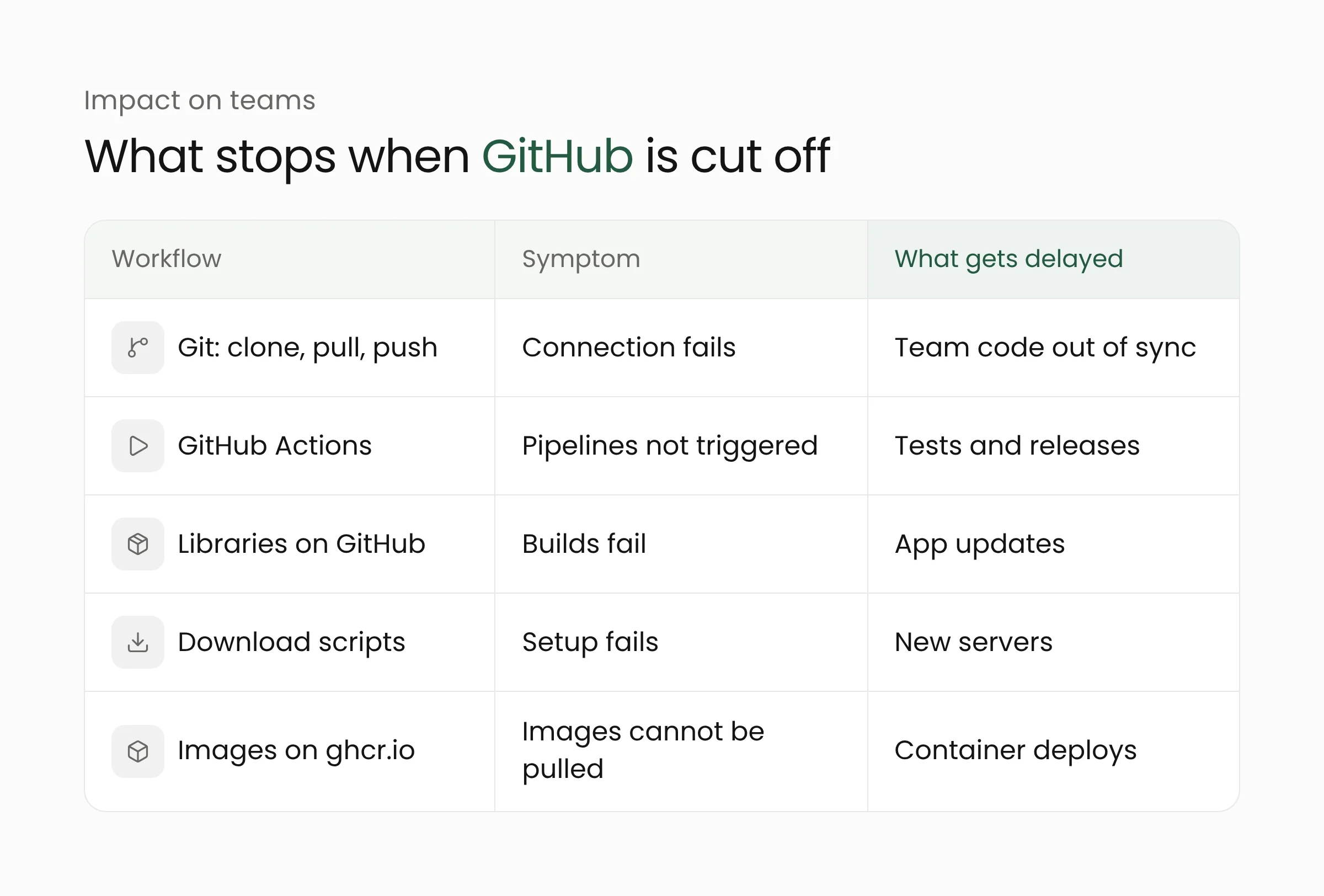
For many teams, GitHub sits at the center of several tasks at once. Developers pull and push code over Git, review changes in pull requests, run tests and releases in GitHub Actions, and fetch third-party libraries whose code is hosted on GitHub. When GitHub cannot be reached from Indonesian networks, all of these stop together.
The effects reach beyond developers’ laptops. Server setup scripts that download files directly from GitHub fail. Pipelines that rebuild an application on every change cannot fetch the latest code. Container images stored in GitHub Container Registry cannot be pulled if those addresses are affected too.
Picture the developers at an online store who need to ship a fix to the checkout page on a Friday afternoon. The code is ready, but the pipeline that pulls it from GitHub fails, and the release waits until access returns. An IT team at a local government office that updates its public service app through the same kind of automated pipeline would face the same delay.
A disruption limited to one country is also harder to diagnose. From abroad the service looks normal, so teams in Indonesia may spend time checking their office network or their own configuration before realizing the problem lies on the path to GitHub.
What this means for development teams
Four hours may sound minor. The same window, however, could fall during a release, an online exam period or an urgent security fix. The steps below aim to keep critical work moving when one service is out of reach, without abandoning GitHub.
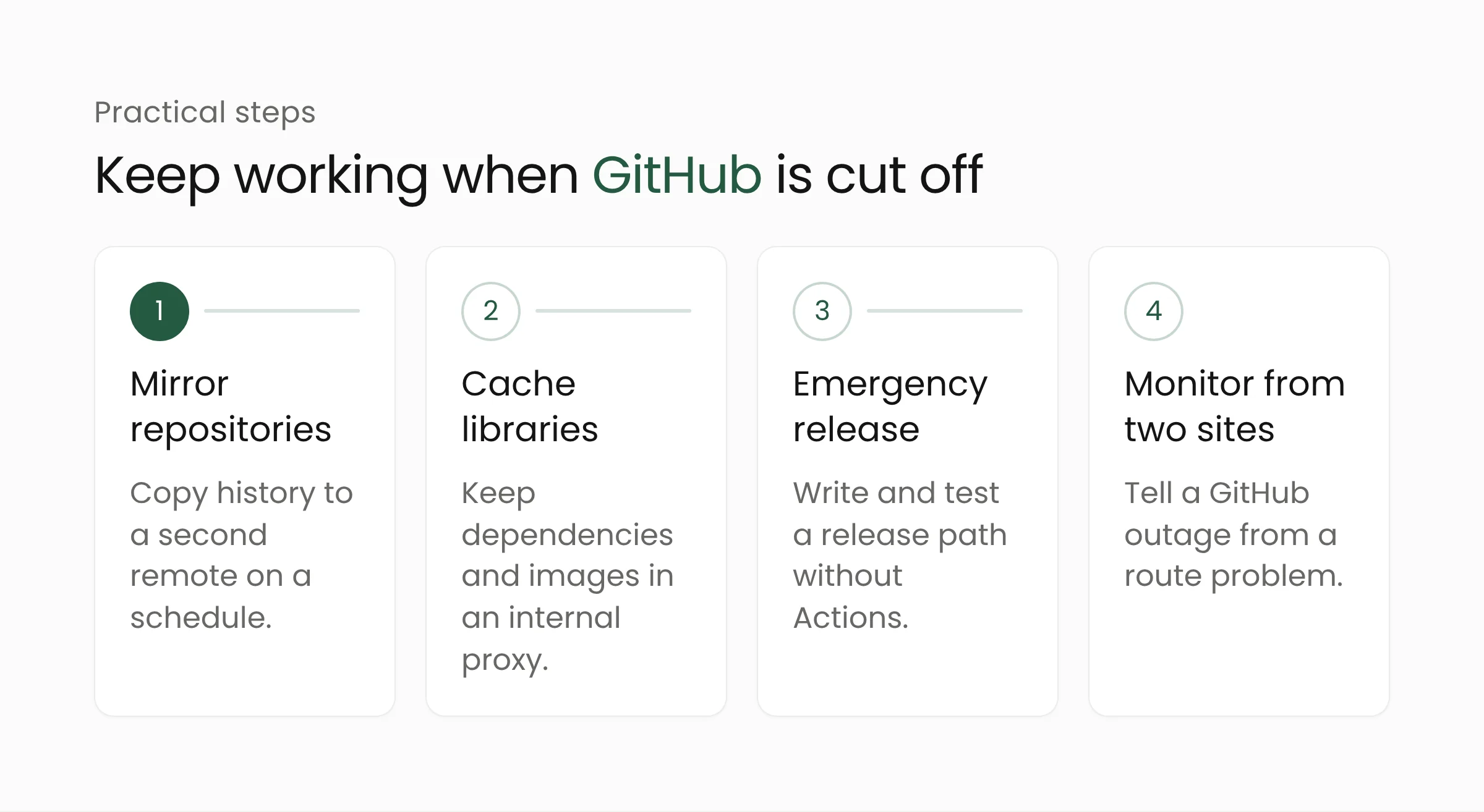
Keep a mirror of your repositories elsewhere. The git clone --mirror and git push --mirror commands copy the full history, branches and tags to another remote, such as an internal Git server or a second provider. Schedule regular syncs and make sure the team knows how to switch to that remote.
Cache libraries and container images. An internal package proxy for npm, Composer, Go modules or Docker images keeps copies of dependencies that have already been downloaded, so builds can continue while the original source is temporarily unreachable.
Document an emergency release path. Write down how to build and ship the application without GitHub Actions, for example from an internal build server, and test it at least once. A path that has never been tried tends to fail when it is needed most.
Avoid live downloads at runtime. Production applications and server setup scripts should not fetch files from raw GitHub URLs or release pages while they run. Keep those files in your own object storage with pinned versions.
Monitor from two network locations. A simple check from a server in Indonesia and another abroad helps a team tell a GitHub outage apart from a problem on the route to GitHub. This kind of resilience, including where caches and build servers live, can be designed alongside the cloud computing infrastructure an organization already runs.
The same lesson applies to IT teams that manage firewalls in offices, universities or government agencies. Before blocking an IP address, compare it with the ranges that large providers such as GitHub publish. GitHub itself does not recommend allowing access by IP address and asks those who still do so to monitor the Meta API regularly. A Majalah ICT analysis of the case also recommends using the most specific blocking measure available, such as a domain or URL, together with a clear restoration procedure.
We have covered the risk of depending on a single point from the data center side in our report on the Google Cloud London outage. For teams organizing their code, pipeline and release workflows, the steps above can become part of everyday web application development practice.
Frequently asked questions
Was GitHub deliberately blocked in Indonesia?
According to Komdigi, no. The block targeted an IP address suspected of being used in malware attacks on a government agency’s network, and that address turned out to be used by GitHub as well. Access returned after the address was removed from the blocking system.
Was code stored in GitHub repositories affected?
No report has said that code or data on GitHub was damaged or lost. The disruption affected access from Indonesia to GitHub’s services, so users could not connect for about four hours.
How can I check whether an IP address belongs to GitHub?
GitHub publishes its address ranges through the Meta API at api.github.com/meta. GitHub’s documentation recommends checking against that list, for instance to confirm whether an address belongs to a GitHub Actions runner. The list is not exhaustive and can change, so it should be checked again regularly.
Closing thoughts
The four-hour block that hit the wrong target has been reversed, and Komdigi has promised to review its process. For development teams, the episode is a good reason to identify which parts of their workflow stop completely when GitHub is unreachable, and to prepare fallbacks while things are calm. If your team wants to rework its code and release workflow to better withstand disruptions, Merakit is happy to talk it through.
Sources
- detikInet: GitHub Sempat Diblokir di Indonesia, Komdigi Ungkap Penyebabnya (November 9, 2026)
- CNBC Indonesia: Komdigi Beberkan Alasan GitHub Sempat Diblokir Selama 4 Jam (November 9, 2026)
- JawaPos: Akses GitHub Sempat Lumpuh 4 Jam, Komdigi: IP Terblokir (November 9, 2026)
- Uzone: GitHub Sempat Diblokir 4 Jam di RI, Komdigi Ungkap Penyebabnya (November 9, 2026)
- Majalah ICT: Komdigi Pastikan Akses GitHub Kembali Normal Setelah Penyesuaian Pemblokiran IP (November 9, 2026)
- Komdigi: Komdigi Pastikan Akses GitHub Kembali Normal Setelah Penyesuaian Pemblokiran IP (November 8, 2026)
- GitHub Docs: About GitHub’s IP addresses (accessed November 9, 2026)