Blog Gadgets
Quick Share Adds Automatic Android Photo Backup to Windows
On this page· 7 sections
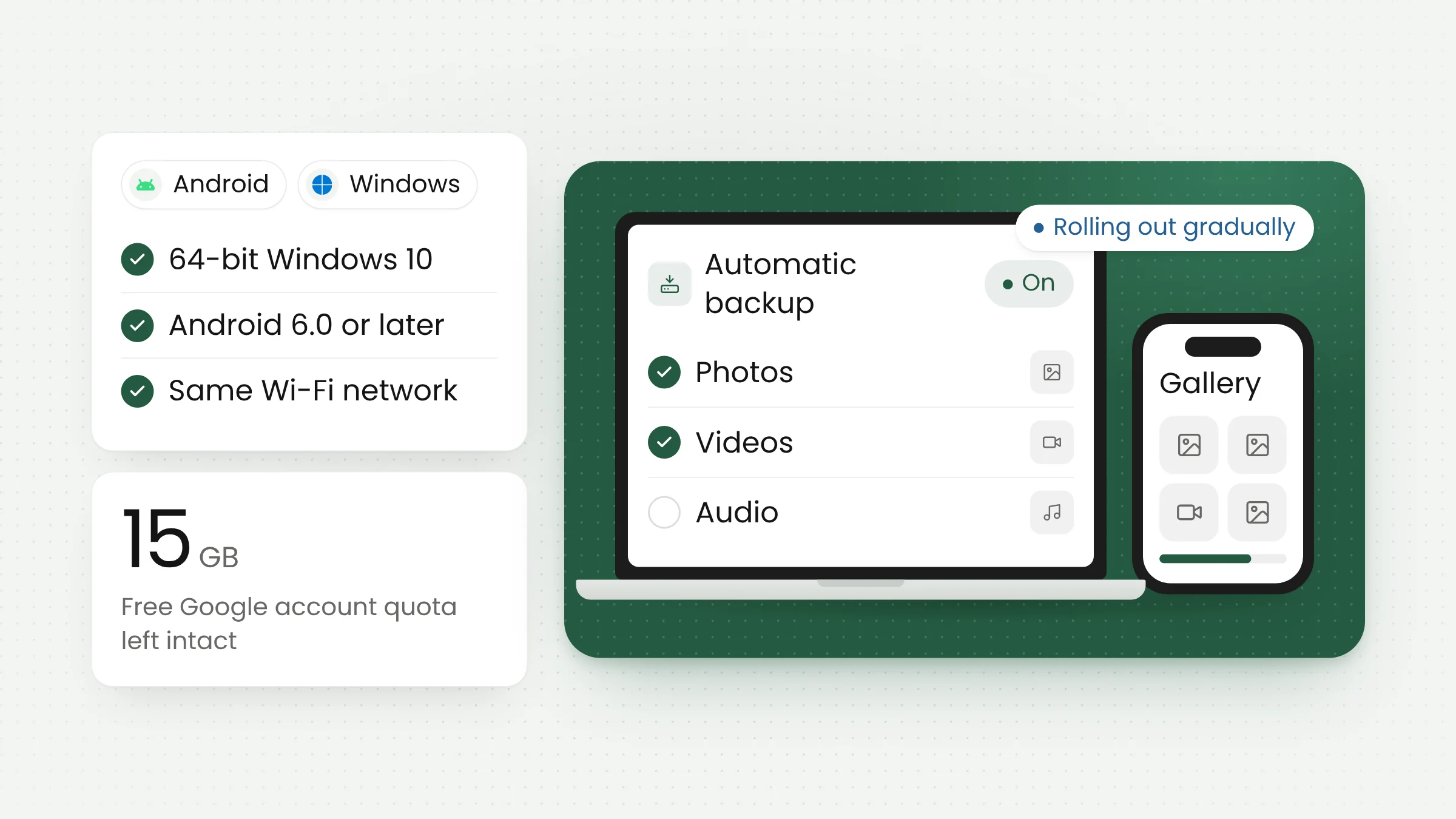
Google is adding automatic Quick Share backup, which copies photos and videos from an Android phone to a Windows PC. It is listed in the Google Play services v26.43 release notes dated November 2, 2026. Outlets report that backups travel over the local network, so the copies stay on your own computer and do not count against Google account storage.
The update drew wide coverage from technology outlets through the week, including Indonesia’s detikINET on November 11, 2026. Interest is high because many Android users keep thousands of photos on their phones while the free tier of a Google account fills up quickly.
What Google’s release notes say
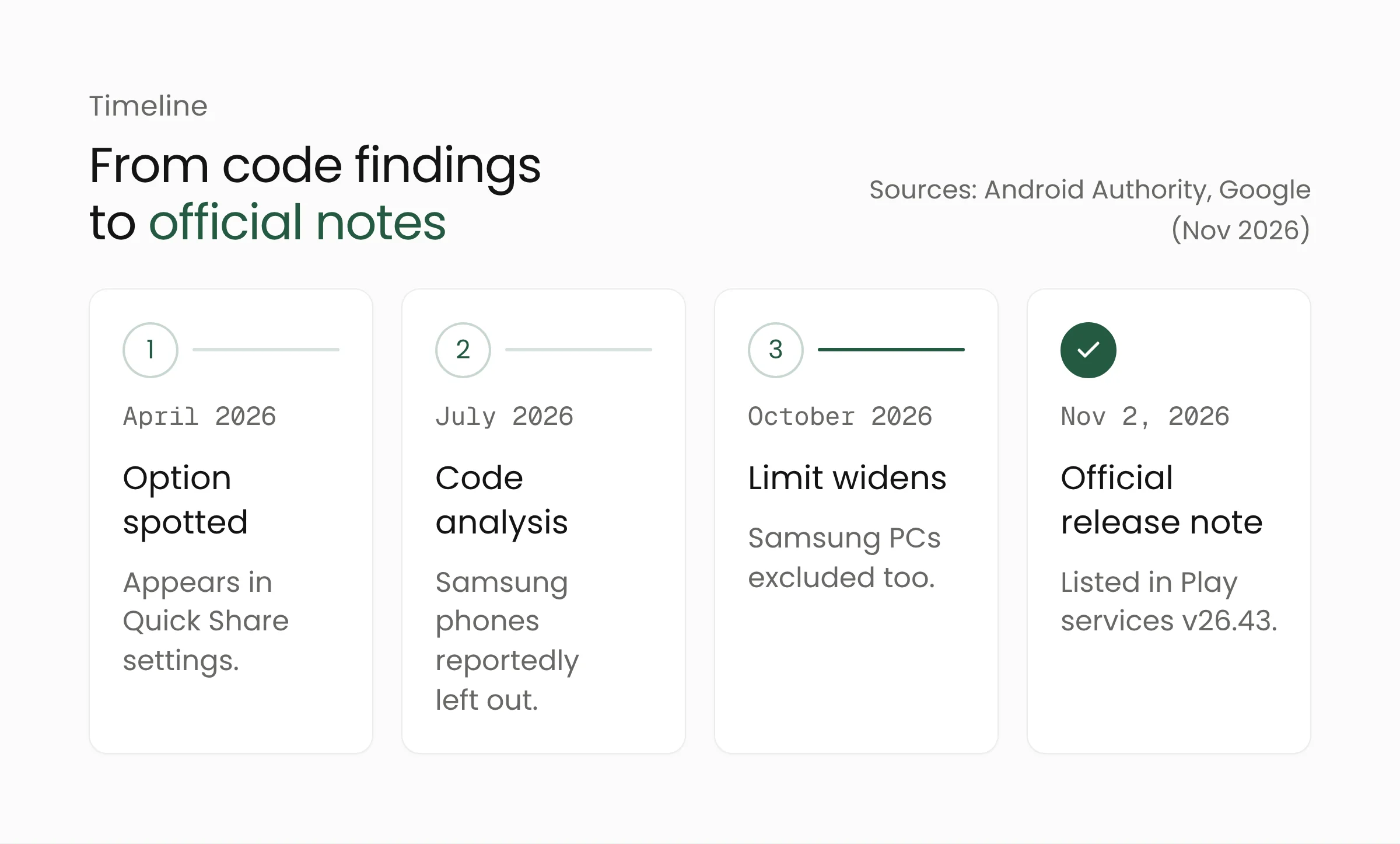
Official information about the feature is still very thin. In Google’s system release notes, the Google Play services v26.43 entry lists a single line under Device Connectivity, tagged for both phones and PCs: “Automatic backing up photos/videos from an Android to Windows using Quick Share feature.”
Google Play services is a system component that Google updates through the Play Store, separately from the Android version updates shipped by phone makers. That lets new features reach phones from many brands without waiting for a new Android release. It also means the rollout is gradual. Android Police noted that Google has not explained how the feature works, and Talk Android pointed out that Play services changes can take weeks or months to reach every phone. Google has not announced a rollout schedule.
Quick Share itself is the file-sharing feature created when Google’s Nearby Share and Samsung’s Quick Share were merged. The two companies announced the combination at CES in January 2024, according to Droid Life. Until now, Quick Share on Windows has been used to send files one batch at a time. Automatic backup turns it into a recurring copy job.
How automatic Quick Share backup works
Most technical details come from code analysis by technology publications, so they may change in the final version. Android Authority reported that setup starts in the Quick Share app for Windows, with the phone kept nearby and both devices signed in to the same Google account. An earlier report from April 2026 said the feature targets devices on the same home network.
According to How-To Geek, photos and videos are copied locally without passing through Google’s cloud servers, so the backups do not use Google account storage and require no subscription. The same outlet reported that deleting a photo on the phone does not remove the copy on the computer.
Talk Android, citing code from earlier versions, described separate toggles for photos, videos, and audio files, plus a button to start a backup immediately. detikINET, citing TechSpot, reported that backups run automatically every day once set up. None of these details has been confirmed in Google’s official documentation.
Device requirements
Google has not published separate requirements for automatic backup. The confirmed baseline is the set of requirements for Quick Share for Windows on Google’s help page:
- A PC running a 64-bit version of Windows 10 or later. ARM-based PCs need Windows 11.
- A phone running Android 6.0 or later.
- Bluetooth and Wi-Fi (or Ethernet on the PC) turned on, with both devices on the same network.
- The two devices within about 5 meters (16 feet) of each other.
- The Quick Share app for Windows signed in with a Google account to access all options.
Samsung support remains unclear
Android Authority noted that a July 2026 code analysis suggested Samsung phones would be excluded, and an October 2026 analysis showed the restriction extending to Samsung PCs. Google’s release notes do not mention any such limit. Google’s help page does direct owners of Samsung PCs to Samsung’s own Quick Share app from the Microsoft Store. Samsung owners should wait for official confirmation.
Local backup versus cloud backup
The feature arrives a few months after Google closed one of the routes for backing up photos from a computer. According to Business Today, the Google Drive desktop app stopped supporting photo and video backups to Google Photos on August 10, 2026, on both Windows and Mac. Photos already backed up remain in place, and regular file syncing through Drive continues.
Meanwhile, Google One states that each Google account includes up to 15 GB of storage shared across Gmail, Google Drive, and Google Photos. For people who shoot a lot of photos and video, that allowance runs out quickly. A local backup to a PC offers an alternative with no monthly fee.
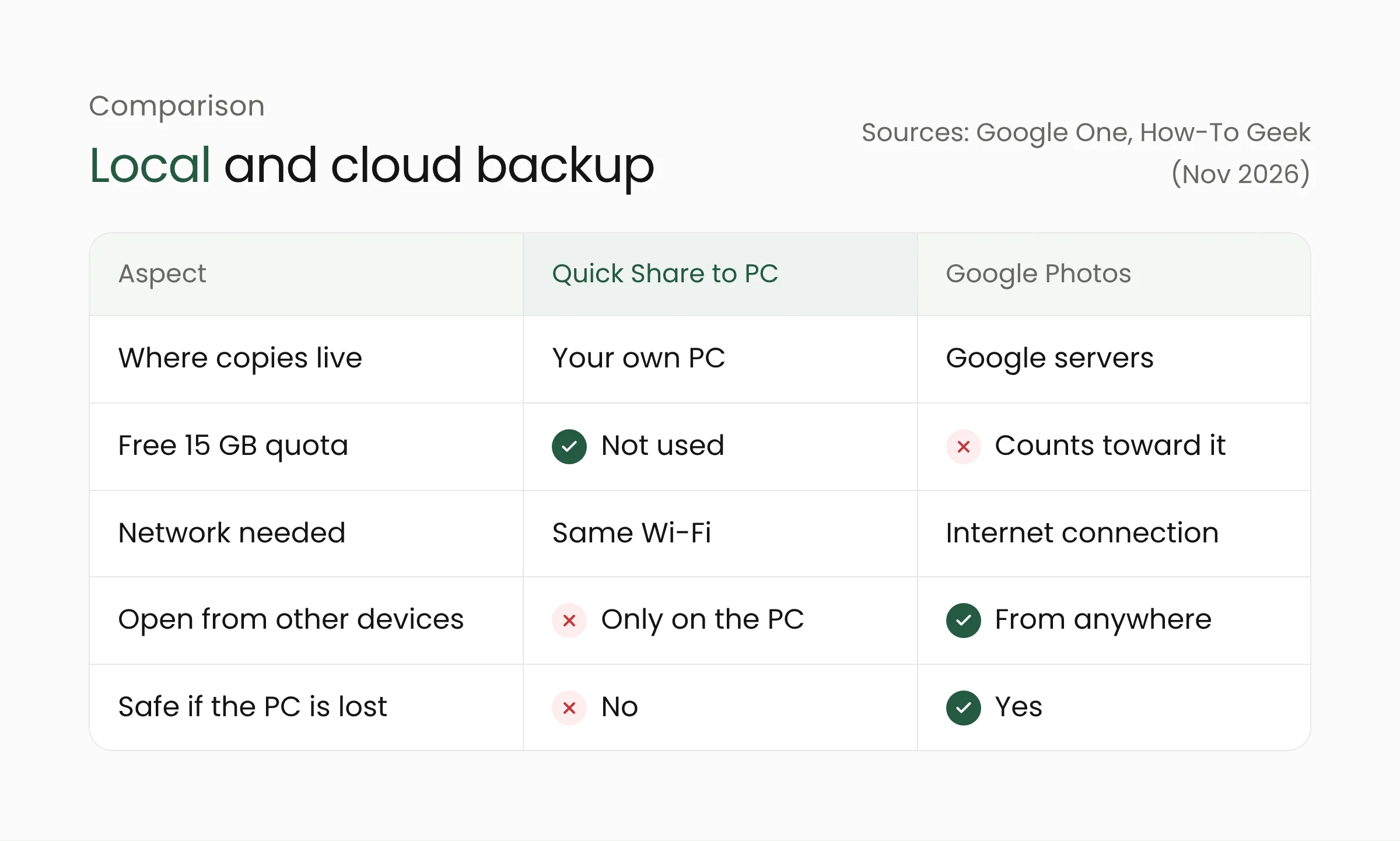
Each approach has its strengths. A cloud backup can be opened from any device and survives a flooded home or a lost laptop. A local backup costs less and stays under the owner’s control, but it disappears if the PC fails or is stolen. IT practitioners commonly follow the 3-2-1 rule: three copies of data, on two types of media, with one copy kept somewhere else. Quick Share can supply the second copy on a PC, while the off-site copy still needs to be arranged separately.
What this means for you
For everyday users, the feature automates a habit that is easy to forget. A few steps are worth taking while waiting for it to appear:
- Keep devices updated. Install the latest Google Play system update on the phone and the latest Quick Share app for Windows. The backup option may not appear right away because the rollout is staged.
- Make room on the PC. Long videos take up a lot of space. Consider a separate drive or an external drive as the destination folder.
- Protect the destination PC. Personal photos will now live on the computer. Set a Windows account password and turn on disk encryption where available.
- Keep a third copy. Store important photos in a cloud service or on a drive kept in another location.
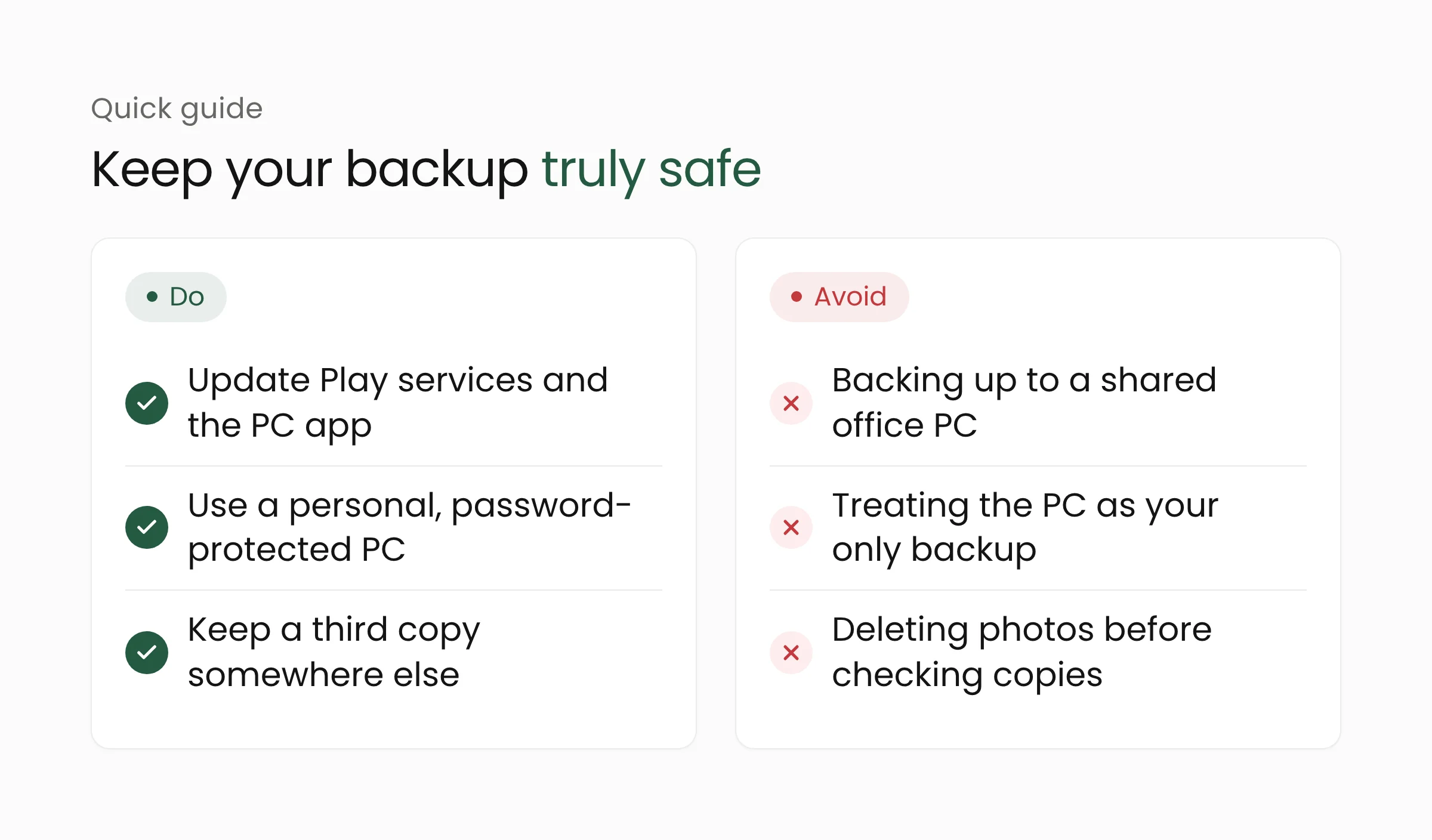
Organizations should pay attention too. In shops, small offices, and clinics, a single computer is often shared by several people. If an employee sets up automatic backup from a personal phone to an office PC, family photos, chat screenshots, and even photos of customer documents could end up on a machine that others can open. IT teams should set a simple rule: shared PCs are not used as destinations for personal backups, and work data belongs in storage the organization manages.
For larger needs, such as field photo archives, project documentation, or customer files, organizations usually need centralized storage with access controls and scheduled backups. Merakit’s cloud computing services team can help design a backup scheme that combines local and cloud copies. An internal app that uploads field photos straight into company systems can also be built through mobile app development, keeping work data out of personal photo galleries.
Frequently asked questions
Does automatic Quick Share backup cost anything?
Reports from technology outlets say the feature needs no subscription or storage plan, since copies are kept on the user’s own PC. Google has not announced any fee for it.
Are photos on the PC deleted when I delete them on my phone?
According to How-To Geek and Talk Android, deleting a photo on the phone does not remove its copy on the PC. This detail comes from code findings and is not yet in Google’s official documentation.
When will the feature reach my phone?
Not announced. The feature ships through Google Play services v26.43, which rolls out gradually, and earlier reports suggested Pixel phones may get it first. Keep Google Play system updates and the Quick Share app for Windows up to date.
Conclusion
Automatic Quick Share backup gives Android users a simple way to keep copies of photos and videos on their own computer without using cloud storage. It works best as one layer of backup, with another copy kept in a different place. If your organization wants to bring more order to how work data is stored and backed up, the Merakit team is happy to talk. Readers interested in other Google features for Android can also read our explainer on Pixel Tag and the Find Hub network.
Sources
- Google System Release Notes: Google Play services v26.43, Google, November 2, 2026
- Quick Share for Windows: device requirements, Google, accessed November 12, 2026
- Google confirms Quick Share feature that could make Android-to-PC backups…, Android Authority, November 2, 2026
- Google is turning Quick Share into the Android backup tool Windows users need, Android Police, November 3, 2026
- Quick Share will soon back up your Android photos to a Windows PC for free, How-To Geek, November 3, 2026
- Google Is Rolling Out Automatic Photo Backups From Android to Windows PCs, Talk Android, November 9, 2026
- HP Android Bisa Backup Otomatis ke PC Windows: Pakai Quick Share, detikINET, November 11, 2026
- Google Drive ends Google Photos backup today, Business Today, August 10, 2026
- How storage works in your Google Account, Google One, accessed November 12, 2026
- Google and Samsung announce Quick Share as Android’s file sharing service, Droid Life, January 9, 2024