Blog Cybersecurity
Metabase Flaw CVE-2026-72898 Still Exploited, Update Now
On this page· 7 sections
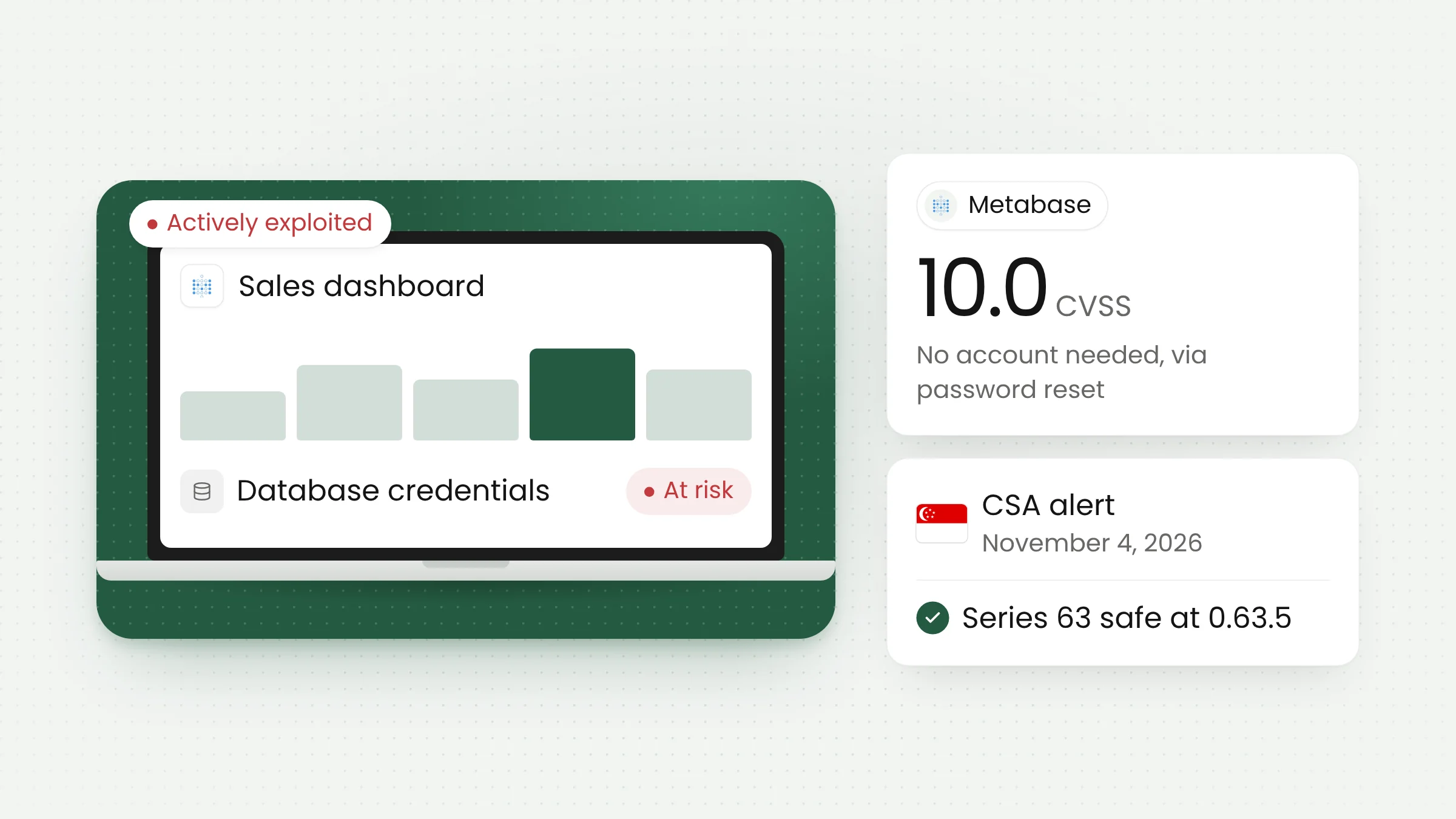
The Metabase vulnerability CVE-2026-72898 lets an attacker with no account inject SQL commands and take over administrator access to the dashboard tool. On November 4, 2026, Singapore’s Cyber Security Agency (CSA) warned that the flaw, rated CVSS 10.0, is still being exploited and that proof-of-concept code is public. Self-hosted Metabase servers need updating now.
How CVE-2026-72898 works
Metabase is an open-source business intelligence application used to build dashboards, charts, and reports on top of many kinds of databases. Plenty of teams host it themselves, on office servers or in the cloud, because it is free and connects easily to a data warehouse. To show sales, inventory, or service figures, Metabase stores the credentials for every database it connects to.
According to Metabase’s official advisory, the bug sits in the password reset API path, /api/session/reset_password. An attacker on the internet can push SQL into Metabase’s internal application database without signing in first. This technique is called SQL injection: database commands are smuggled into a field that should only carry ordinary data.
An advisory from Singapore’s Infocomm Media Development Authority (IMDA) explains the root cause. After a failed authentication, Metabase’s code kept the attacker-supplied user-id value. HoneySQL, the library Metabase uses to build queries, then read a :raw keyword inside that value as an instruction to insert SQL as written.
The consequences are serious. Metabase says an attacker can gain administrator access, change the application’s configuration, steal stored database credentials, read any data reachable through those connections, and export it. A single sales dashboard can become a way into the transaction database behind it.
Exploitation status and the latest warning
Metabase disclosed the flaw on August 6, 2026, in a post on its blog. The company said Metabase Cloud had been attacked through a previously unknown (zero-day) vulnerability in versions 1.58 and above. Metabase blocked the endpoints used in the attack and patched the service. Cloud customers are already updated, while self-hosted instances stay vulnerable until their operators install a fixed release.
Five days later, on August 11, 2026, CISA added CVE-2026-72898 to its Known Exploited Vulnerabilities (KEV) catalog, the list of flaws confirmed to be used in real attacks.
Attacks spread once scanning tools became public. IMDA’s advisory, citing CrowdStrike, says a Nuclei scanner template for the flaw was published on August 12, 2026. Less than an hour later, a hacking group used it against Metabase instances run by a telecommunications operator and an insurer in Asia.
In one of those cases, the attackers gained superuser rights on the PostgreSQL database behind Metabase. They then abused PostgreSQL’s COPY ... PROGRAM feature, tracked as CVE-2019-9193, to run a script on the server’s operating system. PostgreSQL’s maintainers treat that feature as intended behavior for highly privileged accounts, so the defense lies in limiting account privileges.
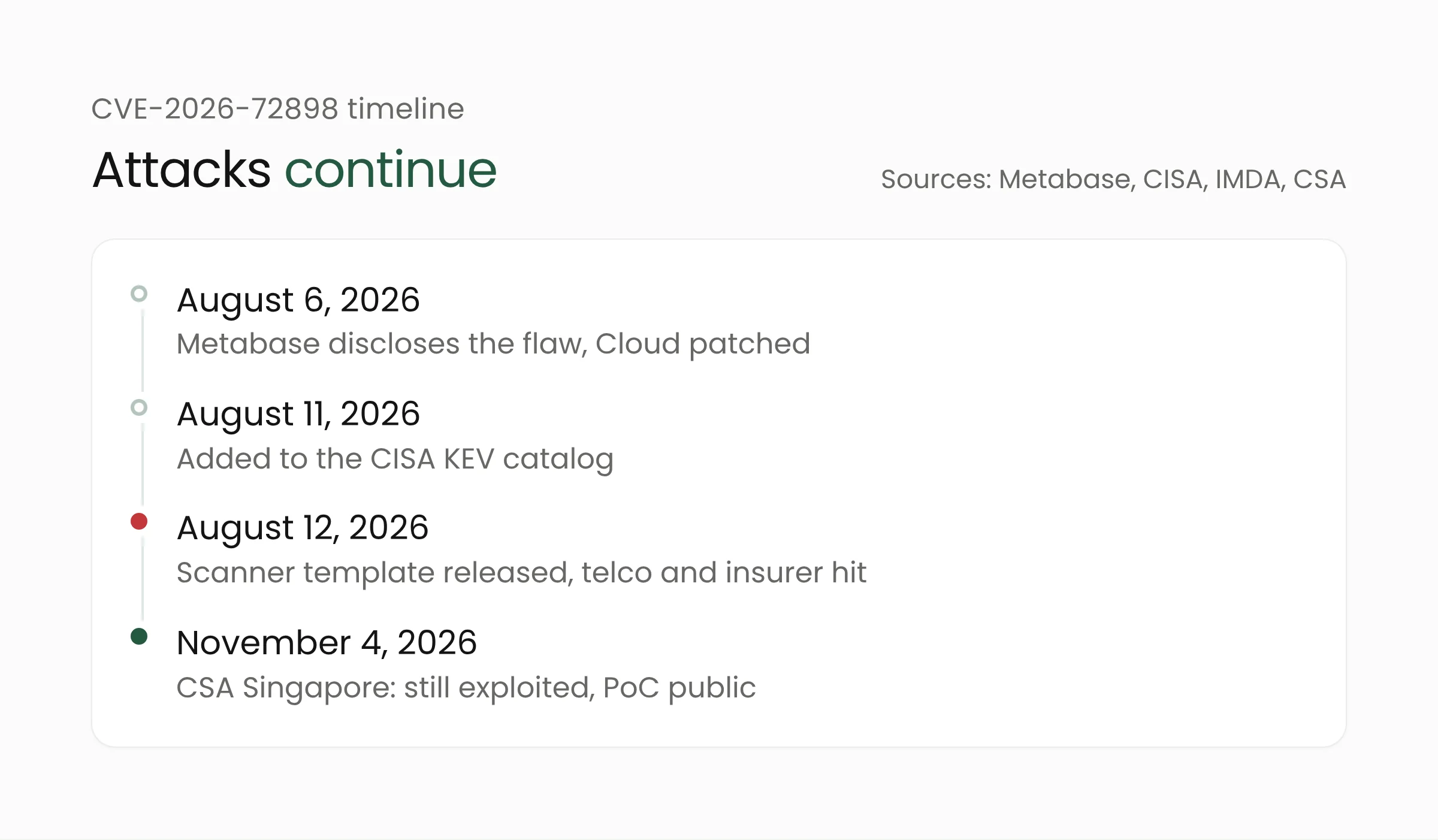
Three months after the patch, the threat has not faded. In alert AL-2026-158, dated November 4, 2026, Singapore’s CSA said the vulnerability has been actively exploited and that a proof-of-concept exploit is publicly available. Under those conditions, automated scanning for unpatched servers usually continues.
Affected and fixed versions
The flaw only affects Metabase series 58 through 63. Metabase says versions below 58 are not vulnerable. For the open-source edition (starting with 0) and the paid edition (starting with 1), the minimum safe release for each series is:
- series 58: 0.58.24 or 1.58.24;
- series 59: 0.59.21 or 1.59.21;
- series 60: 0.60.17 or 1.60.17;
- series 61: 0.61.11 or 1.61.11;
- series 62: 0.62.9 or 1.62.9;
- series 63: 0.63.5 or 1.63.5.
Metabase advises operators to install the latest point release of the series they run. For example, a server on 0.58.6 should move to 0.58.24 or later. Docker users can pull the official image with a safe tag, such as metabase/metabase:v0.63.5.
The running version appears under the gear or grid icon in the upper right corner, via “About Metabase” or “Help > About Metabase”, depending on the release.
If the update cannot go in today, Metabase and CSA recommend temporarily blocking /api/session/reset_password at the reverse proxy, load balancer, or web application firewall. This only buys time, so the upgrade should still be scheduled as soon as possible.
What this means for data teams and Metabase operators
Dashboard tools like Metabase are used by many kinds of organizations in Indonesia, from online stores, financial institutions, and logistics companies to hospital IT units and local government offices. These dashboards are often exposed to the internet so staff can reach them outside the office or embed them in other applications. If the password reset path is publicly reachable, the instance is a target for automated scanning.
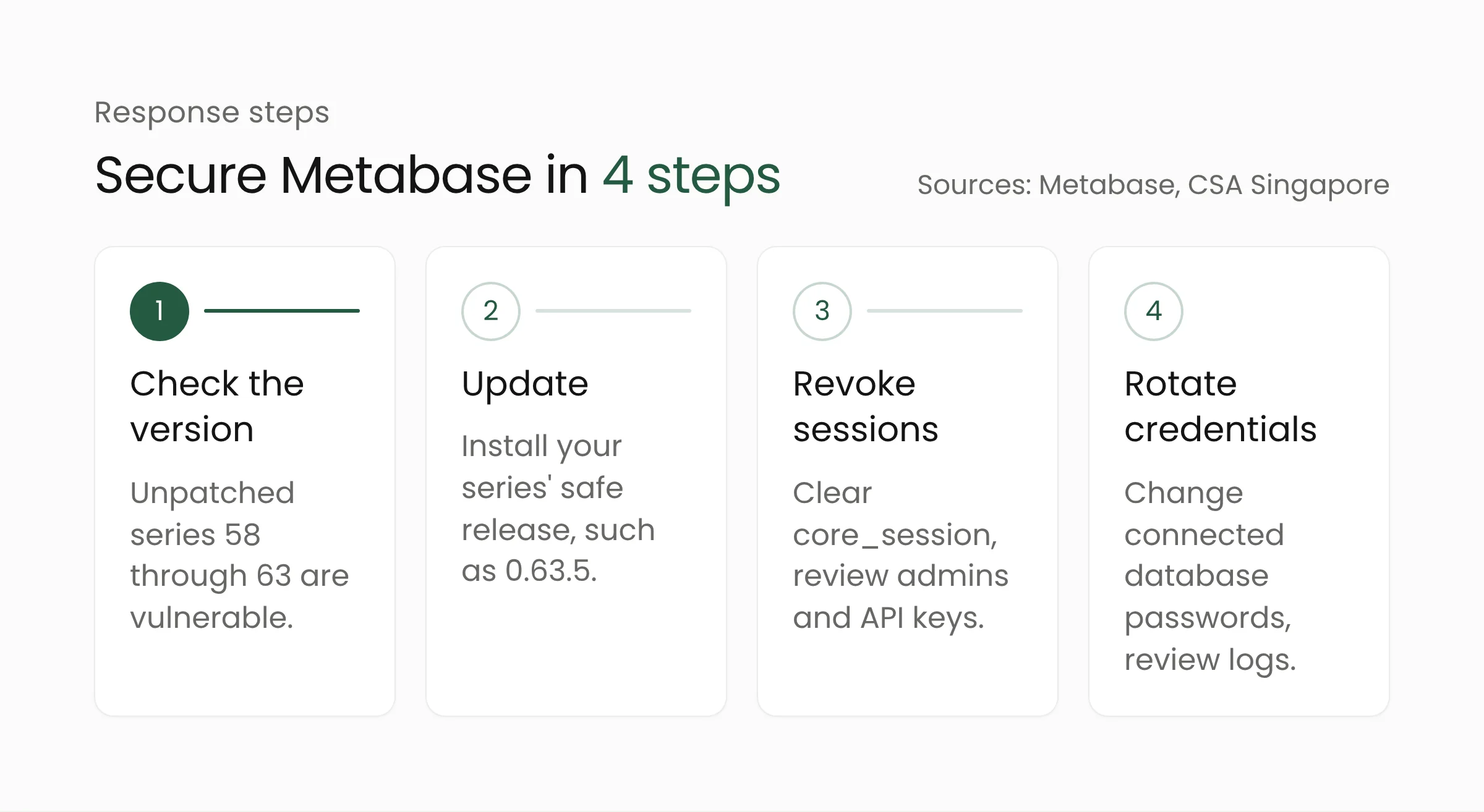
Updating alone is not enough if the server was exposed. Metabase asks operators whose password reset path was publicly accessible to take several steps after upgrading:
- Revoke all user sessions by deleting every row in the
core_sessiontable of the Metabase application database. - Review API keys and delete any you do not recognize.
- Check administrator accounts for unexpected changes.
- Rotate credentials for every database connected to Metabase.
- Review data warehouse logs and Metabase activity and query history for unauthorized access.
Metabase has also shared an attack pattern to search for in application or ingress logs: a POST /api/session/reset_password request returning status 400, followed by a GET /api/user/current request returning 200. Metabase says that if this pattern appears, the instance has likely been compromised. In that case, treat all connected data as possibly leaked and bring in a cybersecurity services team to investigate.
The PostgreSQL case above holds a further lesson for anyone designing data systems. IMDA recommends that the PostgreSQL account used by Metabase run with least privilege, without the superuser or pg_execute_server_program roles. The same principle applies to warehouse connections: the account behind a dashboard only needs read access to the tables or schemas it actually uses.
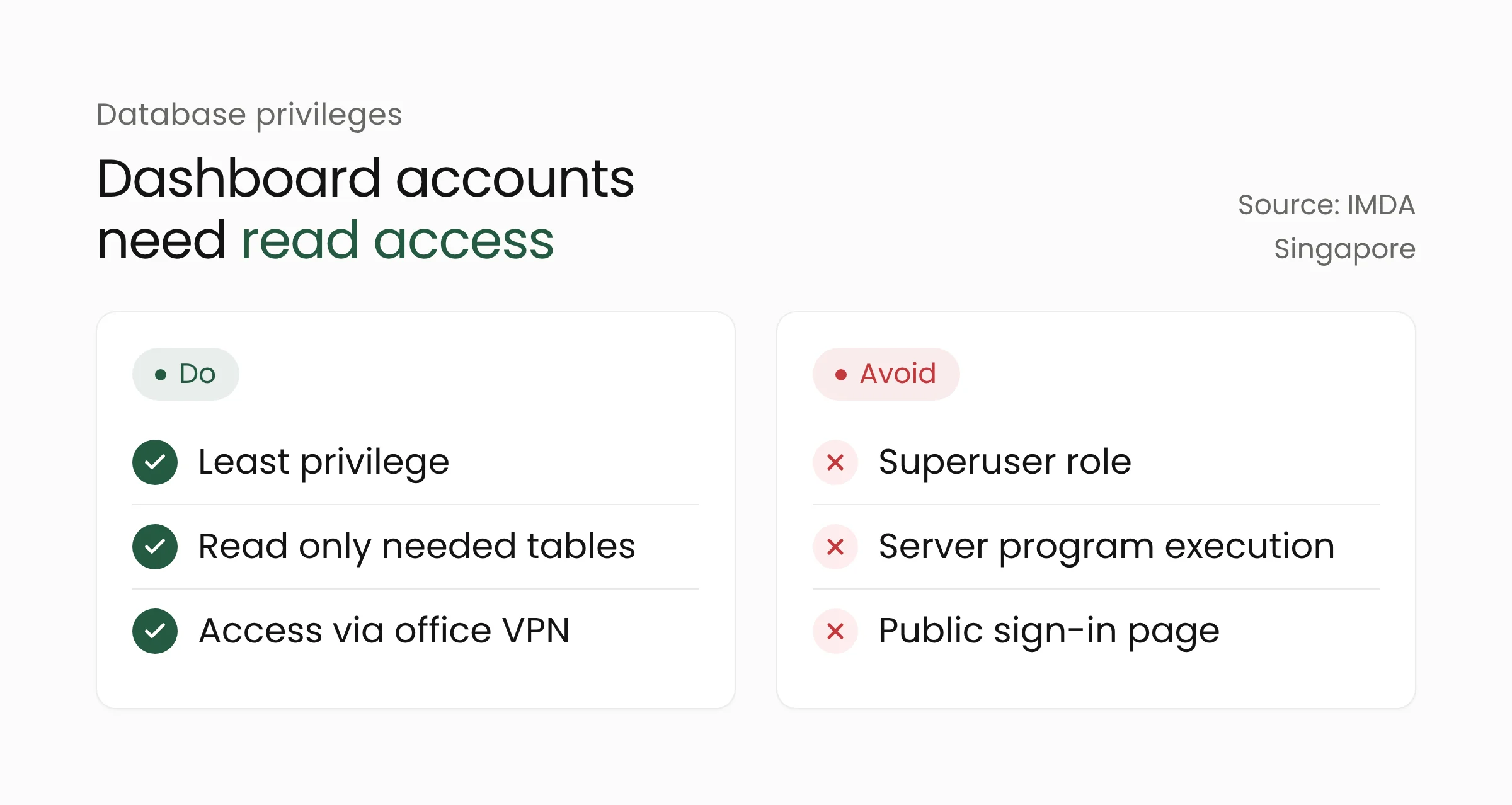
When designing a data analytics platform, narrow privileges like these limit the damage when one application at the top of the stack is breached. Restrict network access to Metabase as well, for example through the office VPN or single sign-on, so the sign-in page and API paths are not directly exposed to the internet. Organizations that hold customers’ or patients’ personal data should also prepare incident notification procedures under Indonesia’s Undang-Undang Pelindungan Data Pribadi (Personal Data Protection Law) in case an investigation finds a breach.
For teams that have dealt with similar flaws in automation tools, the pattern resembles the exploited Node-RED flaw earlier this month: internal applications exposed to the internet without an extra authentication layer are the first targets of mass scanning.
Frequently asked questions
Is Metabase Cloud affected?
Metabase Cloud was attacked as a zero-day, but Metabase says every Cloud instance has been updated and patched. The main risk now lies with self-hosted Metabase, whether it runs on office servers or in an organization’s own cloud account.
How do I check which Metabase version I run?
Open the gear or grid icon in the upper right corner and choose “About Metabase” or “Help > About Metabase”. Compare the version number with the list of safe releases for each series. Versions below 58 are not affected by this flaw.
Is blocking the password reset path enough?
Blocking /api/session/reset_password is only a temporary measure that Metabase and CSA recommend when the update cannot be installed yet. The lasting fix is upgrading to a safe release, along with reviewing sessions, admin accounts, API keys, and database credentials if the path was exposed.
Closing
CVE-2026-72898 is a reminder that dashboard tools hold the keys to an organization’s most valuable data. Check your Metabase version today, install the safe release for your series, and review the privileges of the database accounts it uses. If your team needs help redesigning its dashboard and data warehouse setup to make it safer, the Merakit team is ready to talk.
Sources
- Metabase: Security update available for Metabase, Please upgrade now (August 6, 2026)
- Metabase: GitHub Security Advisory GHSA-vwf4-m7j8-wcjf (August 6, 2026)
- CISA: Known Exploited Vulnerabilities Catalog, CVE-2026-72898 entry (added August 11, 2026)
- IMDA: VAULT PANDA Exploits Metabase Vulnerability to Compromise a Telco Operator (original report August 18, 2026)
- CSA Singapore: Active Exploitation of Metabase Vulnerability (AL-2026-158) (November 4, 2026)