Blog Data Privacy
Signal Blocks AI Agents From Reading Chats on iOS, Android
On this page· 7 sections
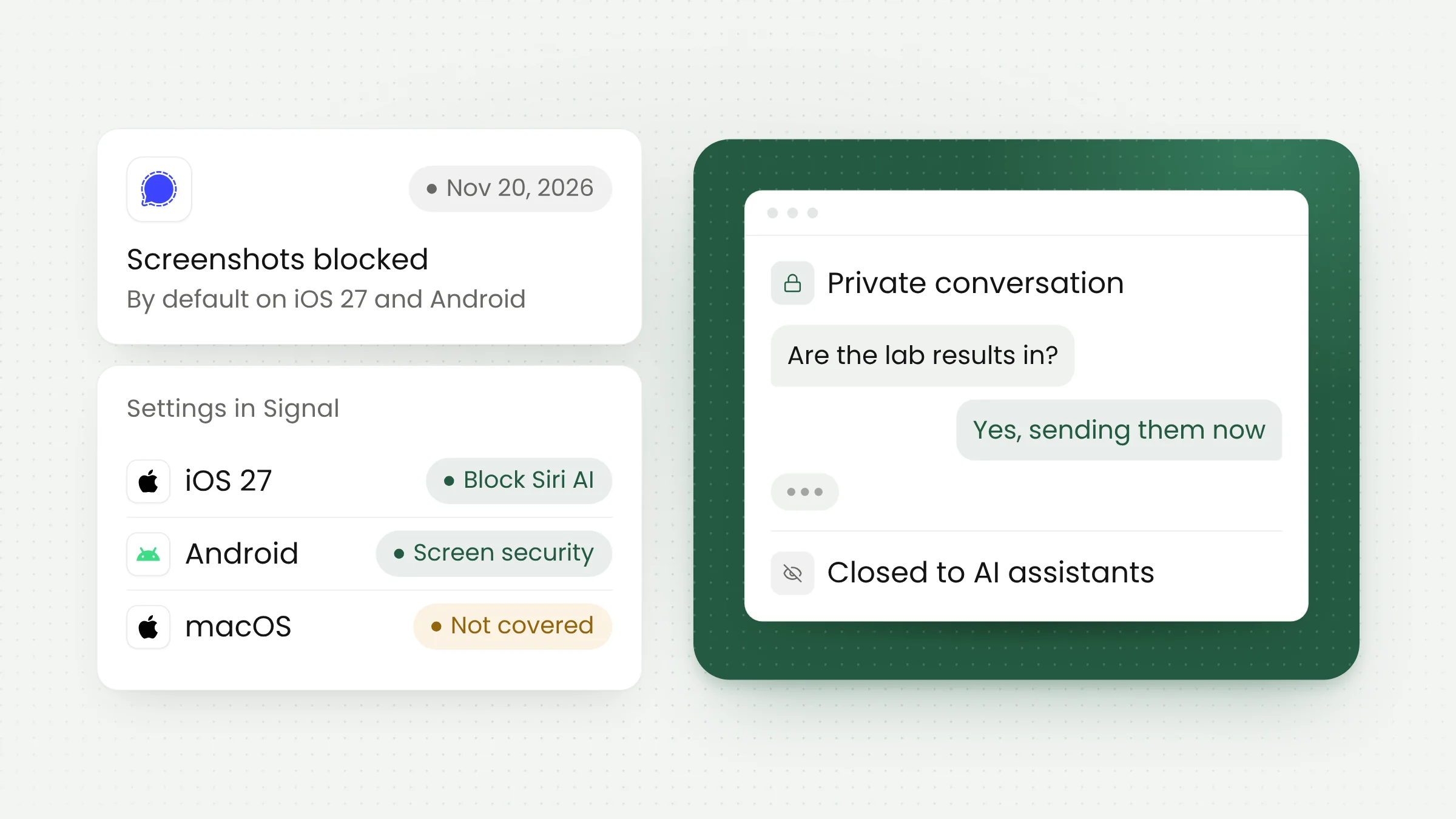
Signal is blocking the AI agents built into phone operating systems from reading its users’ messages. In a November 20, 2026 announcement, the encrypted messaging app said it now prevents screenshots by default on iOS 27, and on Android whenever it detects an AI assistant reading the screen. Signal says the protection is incomplete and does not reach macOS.
New protections on iOS 27 and Android
The announcement was written by Meredith Whittaker, president of the Signal Foundation, on Signal’s official blog. It names two agentic features: Onscreen Awareness in Apple’s Siri AI and Gemini Intelligence in Google Gemini.
Both features let an assistant understand what is currently on the display, then answer questions or carry out tasks for the user. According to Signal, these agents obtain that information by scanning the screen. When a Signal conversation is open, its contents are captured too, and they can be stored locally or on a remote server the agent uses.
The Block Siri AI setting on iPhone
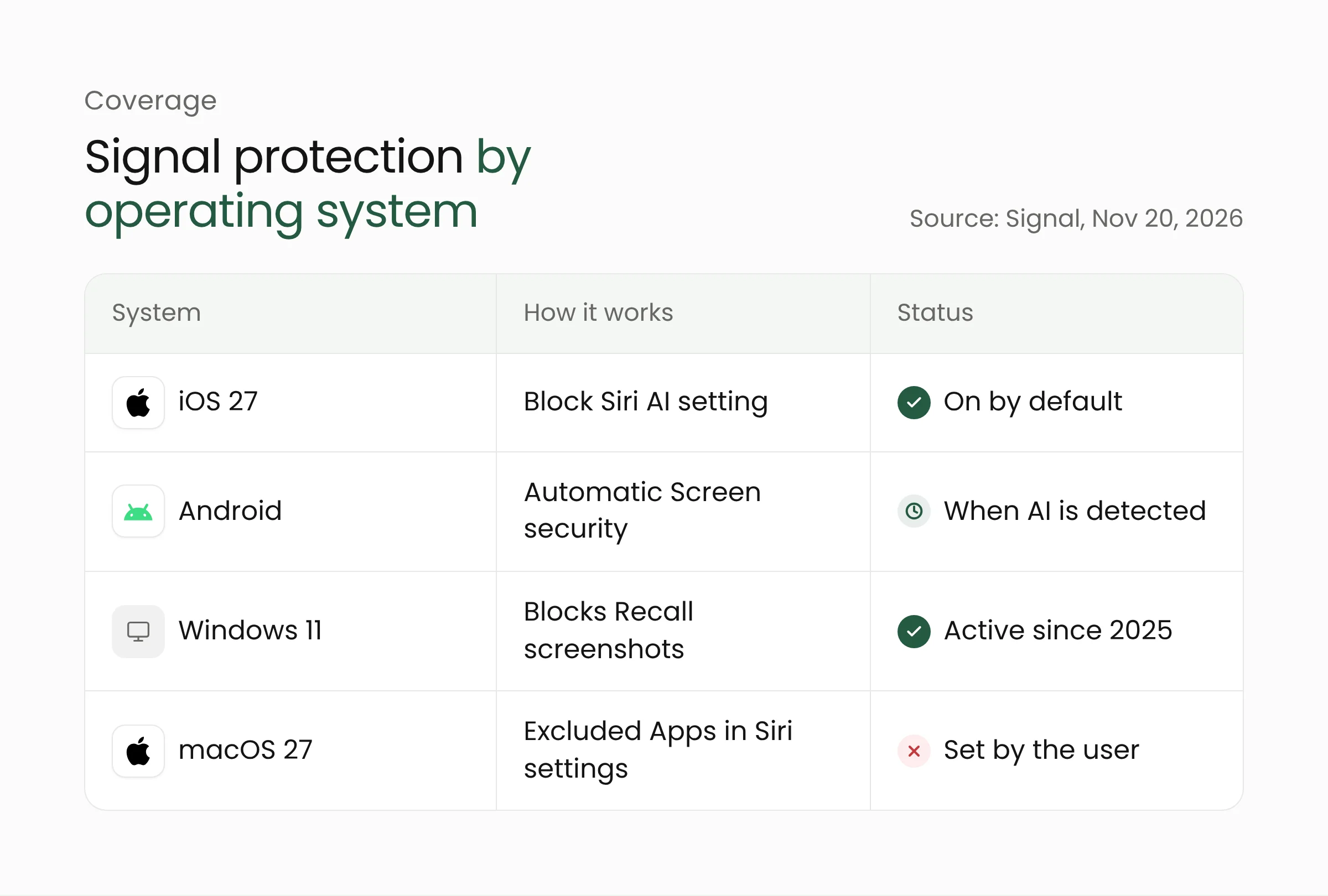
On iOS 27, Signal prevents screenshots inside the app. The Hacker News reports that the setting is called Block Siri AI and sits under Settings > Privacy > App Security in Signal. It is on by default.
Notebookcheck adds a few details. The setting requires Signal 8.37 or later, also blocks screen recordings, and can be turned off for ten minutes or disabled entirely.
Screen security on Android
Signal explains that Android ships in many vendor versions beyond the one Google provides for Pixel devices, and for many vendors the app has no reliable way to tell when a screenshot was attempted.
Signal chose to detect when an AI assistant tries to access the screen. When that access is detected, the Screen security setting in Signal for Android turns on automatically. Notebookcheck says the feature runs on Signal 8.35.1 or later.
How AI assistants read app content
End-to-end encryption protects a message while it travels from one device to another. Once the message is decrypted and displayed, that protection has done its job. Anything that can see the screen, including an assistant that belongs to the operating system, can read the text. Android Authority notes that the same concern applies to banking, healthcare, and workplace apps.
Signal has dealt with a similar problem on desktop. In May 2025 it began blocking screenshots on Windows 11 by default in response to Recall, the Microsoft feature that captures the screen every few seconds, extracts the text, and stores it in a searchable on-device database. Signal says that could retain even disappearing messages indefinitely.
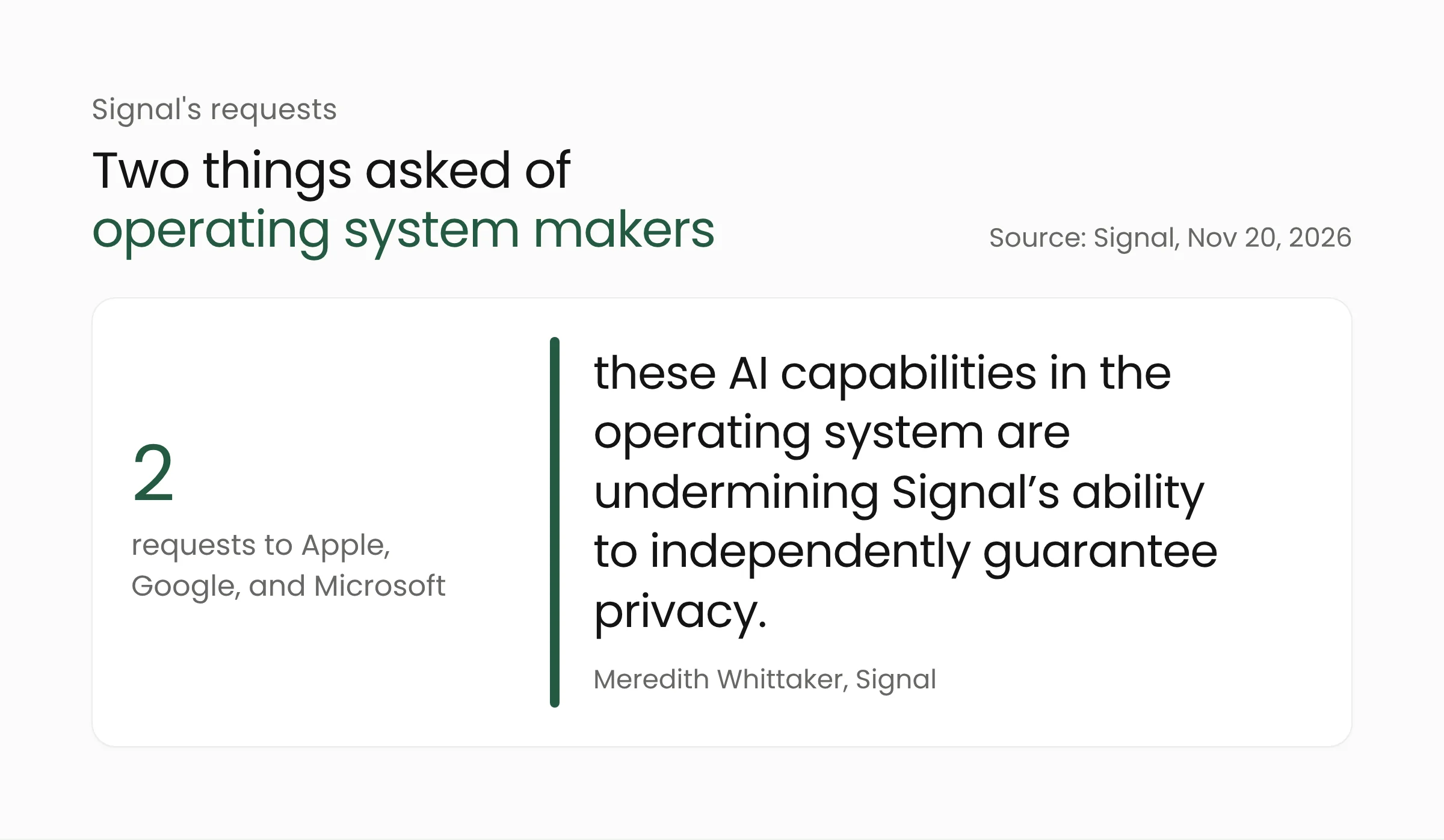
Whittaker argues that building agents into the operating system changes the environment every app runs in. She writes, “these AI capabilities in the operating system are undermining Signal’s ability to independently guarantee privacy.” The guarantee, long backed by open source code and a verified encryption protocol, now also depends on how the platform underneath behaves.
The Reuters report on the Muse agent
Two days before Signal’s announcement, Reuters published an investigation into Muse, the AI agent made by Meta. According to The Next Web, Reuters reviewed more than two dozen internal posts by Meta employees and repeated the Signal access with help from Signal staff and the AI Now Institute.
In the reported tests, Muse read Signal messages on an Android phone through its permission to read notifications. On a Mac, the agent used accessibility and screenshot tools. The same requests failed on an iPhone.
A Meta spokesperson described the examples as isolated incidents and said Muse reaches other apps only through permissions that users grant. The Next Web also reports that Apple shipped an update that week which closed the Mac access route and added a new set of permissions for agents.
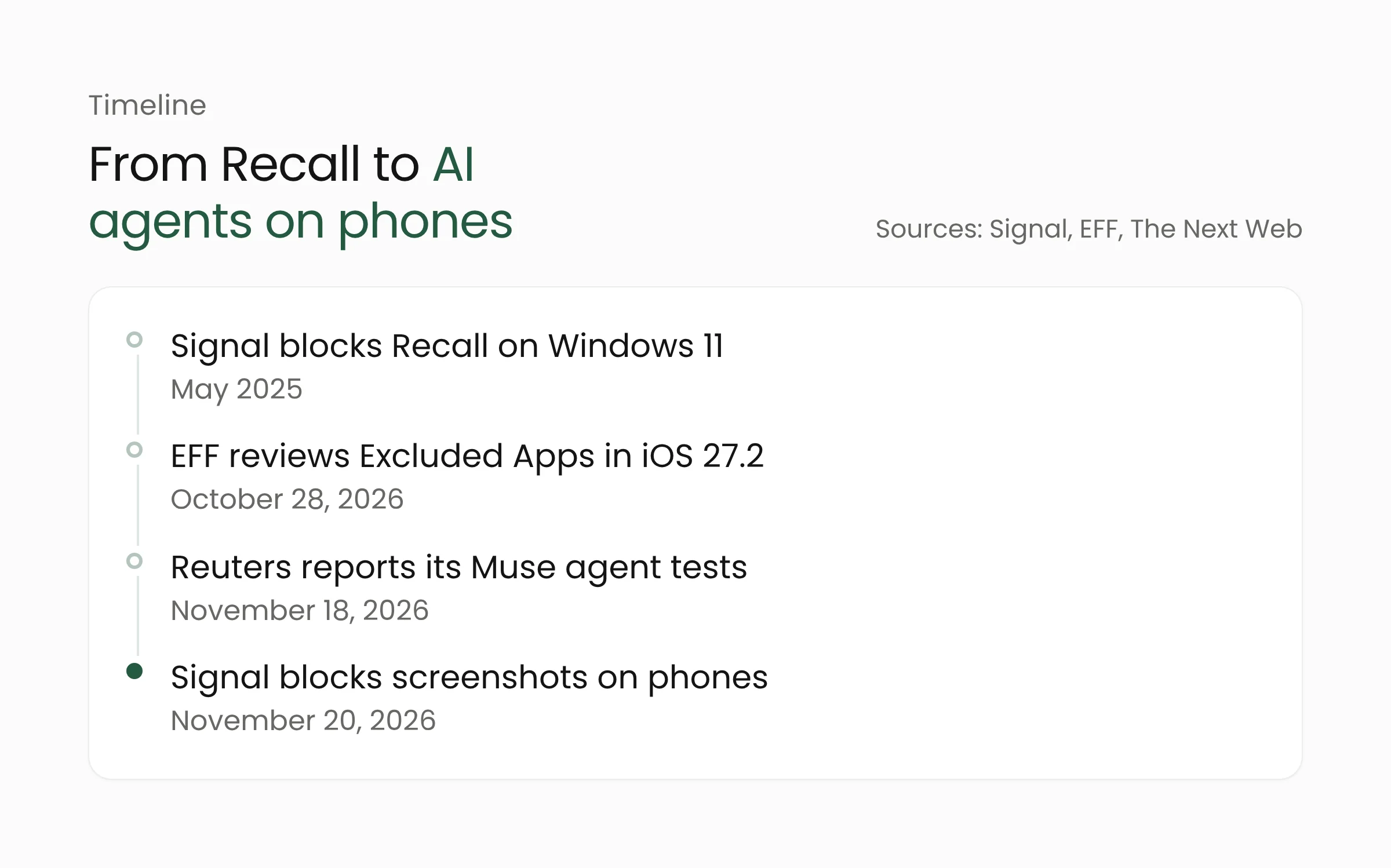
Signal refers to the case in its post, saying third-party agents such as Muse rely on deep permissions granted during setup, including accessibility settings.
Gaps that Signal acknowledges
Blocking screenshots, Signal concedes, does nothing about other routes, such as an agent retrieving content that already sits on the device through the filesystem.
The second gap is macOS. Signal says it cannot reliably block screenshots there because clearly documented APIs for the job are missing. For macOS 27 users, Signal has a single recommendation: add Signal to the Excluded Apps section in System Settings > Siri.
Apple’s update notes for iOS 27.2 say Excluded Apps lets users choose which apps Siri, Search, and suggestions can access. The Electronic Frontier Foundation, the digital rights group that pushed for the change, reviewed it on October 28, 2026.
Controls on Android are less granular, according to the EFF. Users can revoke app access through Connected Apps in Gemini’s settings, but there is no per-app control over screen context. Gemini can also read notifications through Device Assistance and use screen context unless the “Use screen and app data” option is switched off.
Two requests to operating system makers
Signal asks Apple, Google, and Microsoft for two things. First, developers should have an easy, well-documented way to opt their apps out of AI data access and processing. That opt-out should cover screen reading, filesystem access, notifications, APIs, and other OS frameworks, without breaking the core function of the app.
Second, operating system companies should publish better documentation and technical specifications on how AI agents access and process data. Signal says it has spent months of developer time investigating what these systems do on Android and iOS.
Signal describes itself as cautiously optimistic, since Google and Apple are talking with it about how agents should work with privacy-sensitive apps.
What this means for app developers
The issue reaches any app that shows sensitive data, from mobile banking and telemedicine to citizen services and internal company tools. In Indonesia, Undang-Undang Nomor 27 Tahun 2022 tentang Pelindungan Data Pribadi (the Personal Data Protection Law) places responsibility for data security on the data controller.
A mobile app development team can start on the following steps without waiting for Apple and Google to change anything.
- Map the screens that show sensitive data. Account balances and statements, lab results, national ID numbers, and one-time passcodes deserve different treatment from a promotions page.
- Turn on screen protection on Android. The Android documentation describes
FLAG_SECURE, a window flag that makes screenshots come out blank and is described as useful for banking apps and password managers. Behavior can vary between vendors, so test on several phone brands. - Trim notification content. In the tests Reuters reported, messages were read through notifications. Keep amounts, names, and message text out of notifications and show them inside the app.
- Review what is stored on the device. Signal names the filesystem as a route it has not closed. Caches, downloaded files, and local databases should be encrypted and cleared on a schedule.
- Decide where you stand on AI agents. Some apps want to be usable through an assistant, as we covered in our article on Siri AI and App Intents. Make that choice feature by feature, much as US banks have restricted AI agents that access customer accounts.
Organizations whose staff discuss work in messaging apps should update their device policies as well. A cybersecurity team can decide which AI agents may be installed on company phones and laptops and which permissions they may receive.
Steps for users
Signal users only need to update the app and leave the default protection on. Before installing a third-party AI agent, read the permissions it requests.
Frequently asked questions
Has Signal’s encryption been broken?
No. Signal’s end-to-end encryption still protects messages in transit. The exposure begins after a message appears on the screen or in a notification, because an AI assistant with access to the screen can read it the same way the user does.
Can users still take screenshots in Signal?
Yes, by turning the protection off in Signal’s settings. The options are Block Siri AI on iOS and Screen security on Android. Signal warns that turning them off may expose conversations, including messages from contacts, to AI agents.
Does the protection work on every device?
No. It applies on iOS 27 and on Android devices where Signal can detect an AI assistant reading the screen. On macOS, Signal cannot block screenshots yet and recommends Excluded Apps instead.
Closing
Signal’s move shows that an app’s privacy now depends in part on the operating system and the AI agents running on top of it. Until Apple, Google, and Microsoft offer a standard opt-out, app owners have to close the routes they can and be clear with users about the rest. If your team is reviewing data protection in a mobile app, the Merakit team is ready to talk.
Sources
- Signal is Serious About Protecting Your Privacy, Signal, November 20, 2026
- Signal Blocks AI Agents From Reading Private Chats via Screenshots on Android and iOS, The Hacker News, November 21, 2026
- Signal now blocks Gemini and Siri AI from reading your messages, Android Authority, November 20, 2026
- Signal blocks screenshots to keep AI out of chats, but Macs miss out, Notebookcheck, November 21, 2026
- Meta’s Muse read Signal messages and invented purchases, Reuters reports, The Next Web, November 20, 2026
- EFF review of the Excluded Apps setting for Siri AI, Electronic Frontier Foundation, October 28, 2026
- About iOS 27 Updates, Apple Support, accessed November 22, 2026
- FLAG_SECURE documentation for sensitive activities, Android Developers, accessed November 22, 2026