Blog Gemini
Gemini Personal Intelligence Arrives on Android Auto
On this page· 7 sections
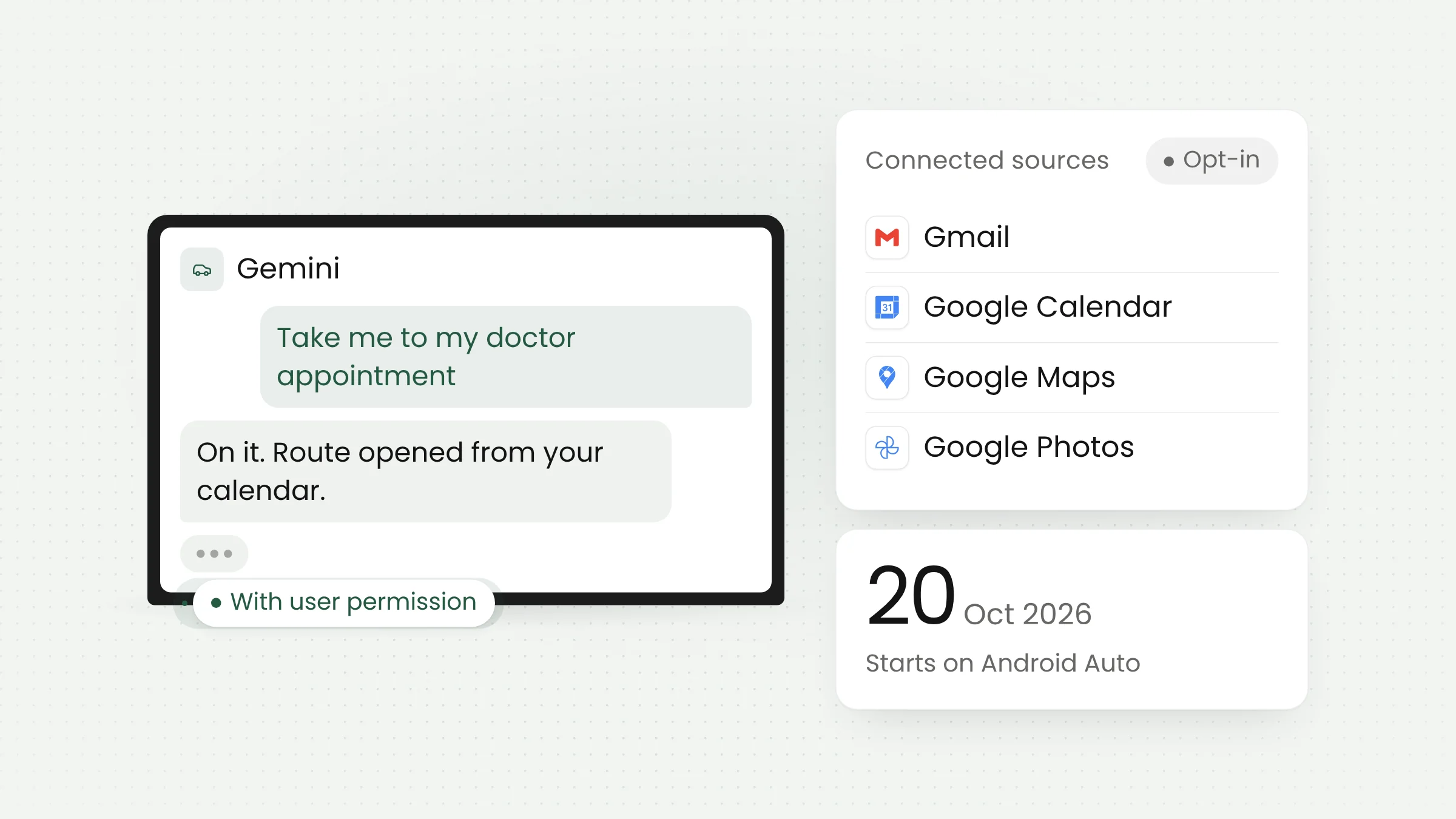
Google began rolling out Personal Intelligence for Gemini on Android Auto on October 20, 2026. With the user’s permission, the assistant can draw on Gmail, Google Calendar, Google Maps, Google Photos, YouTube, and Search to answer requests while driving. The version for cars with Google built-in follows in the coming months.
What Google announced
The news came through Google’s official blog on October 20, 2026. Karan Daryanani, Senior Product Manager for Gemini, wrote that Gemini is now available in cars globally, both through Android Auto and in cars with Google built-in. Android Auto shows phone apps on the car’s screen, while Google built-in is Google’s software running directly in the car, also known as Android Automotive.
Personal Intelligence began reaching Android Auto on the day of the announcement. For cars with Google built-in, Google says only that the feature is due in the coming months, with no firm date. According to 9to5Google, it works the way it does in the Gemini app and in AI Mode, Google’s AI-based search mode.
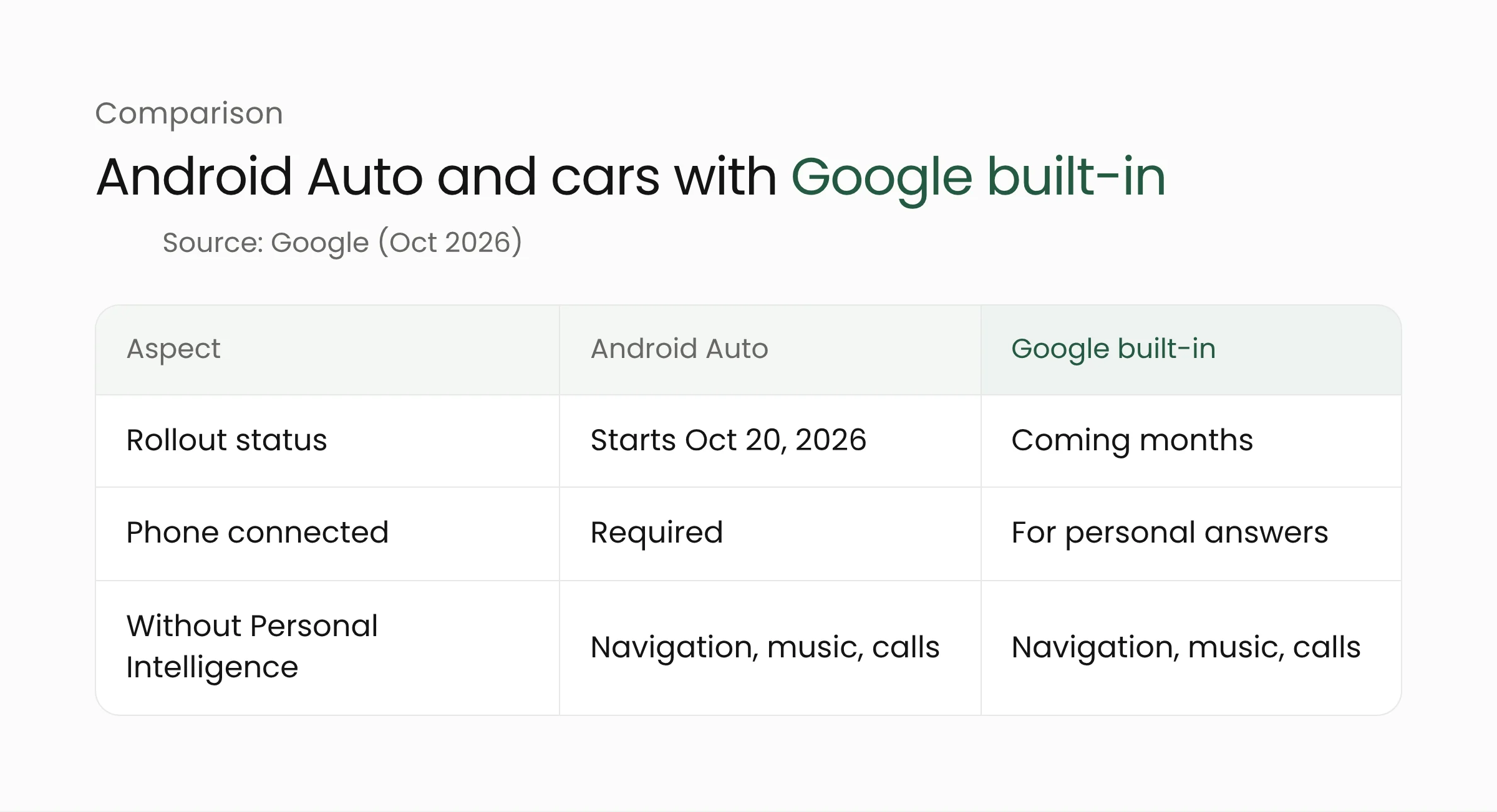
The update adds a personal layer to the assistant already in the car. Without Personal Intelligence, navigation, music, phone calls, and general questions still work, but answers are not tailored to the user. The difference lies in the data the assistant may read, while its basic abilities stay the same.
How it works and example requests
Personal Intelligence connects Gemini to Google data the user already has. The sources Google names are Workspace, including Gmail and Google Calendar, plus Google Photos, Google Maps, YouTube, and Search. Google describes two strengths: retrieving specific details from an email, a photo, or a place saved in Maps, and reasoning across several sources at once.
Google gave five example requests, which 9to5Google also lists:
- asking for a flight’s gate and whether it is on time, in a single answer;
- finding an indoor restaurant along the route that fits the user’s usual taste;
- asking to be taken to a doctor’s appointment without typing the address;
- finding a car wash from a photo taken last week and navigating there;
- heading to a coffee shop discussed the day before.
iTechPost explains that the flight details in the first example come from a confirmation in Gmail. In practice, the driver does not need to say a flight number or a clinic address, because the assistant looks them up in the email and calendar the user already has.
All of these examples come from Google’s own material and have not been tested independently. Google also does not list the languages supported for in-car Gemini or Personal Intelligence. Readers in Indonesia should treat the examples as a picture of where the product is heading. Support in Indonesian is not guaranteed.
Similar patterns are appearing on other devices. Our article on Manus Agent Mode on the OPPO Find X10 covers an assistant that carries out tasks directly on the phone. With Android Auto, the workspace moves into the car cabin, with voice as the main entry point. Drivers do not have to open each app that holds their email, photos, or calendar, because the assistant fetches the information once the user grants permission.
Permissions, privacy, and who is eligible
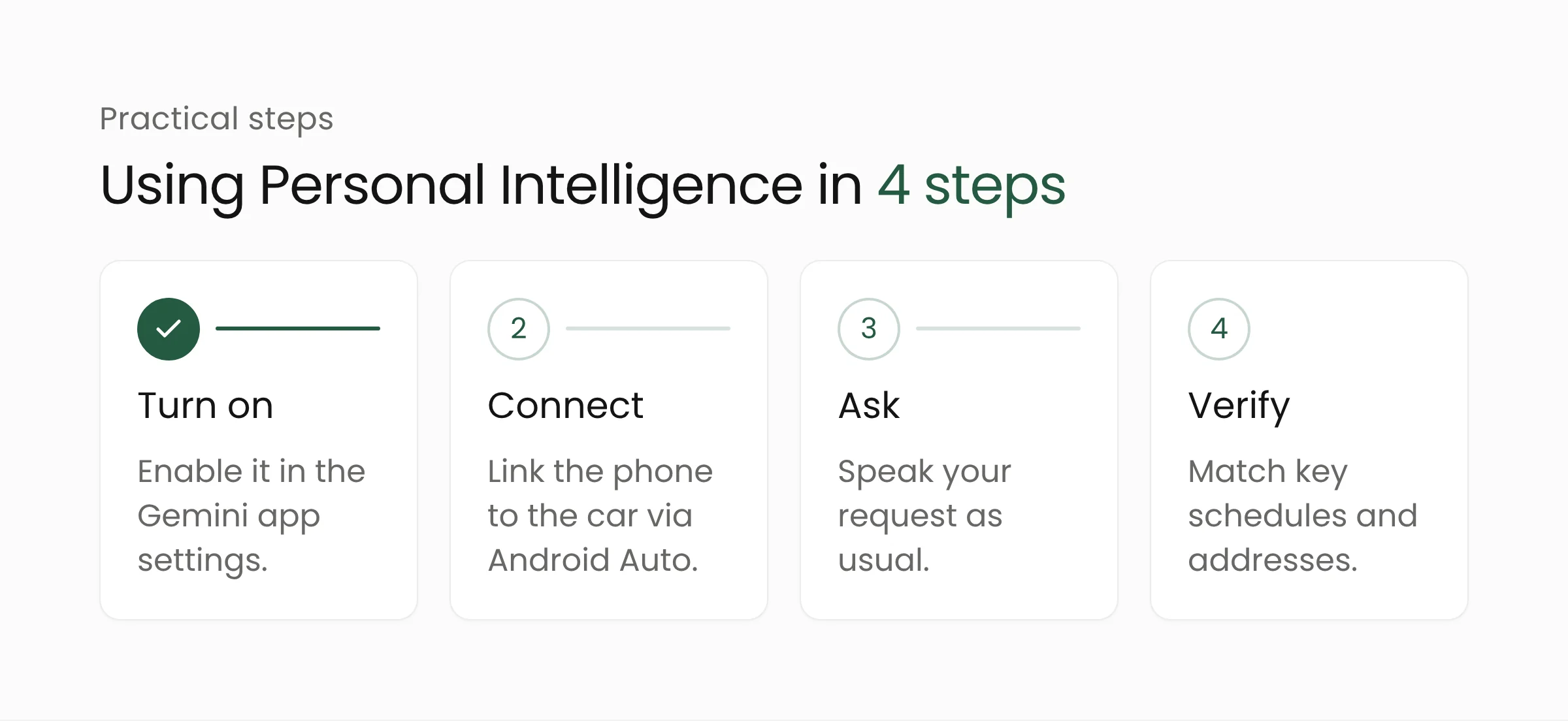
Personal Intelligence is optional. According to Google, apps are not connected until the user turns it on, and the user can turn it off at any time in Gemini settings. If the feature is already on in the Gemini app on the phone, that setting carries over to Android Auto automatically.
In cars with Google built-in, personal responses are shared only when the user is in the car with their phone connected. This keeps passengers, or the next driver of a shared car, from hearing the contents of the account owner’s email or schedule.
Account eligibility is narrow. Google says the feature is only for eligible personal Google accounts held by users aged 18 and older. Workspace business, enterprise, and education users are excluded. The excluded regions are the European Economic Area, Switzerland, the United Kingdom, and Nigeria, and the rollout is otherwise described as global.
Indonesia is not on that exclusion list. However, iTechPost notes that availability still depends on the vehicle, device, account eligibility, language, and region. The sources reviewed therefore do not confirm whether, or when, the feature will appear on Android Auto for users in Indonesia.
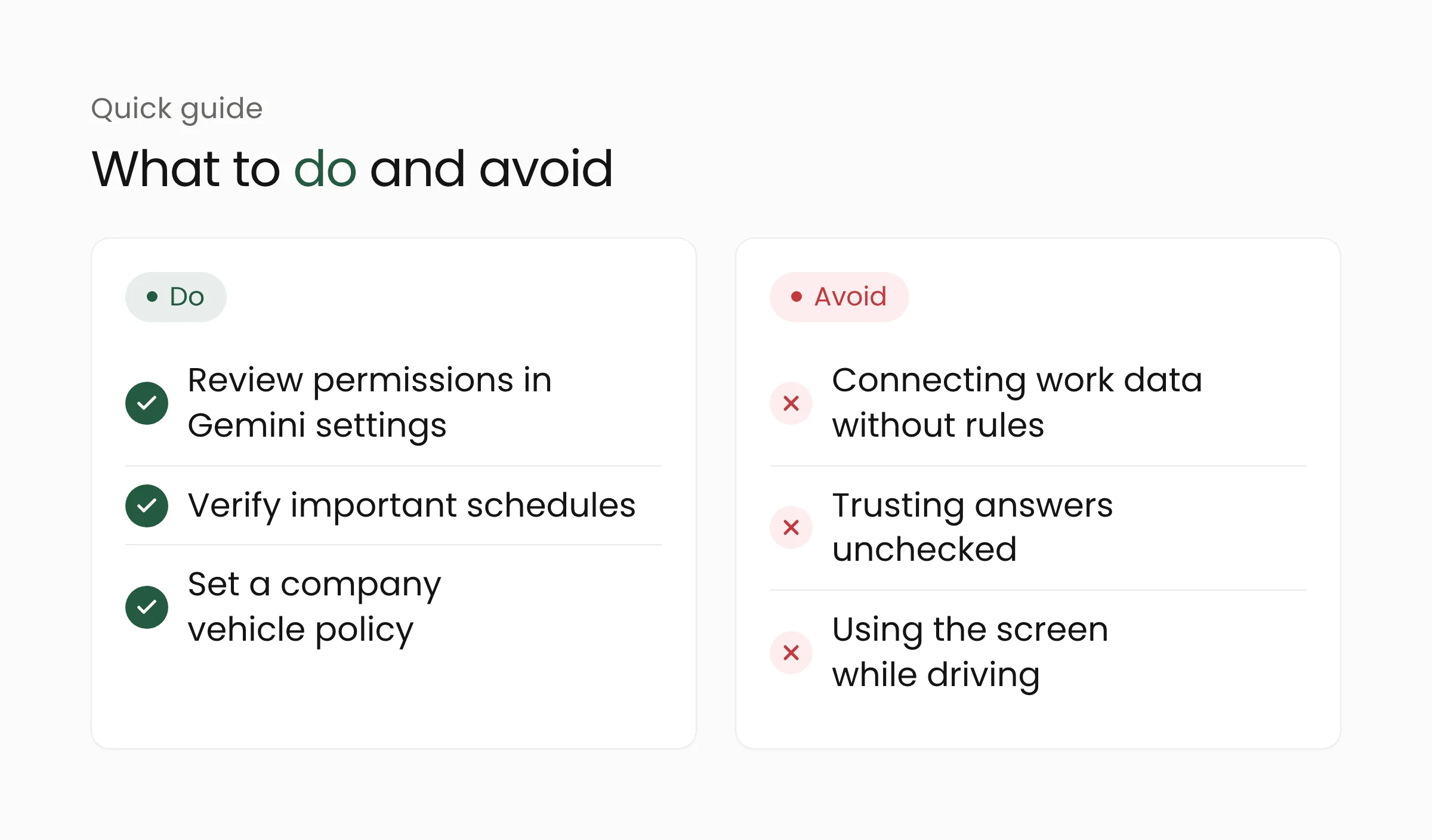
iTechPost also adds two safety notes. AI answers can be wrong or incomplete, so schedules and travel details should be checked again. Drivers are also advised to keep their attention on the road and avoid interactions that demand visual focus. Voice helps, but eyes should stay on the road while the vehicle is moving.
What this means for drivers and your company
For private drivers, the main decision is how much access to email, photos, and location history to grant the assistant. Turn the feature on only after reading the settings in the Gemini app, and review them from time to time. For time-sensitive decisions, such as a departure time or an appointment location, match the assistant’s answer against the original source before leaving.
Companies need to watch the account boundary. Employees who use a work Workspace account are outside this rollout, so work email and calendars are not connected to the feature. Yet the same phone often holds personal accounts, and personal data about customers or colleagues sometimes sits there too. A device policy should spell out which data may connect to an assistant, especially for company vehicles. Organizations that handle personal data in Indonesia remain bound by Law No. 27 of 2022 on Personal Data Protection.
For app developers, the pattern Google shows is worth studying: the user grants permission, data from several sources is connected, and the assistant answers in context. The same pattern can be applied to customer service, logistics, or device-monitoring apps, as long as permission controls are clear from the start. This kind of work overlaps with artificial intelligence services, mobile app development, and IoT for devices connected to vehicles.
One practical lesson applies to everyone, from individual users to organizations that manage many devices. The more data sources are connected, the more important clear permissions, records, and ways to switch the feature off become. A feature that is easy to turn on should be just as easy to turn off.
Frequently asked questions
Is Personal Intelligence on by default?
No. Google says apps are not connected until the user turns the feature on. If it is already on in the Gemini app on the phone, that setting carries over to Android Auto, and the user can turn it off at any time in Gemini settings.
Can a work Google account use it?
Not yet. According to Google, the feature is only for eligible personal Google accounts. Workspace business, enterprise, and education users are excluded, and users must be 18 or older.
When will it reach cars with Google built-in?
Google says only that it is due in the coming months and has not given an exact date. In these cars, personal responses are shared only when the user is in the car with a connected phone.
Closing
Personal Intelligence on Android Auto shows AI assistants moving into places people use every day, including the car cabin. The staged rollout, strict account rules, and warnings to verify answers suggest that Google itself is being careful. Organizations that want to design similar experiences with well-structured permissions can talk to the Merakit team through the contact page.