Blog Mobile App Development
Siri AI Developer Preview Opens Siri to Every iPhone App
On this page· 7 sections
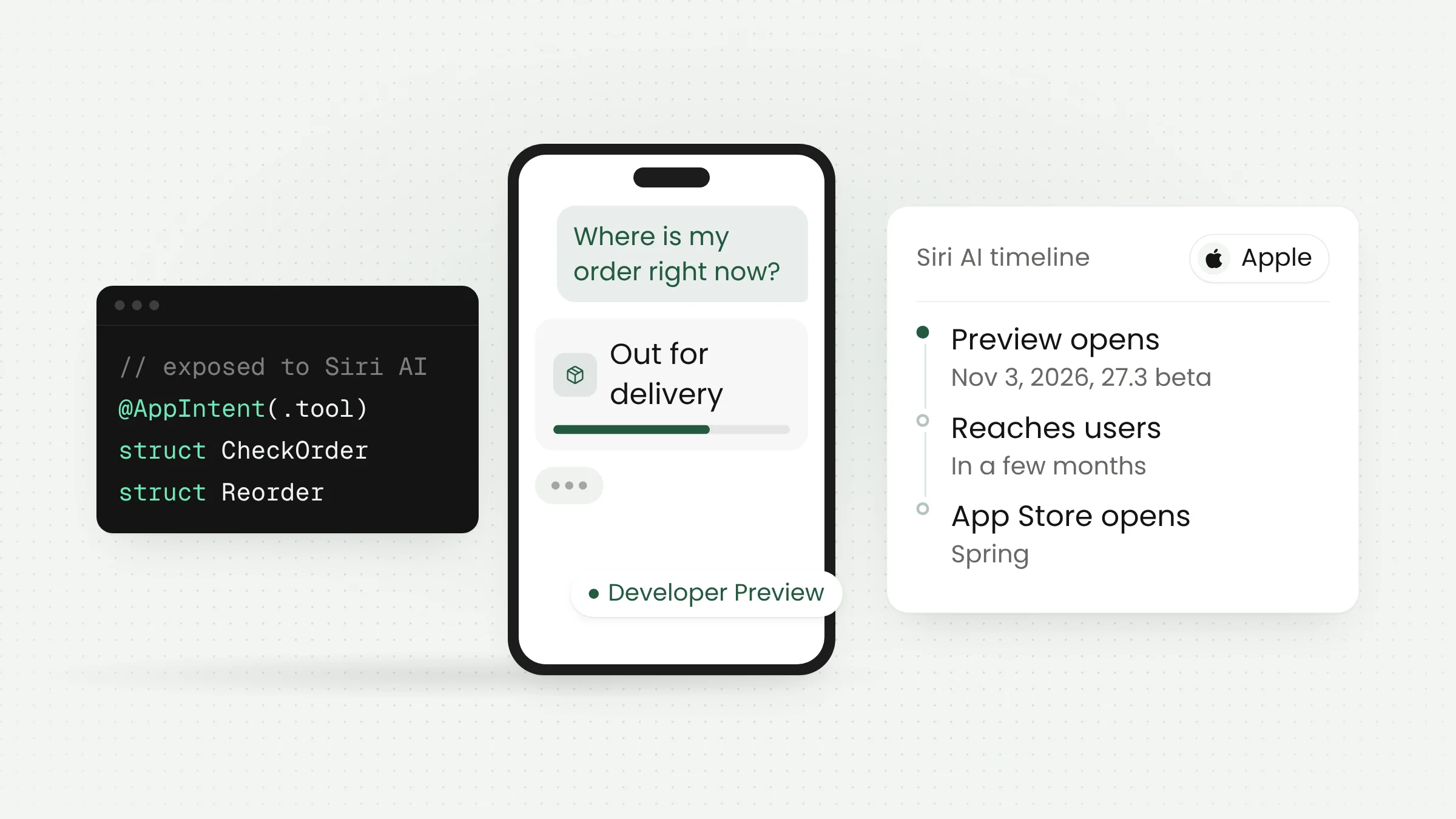
Apple opened Siri AI to all developers on November 3, 2026, with a Siri AI Developer Preview in the iOS 27.3, iPadOS 27.3, macOS 27.3, and visionOS 27.3 betas. Using App Intents, third-party apps can now hand their own actions and content to Siri AI instead of fitting into Apple’s predefined categories.
In practice, people will be able to ask Siri to check a delivery, book a table, or place an order in the apps they already use, in their own words. None of this has reached regular users yet, and App Store submissions for these integrations open in the spring. Below: what Apple announced, how it works, the preview limits, and how app teams, including those serving Indonesian users, can prepare.
What Apple announced
The announcement came through Apple Developer News alongside the first betas of the 27.3 operating system releases. Apple describes Siri AI as an entirely new version of Siri that is more conversational and understands a user’s personal context. According to Apple, thousands of developers have already built Siri integrations for tasks such as directions, to-do lists, messages, and audiobooks.
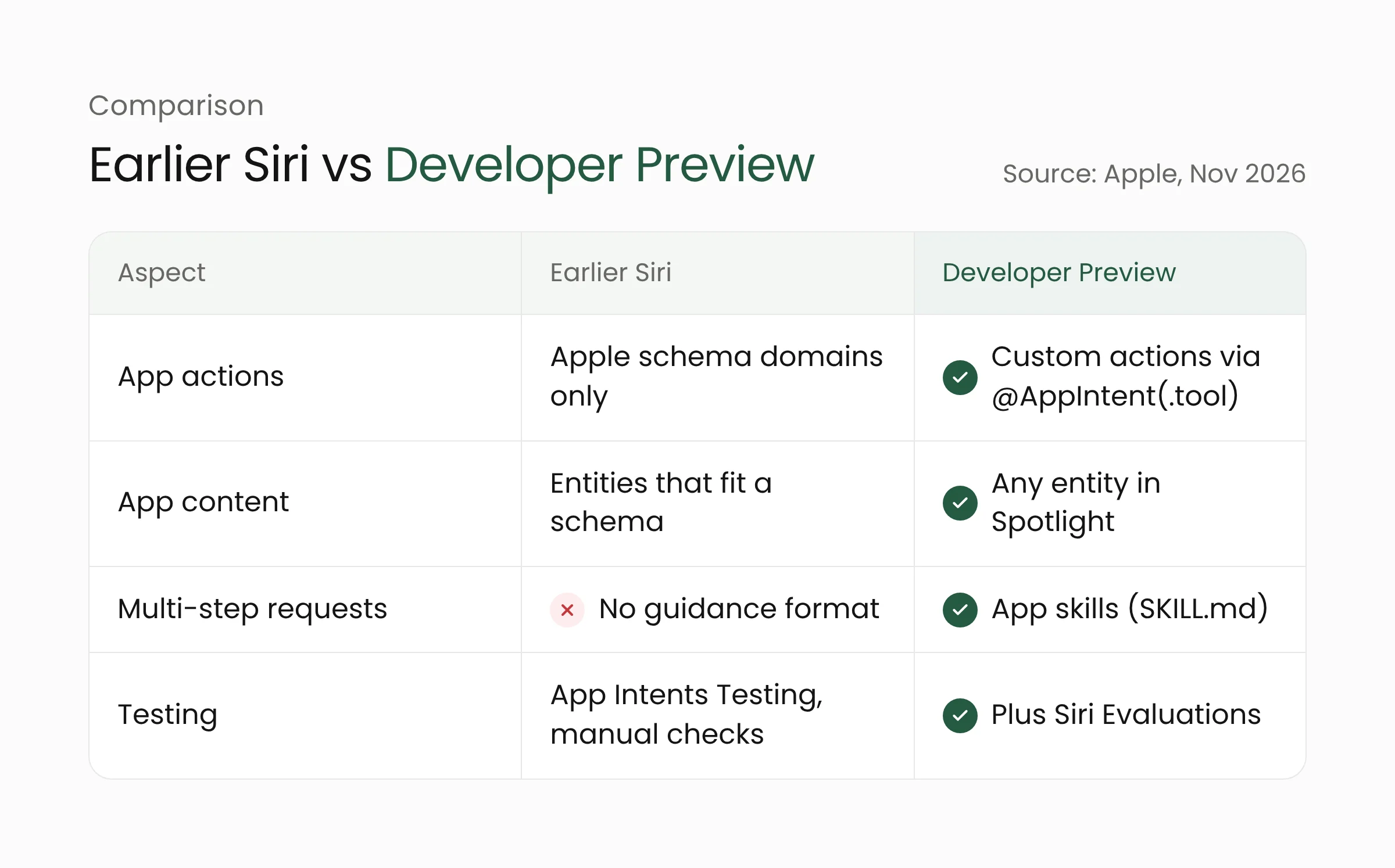
Until now, Siri could only work with app functionality and data that matched Apple’s system-defined app schema domains, such as messaging or journaling. The Siri AI Developer Preview documentation says that limit is being relaxed. Siri can understand context, find content, and perform custom actions for an app, as long as the app makes them explicitly available through App Intents.
Apple summed up the goal in one line of its announcement: “Siri AI carries out any custom action you’ve built, from checking a delivery to booking a reservation to placing an order.” Apple also said Siri AI can now surface any entity in the Spotlight semantic index, not only entities that fit an existing schema.
Apple has started applying these capabilities to its own apps, including Calendar, Files, Mail, Maps, Notes, Reminders, and Safari. ChannelLife lists examples such as organizing files, grouping Safari tabs, and creating Journal entries through Siri.
How App Intents become tools for Siri
App Intents is Apple’s framework for describing an app’s actions (intents) and data (entities) to the system. The same framework already feeds Shortcuts and Spotlight. In the preview, developers mark the intents they want to expose with the @AppIntent(.tool) macro, which turns each one into a tool that Siri can call.
According to Apple’s guide to custom actions, Siri relies on the title and description of each intent and its parameters to understand what it does and to tell it apart from other intents. App entities, such as products, orders, or accounts, also need descriptions and should be added to the Spotlight index so Siri can find them.
Developers do not need a new entitlement or a separate developer program. Updating existing App Intents code is enough.
When users have to name the app
Apple’s documentation separates two situations. Users do not need to mention the app when it is in the foreground, when one of its Live Activities is running, or when they continue a conversation in the Siri app that already mentioned it. Apple’s example is a ride-share user who asks Siri to change the pickup point while waiting for the car.
When the app is in the background, users need to name it. Apple’s example is asking whether sneakers the user liked in a shopping app are on sale. Siri can also move content between apps, for instance sending a favorite product to a partner through a messaging app.
App skills for multi-step requests
For requests that take several steps, Apple is introducing app skills. The app skills documentation explains that each skill is a Markdown file named SKILL.md inside a Skills.skillsbundle. The top of the file holds a name and a description that Siri uses to decide whether the skill fits a request. Siri reads the full body only after it decides the skill applies.
Apple’s example is a shopping app skill that guides Siri through searching for items, adding them to a cart, choosing payment and delivery, and confirming the purchase. Apple is also clear that a skill is guidance. Siri does not run the listed intents in sequence, so skills cannot be used to enforce a fixed flow.
Testing tools and preview limits
Apple added two tools. The Siri Integration Advisor in Xcode suggests improvements to an App Intents implementation. The Siri Evaluations framework, still in beta, lets developers script conversations with Siri, measure how Siri responds, and catch changes in behavior whenever intents are updated. PPC Land notes that Siri’s answers can vary between runs, so test scenarios need to be repeated.
Testing is restricted as well. During the preview, the integration only works in builds signed with a development profile and for internal TestFlight testers. External TestFlight testers and people who download the app from the App Store do not get it. Apple also warns that the App Intents API and Siri’s behavior may still change.
On timing, Apple only says the capabilities will first ship to customers “in a few months,” with App Store submissions opening in the spring. No exact dates have been announced. Apple has not yet published the terms and usage policies for experiences built on Siri AI and says more details will follow.
Apple’s release notes list a few other limits:
- Siri AI is not currently available in the EU on iOS, iPadOS, and watchOS.
- Siri AI is not available to users under 13.
- Apple Intelligence features that rely on server-side models, including Siri AI, have daily usage limits. Apple says expanded access will be offered for a fee in the future.
Indonesian is missing from the language list
Siri AI currently works in English, French, Japanese, Korean, Portuguese, and Spanish. Apple says Traditional Chinese, Norwegian, Turkish, and Vietnamese are coming soon. Indonesian is on neither list, and Apple has not announced plans for it. Apple also notes that some features may not be available in every region or language. According to Cult of Mac, the iOS 27.3 beta brings several Apple Intelligence features to China, but Siri AI is not among them.
The same language gap showed up when Apple launched its new iPad mini, as covered in our piece on the OLED iPad mini for field work. Users whose devices are set to Indonesian cannot use Siri AI integrations yet.
The technical groundwork still pays off. Clear titles, descriptions, and entities in App Intents are also used by Shortcuts and Spotlight. When language support expands, apps that have already prepared their intents and entities only need to add translations and test them.
What this means for mobile app teams
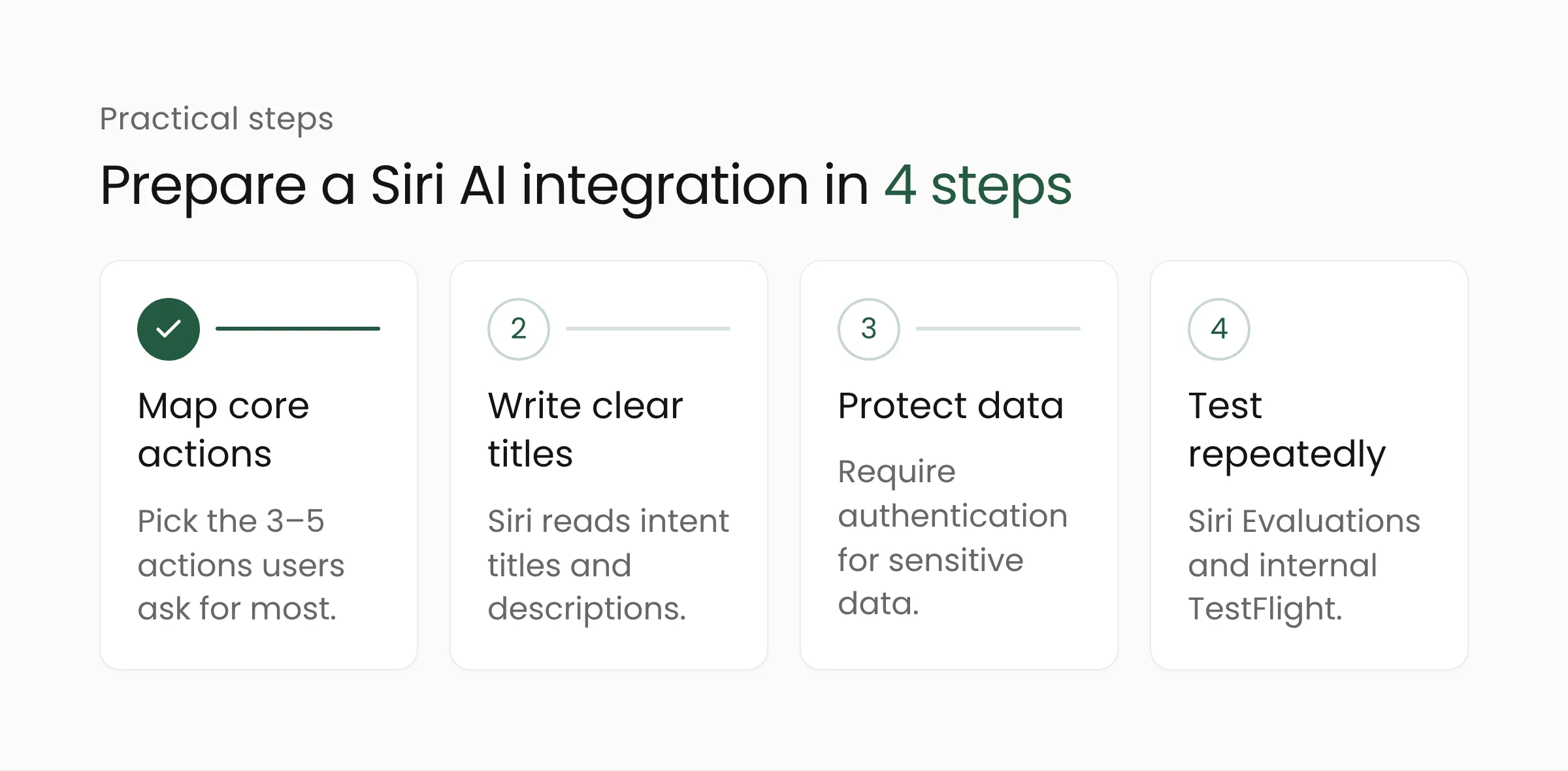
The preview gives teams a few months before the feature reaches users. Retail, booking, and customer service apps stand to gain the most, since Apple’s own examples center on delivery status, shopping carts, and reservations. Steps teams can take now:
- Map the core actions. Pick three to five actions users ask for most, such as checking an order, reordering, or searching for a product. These are the best candidates for tool intents.
- Write clear titles and descriptions. Siri reads this text to understand each intent and its parameters. Avoid internal names that only the team understands, and prepare translations for every language the app supports.
- Protect sensitive data. Apple’s documentation offers
authenticationPolicyto require authentication before Siri shows certain data, and avisibilityoption that keeps internal properties away from Siri. Customer addresses, payment history, and loyalty balances belong in that category. - Test repeatedly before release. Use the Siri Integration Advisor and Siri Evaluations, then run trials with internal TestFlight testers. Log the requests Siri misunderstands and use them to improve descriptions.
Teams should also watch for Apple’s pending usage terms, which may affect which actions can be exposed through Siri, and avoid locking in a release date before Apple sets one.
For businesses whose apps serve both iPhone and Android users, the change is a reminder to design core app actions cleanly from the start. Merakit’s mobile app development team can help structure App Intents and testing workflows, while store owners and retail chains can explore our retail management solutions to connect customer apps with order systems.
Frequently asked questions
When will apps with Siri AI integration reach users?
Apple says the capabilities will reach customers in a few months, and App Store submissions open in the spring. Exact dates have not been announced. Until then, integrations only run on developer devices and for internal TestFlight testers.
Does Siri AI support Indonesian?
Not yet. Siri AI is available in English, French, Japanese, Korean, Portuguese, and Spanish. The languages Apple says are coming next are Traditional Chinese, Norwegian, Turkish, and Vietnamese. No plans for Indonesian have been announced.
Do developers need to join a special program?
No. According to Apple’s documentation, developers do not need a new entitlement or a separate program. They update their App Intents code, build the app with Xcode, and test it on an Apple Intelligence-capable device running a 27.3 beta.
Sources
- Apple Developer News: Siri AI is now open to all developers (November 3, 2026)
- Apple Developer News: Get ready with the latest beta releases (November 3, 2026)
- Apple Developer Documentation: Siri AI Developer Preview (accessed November 4, 2026)
- Apple Developer Documentation: Bringing custom actions and content to Siri (accessed November 4, 2026)
- Apple Developer Documentation: Orchestrating complex actions with app skills (accessed November 4, 2026)
- PPC Land: Apple opens Siri AI to all developers, but apps can’t ship it until spring (November 4, 2026)
- Cult of Mac: Siri AI opens to third-party apps in iOS 27.3 beta (November 3, 2026)
- ChannelLife: Apple adds Siri AI app intents in 27.3 developer betas (November 4, 2026)