Blog Cybersecurity
GitLab Critical Flaw CVSS 10: Patch Self-Managed Servers
On this page· 7 sections
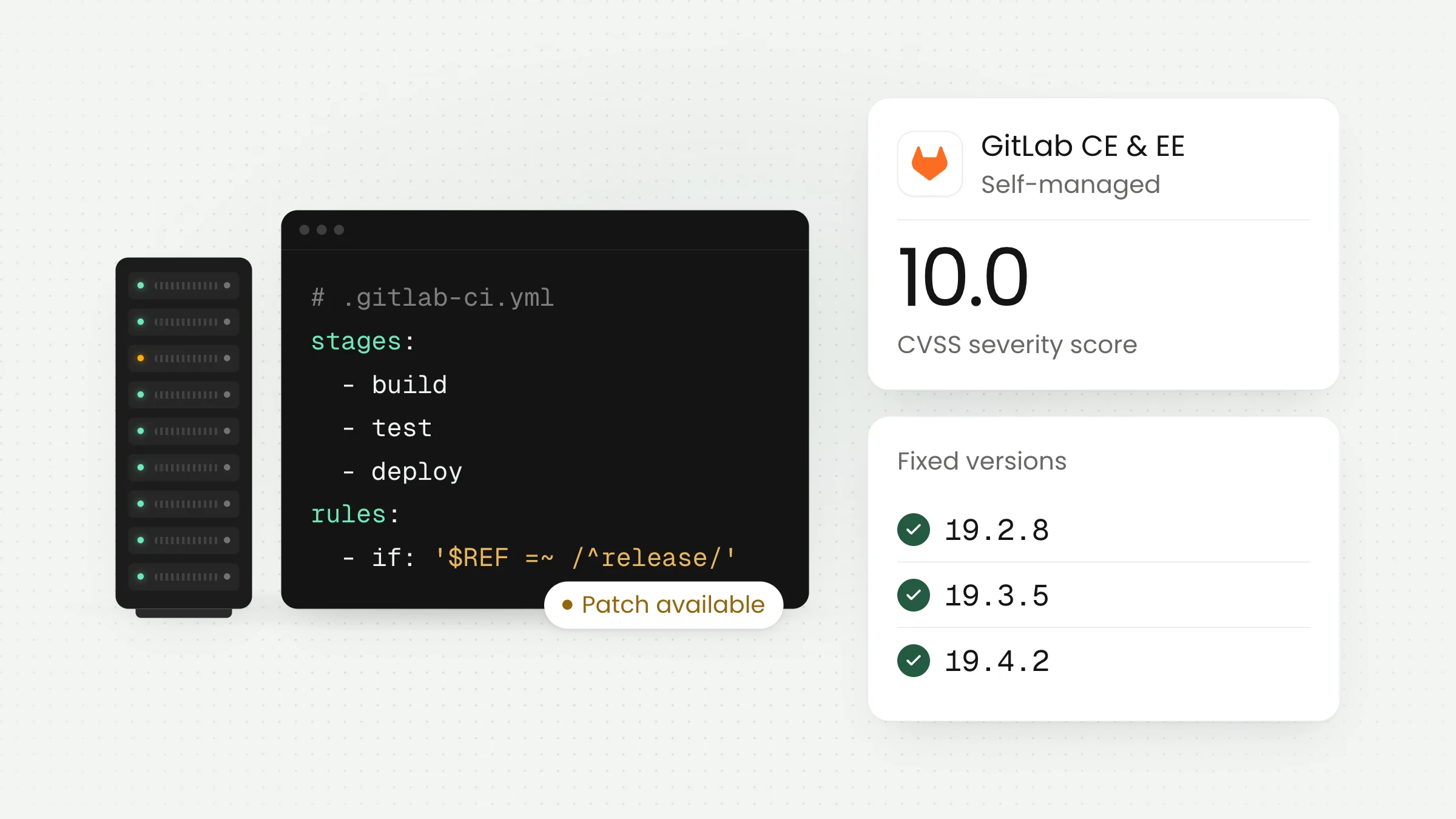
On October 12, 2026, GitLab released a patch for a critical vulnerability scored CVSS 10.0, the highest rating possible. It only affects GitLab that you run on your own servers. If an IT team at your school, university, agency, or company uses it, check the version today.
What GitLab announced
According to GitLab’s patch release notes published on October 12, 2026, the flaw is tracked as CVE-2026-97229. It is an integer overflow in the regular expression (regex) compiler used for CI/CD. In plain terms, validation of a specially crafted regex was not strict enough. Under certain conditions, an unauthenticated user could run code on the GitLab server.
CI/CD is the automated pipeline that builds, tests, and releases an application each time a developer pushes a change. Its configuration usually lives in a single file, and that file can contain regex to filter particular branches or tags.
The 10.0 score comes from the vector CVSS:3.1/AV:N/AC:L/PR:N/UI:N/S:C/C:H/I:H/A:H. Read slowly, it says: reachable over the network, low complexity, no account needed, no victim click needed, and high impact on confidentiality, integrity, and availability. GitLab credits a researcher known as joaxcar, who reported it through HackerOne.
Fixes exist for three release branches. Only versions below these numbers are vulnerable:
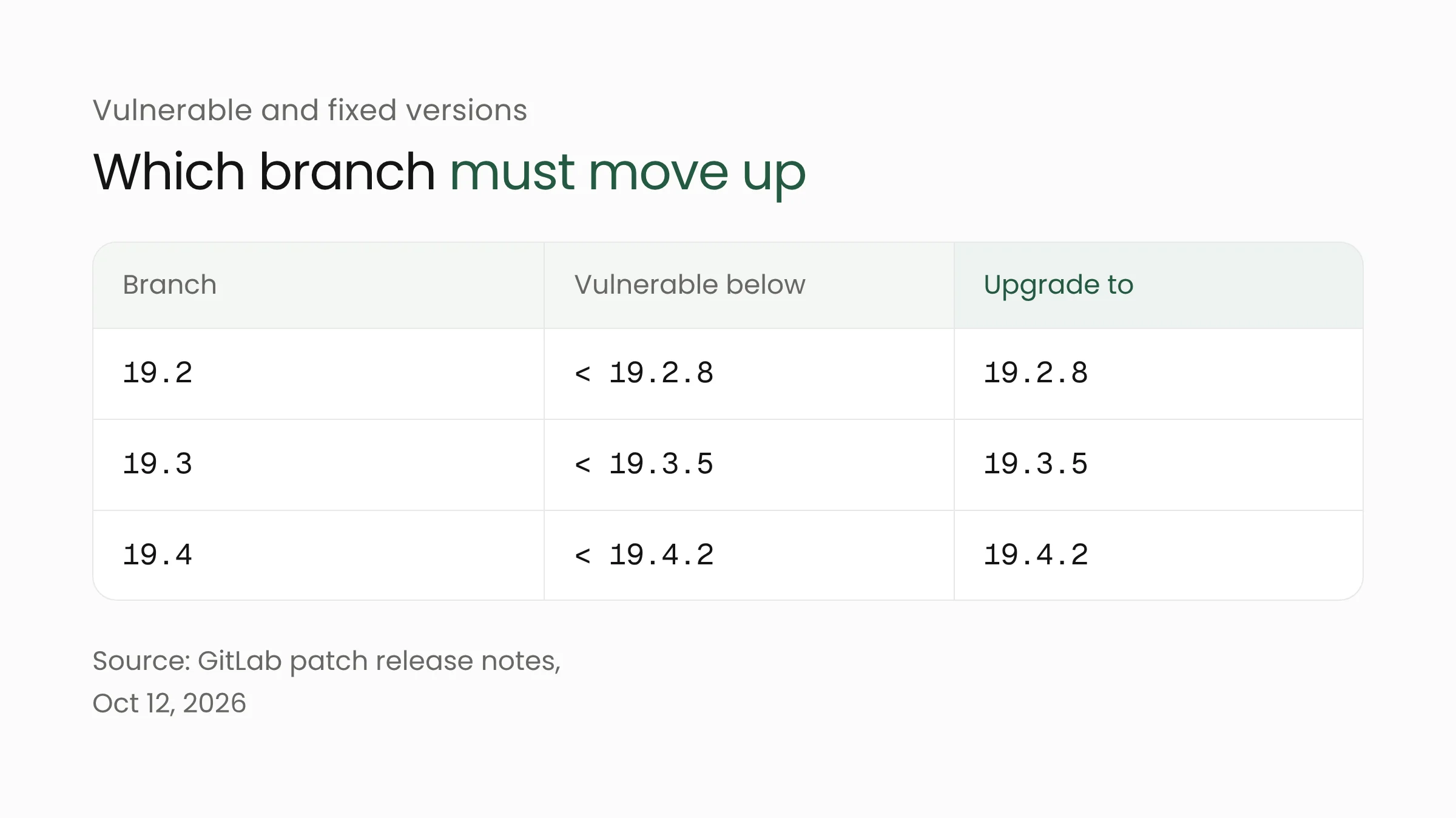
The affected editions are Community Edition (CE) and Enterprise Edition (EE). Two pieces of good news: GitLab.com already runs the patched code, and GitLab Dedicated customers need to do nothing. The homework belongs to teams that installed GitLab themselves.
One small note on versions. The same document says release 19.3.4 had a bug on merge request pages for installations with the Ona integration enabled, and that 19.3.5 fixes it. So for the 19.3 branch, aim for 19.3.5, not 19.3.4.
Why a flaw in the CI/CD path feels serious
Many organizations in Indonesia choose to install GitLab on their own servers. The reasoning is sound: source code and project data stay on infrastructure they control, which agencies, schools, and data-sensitive companies often value. The trade-off is that updates become the internal team’s job, not the vendor’s.
A GitLab server rarely stands alone. It stores source code, decides who can change what, and instructs runners (worker machines) to execute builds. Along that path there are often access keys, cloud tokens, or database credentials, so releases can run without a human in the loop.
An analysis by Penligent stresses that the official advisory names GitLab CE/EE as the affected product, not GitLab Runner as a standalone program. Even so, the analysis notes that a compromised server could still create risk for the CI/CD infrastructure connected to it. Runners deserve a place on your checklist.
Picture a government office that runs GitLab on a server in its own building to manage a public-service application. Or a university using it for student assignments and the academic information system at once. If that server faces the internet and its version lags behind, the risk is not only readable code but also the secrets inside the pipeline.
What we do not know yet, and why that is no reason to wait
To be fair, we should be honest about the limits of the information. As of October 13, 2026, Penligent’s analysis says neither the GitLab advisory nor CERT-EU reports confirmed exploitation in the wild. The same source found no publicly verified proof of concept. GitLab usually publishes full technical details about 90 days after a release.
That is reassuring, but do not read it as “safe to postpone.” Once a patch ships, others can compare old and new versions to guess where the flaw sits. The gap between a patch release and its installation is therefore the riskiest period. We covered this in our article on AI-powered attacks and the shrinking patch window, and GitLab’s case is a fitting example.
One more point from that analysis: removing regex from the CI configuration file is not a fix. Upgrading remains the main path, and no vendor-verified workaround exists.
What this means for your organization
First, confirm whether you are affected. If your team uses GitLab.com or the Dedicated service, the vendor has handled most of it. If you installed GitLab yourself, follow the flow below.
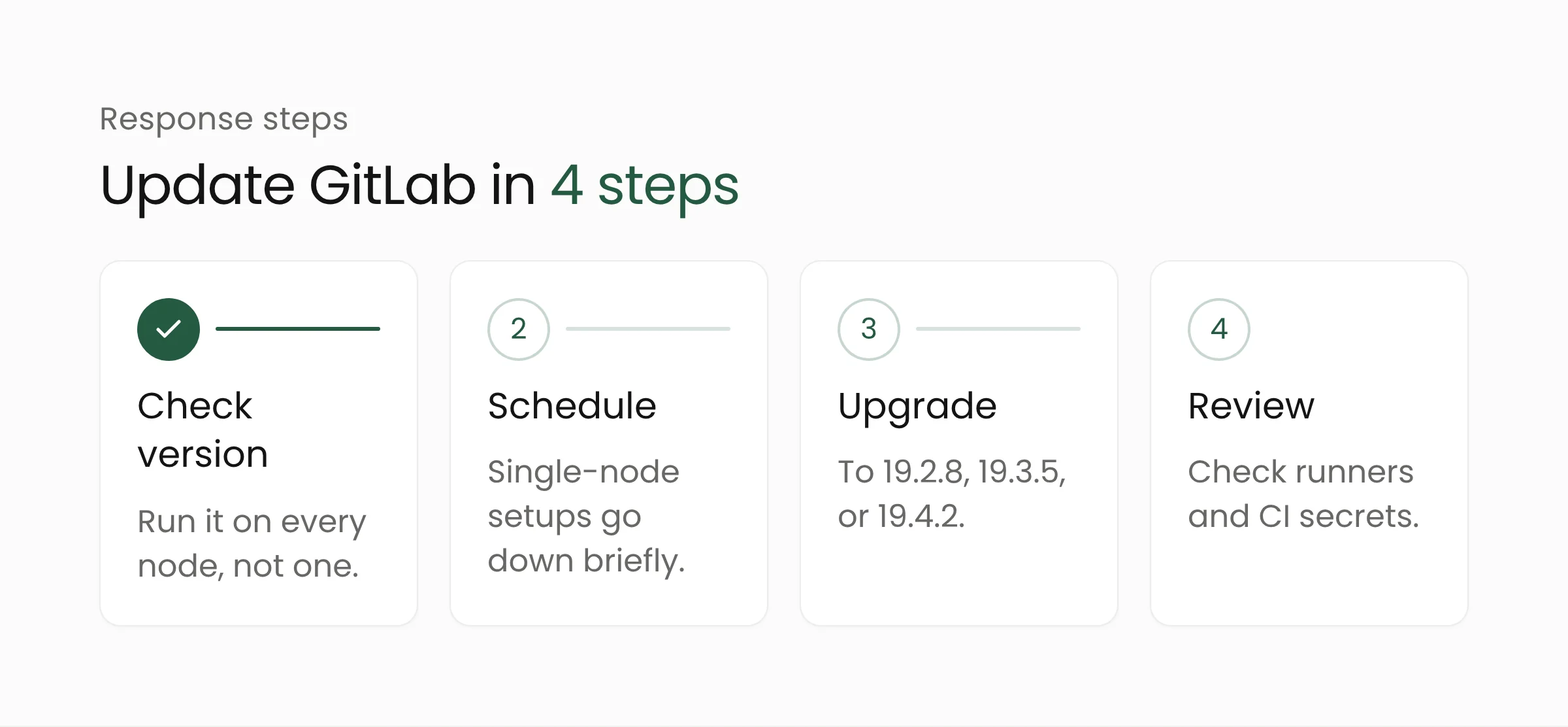
A few notes on those steps. To check the version, Penligent suggests running sudo gitlab-rake gitlab:env:info on every application node, not just one. This update also includes database migrations. On a single-node installation, GitLab will be down until the migrations finish, so announce a maintenance window to your team. Multi-node installations can follow GitLab’s zero-downtime procedure.
Before you press the upgrade button, prepare a backup of the database and configuration, and note the version currently running. That is good habit for any update, and more so with database migrations involved. If you have a test environment, try it there first, but do not let that test keep production waiting for days.
After upgrading, take time to review what surrounds the server. Who has admin access? Which secrets are stored as CI variables? Are there keys worth rotating, especially if your server faces the internet and was behind for a long time? These are sensible precautions, even though sources do not mention any exploitation.
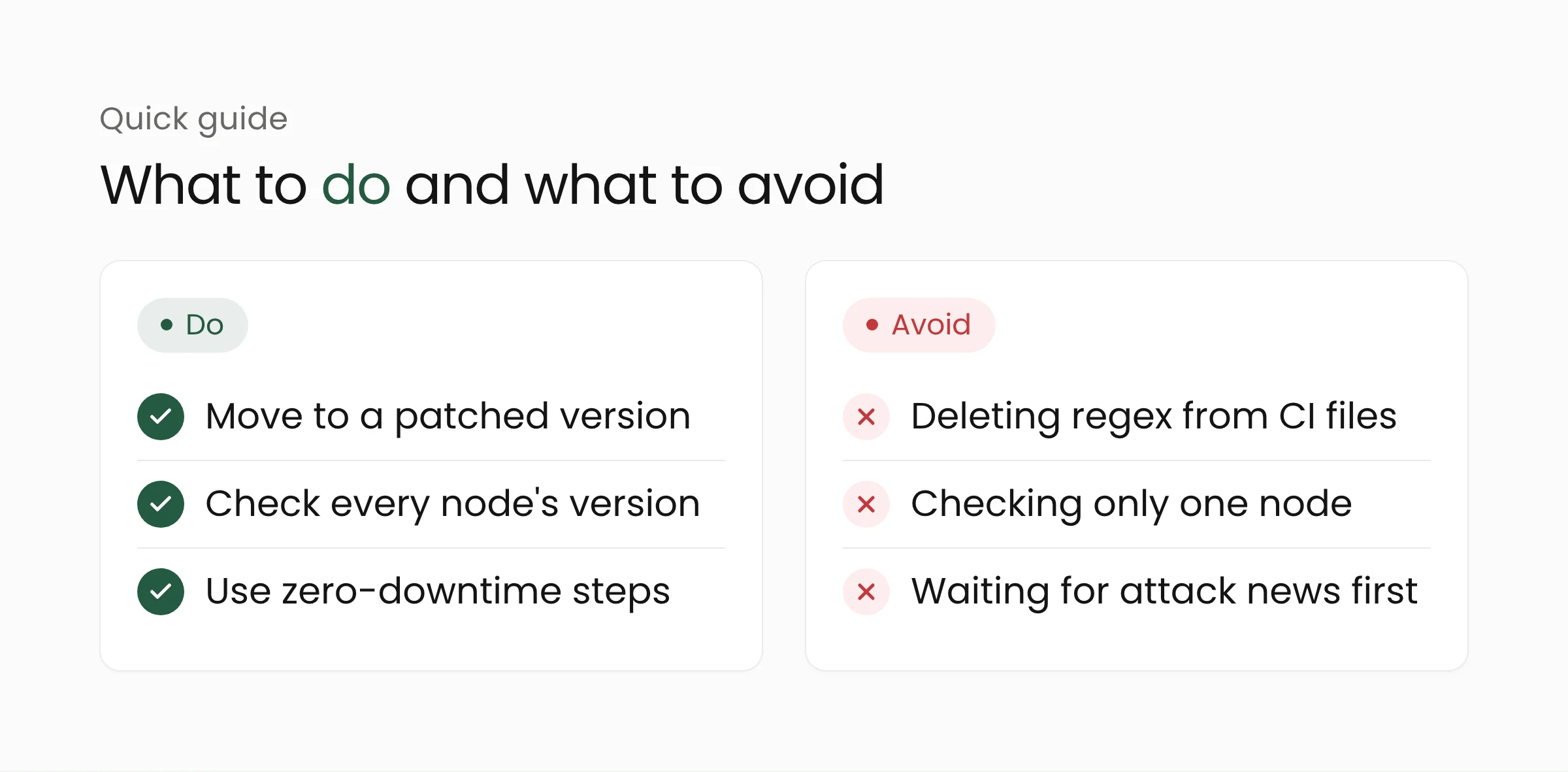
You also do not need to wait for an incident to improve how you work. Treat this event as a drill: how long does your team take from reading the news to finishing the update? If the answer is more than a few days for a 10.0 flaw, that is where your process needs tidying.
For the medium term, these habits help most: keep a list of internet-facing systems, name one person responsible for updates, and subscribe to the vendor’s security notices. Organizations without a dedicated team can begin with a simple audit, for example through cybersecurity services or by arranging infrastructure on cloud where updates are easier to manage.
Frequently asked questions
Is the GitLab.com we use affected?
No action is needed from you. GitLab’s release notes say GitLab.com already runs the patched version, and GitLab Dedicated customers need not act. This flaw is a matter for those who installed GitLab CE or EE themselves.
We are still on 19.1 or older. Are we safe?
The release notes name only three affected branches: 19.2, 19.3, and 19.4, before their patched versions. Still, versions far behind usually carry other known flaws. Check GitLab’s official advisory for the branch you run, then plan an update to a supported version.
Has this flaw been used in attacks?
As of October 13, 2026, no confirmed exploitation has been reported, according to Penligent’s analysis, which refers to GitLab and CERT-EU. That status can change, so follow GitLab for the latest news.
Closing: small in configuration, big in impact
A flaw like this reminds us that developer tools are part of the attack surface too. Regular updates, a clear asset list, and one person who owns the patch schedule often beat buying another tool. If you would like company while assessing the readiness of your development infrastructure, our team is happy to talk through the contact page.
Sources
- GitLab: Patch release 19.4.2, 19.3.5, 19.2.8, October 12, 2026
- Penligent: CVE-2026-97229, Critical GitLab CI/CD RCE Vulnerability, October 13, 2026
- DEV Community: GitLab’s CVSS 10 fix lives in the CI config parser, October 13, 2026