Blog Education Technology
Office 365 A1 Retires in 2028: What Schools Should Plan Now
On this page· 7 sections
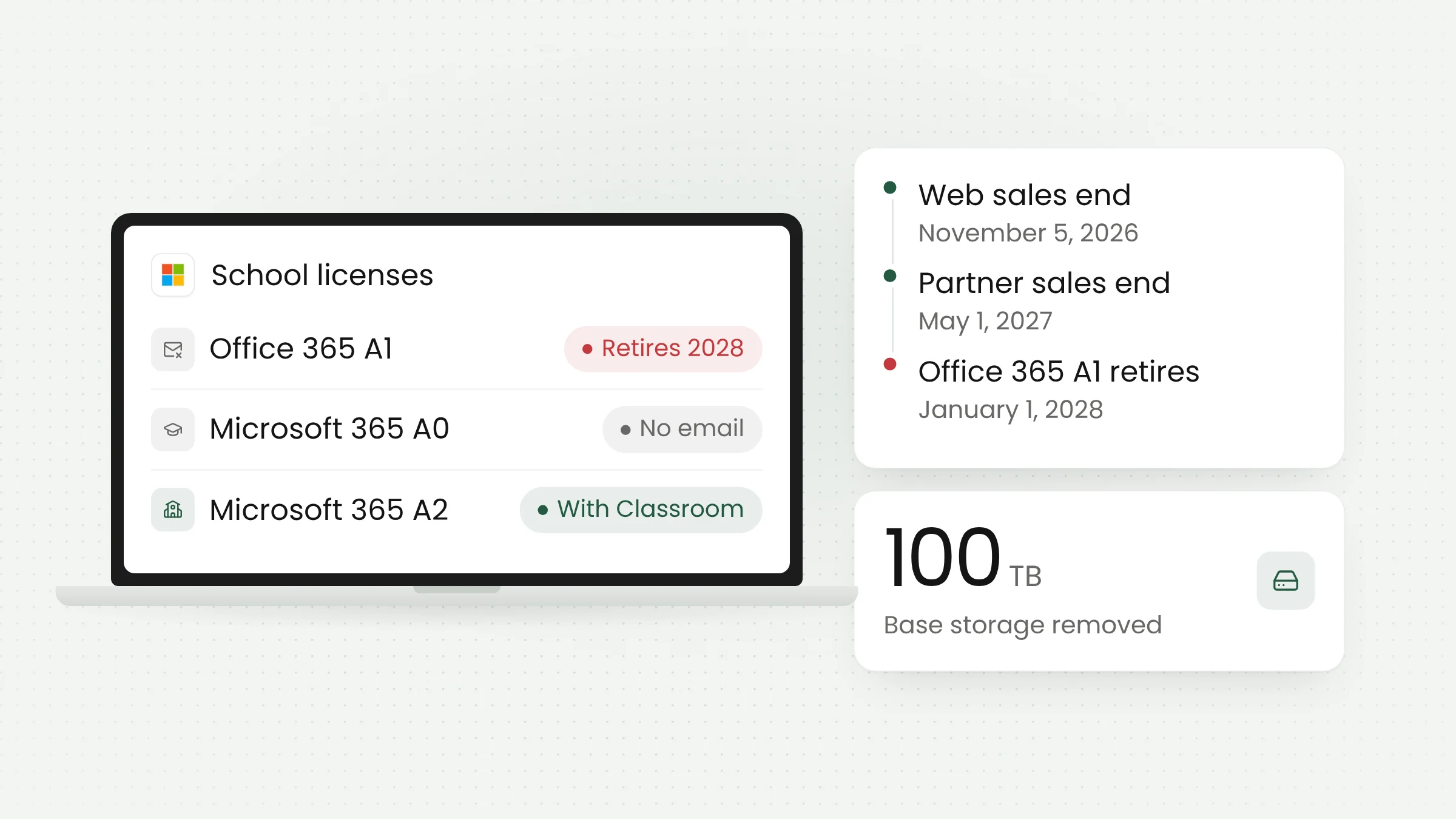
Microsoft will retire Office 365 A1, the free license that has given many schools and universities email and web-based Office apps, on January 1, 2028. Its replacement, Microsoft 365 Education A0, stays free for students but leaves out Exchange Online email, SharePoint Online, and Teams.
Microsoft announced the change on November 5, 2026, in an overhaul of Microsoft 365 Education. It is also ending the Student Use Benefit program, free email for alumni, and the 100 TB base storage allocation that every institution currently receives. In their place come a new app called Microsoft Classroom and a lineup of licenses running from A0 to A7.
For Indonesian schools and universities that use Microsoft accounts for official student email, the deadline is more than a year away, but budgets, procurement, and data migration need to be settled well before renewal.
The timeline for Microsoft 365 Education licensing
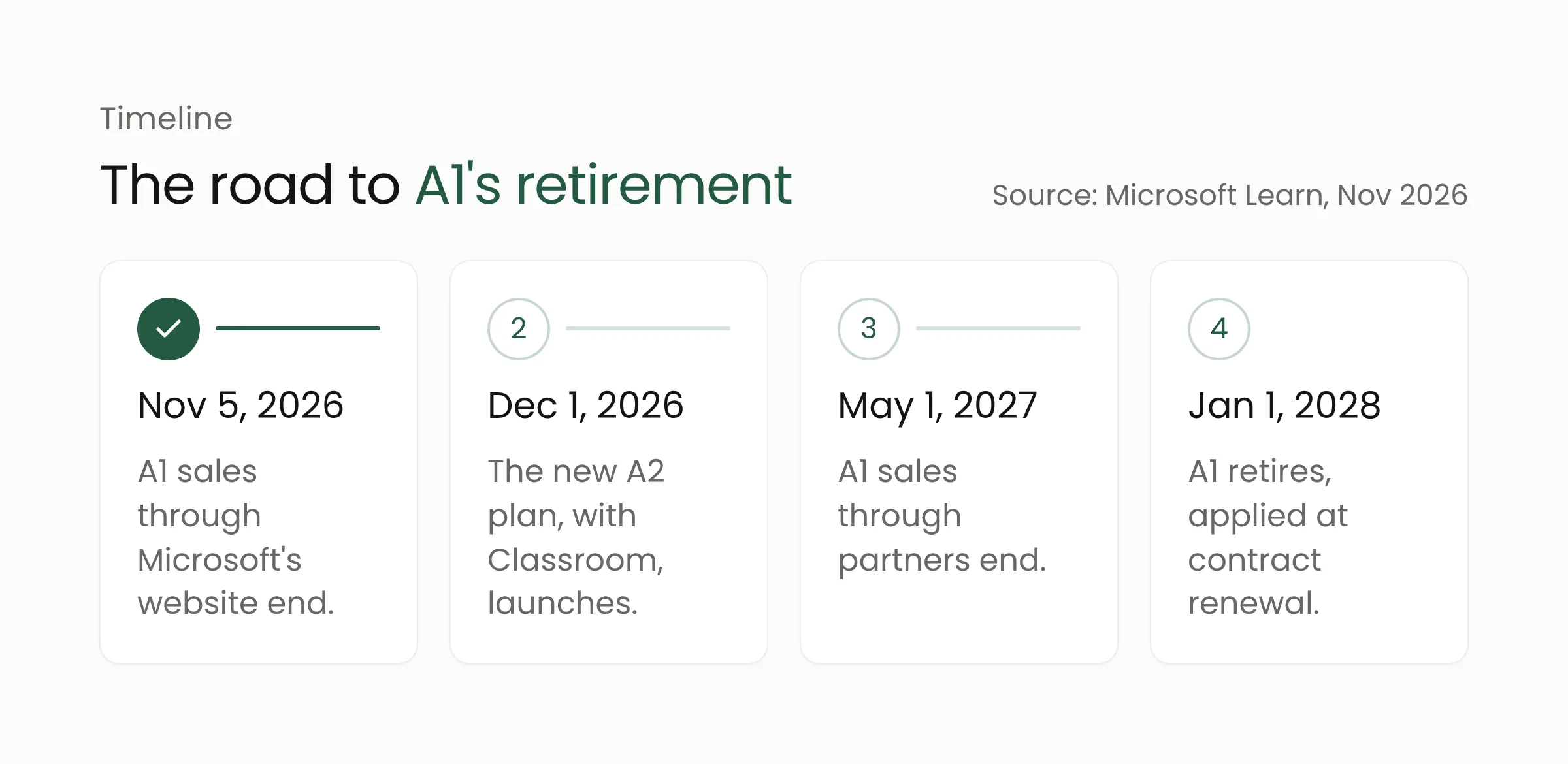
According to the official Microsoft 365 Education FAQ on Microsoft Learn, the changes arrive in stages. Office 365 A1 stopped being sold through Microsoft’s web direct channel on November 5, 2026. Sales through partners, including the Cloud Solution Provider (CSP) program and Volume Licensing, end on May 1, 2027. The license retires on January 1, 2028.
The date that matters most for each institution is its own renewal date. Microsoft says the new portfolio, storage entitlements, and retirements take effect at an institution’s first renewal or extension on or after January 1, 2028. Current agreements, including multi-year ones, keep their existing terms and pricing until they end.
Microsoft’s own documents differ on one detail. The FAQ says customers with an active Enrollment that began before May 1, 2027, may keep using A1 for that Enrollment term. The Microsoft 365 Education portfolio guide puts the cutoff at Enrollments that began before January 1, 2028. Institutions should ask their partner or Microsoft representative to confirm in writing which applies to their contract.
Microsoft also says early renewals intended to avoid the new rules are not permitted. From the first renewal or extension on or after May 1, 2027, online services bought through Academic Volume Licensing will carry a single price across all Price Levels. Some institutions may therefore see their costs change before 2028.
The Student Use Benefit and the free Exchange Online for Alumni offer also retire on January 1, 2028. Licenses under both remain valid until the current subscription term ends but cannot be renewed. Microsoft plans a paid alumni email offer, available from January 1, 2028.
A0 is free, with conditions and without email
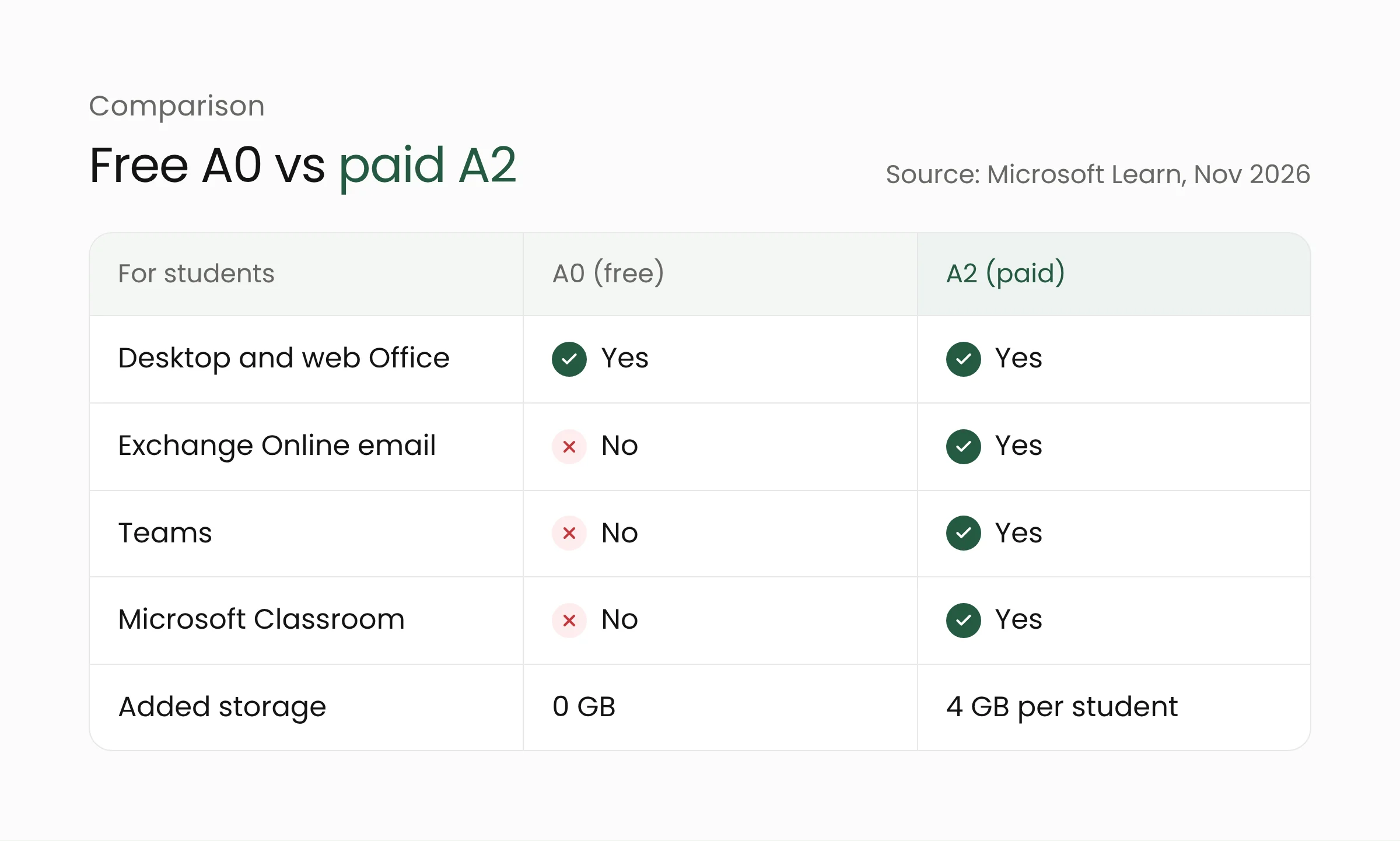
Microsoft 365 Education A0 is the only no-cost option in the new lineup, and it is for students only. It includes the desktop and web versions of Office, OneDrive, Minecraft Education, Microsoft Entra ID Free for account identity, and Learning Zone on eligible devices. Exchange Online email, SharePoint Online, and Teams are not included.
The eligibility rules are also stricter than A1. An institution must license all of its faculty on a paid plan at A2 or higher, and students receiving A0 must actively use Windows devices for their education. Each eligible paid faculty license covers up to 20 A0 student licenses.
Students moved to A0 therefore lose their Microsoft-hosted mailbox, and keeping email means buying a paid license such as A2.
Reporting by The Register on November 10, 2026, shows the change has met resistance. An unnamed industry insider estimated that losing free email could add thousands of pounds or dollars to institutions’ bills. The UK Department for Education said, “We are disappointed that Microsoft has made this decision.” The department added that it had negotiated extra concessions to give UK institutions time to transition.
Microsoft Classroom comes with the paid plans
Microsoft Classroom is a new app for teaching and learning that institutions can tailor for kindergarten to grade 5, grades 6 to 12, or higher education. It brings together Teams features such as Assignments, Gradebook, Learning Accelerators, and Class Notebook, and adds a Teach module for educators and an AI-based Study and Learn Agent for students.
Microsoft says Classroom does not replace Teams for Education. Schools can keep using Teams Assignments, or run Classroom alongside another collaboration platform or an existing learning management system (LMS). Classroom is only available in A2 through A7.
The paid plans also include Copilot Chat. Students aged 13 and older can use it once their institution switches it on, and Copilot Chat must be enabled before students can reach the Study and Learn Agent. The top tier, A7, has been available since October 1, 2026, and bundles Microsoft 365 Copilot and Microsoft Agent 365 for managing AI agents. A2 arrives on December 1, 2026, while the new A0, A3, and A5 become available on January 1, 2028.
Microsoft says A2 through A5 carry discounts of more than 80% compared with commercial pricing, and A7 up to 60%. Per-license prices are not listed in the announcement documents.
The 100 TB base storage gives way to per-license quotas
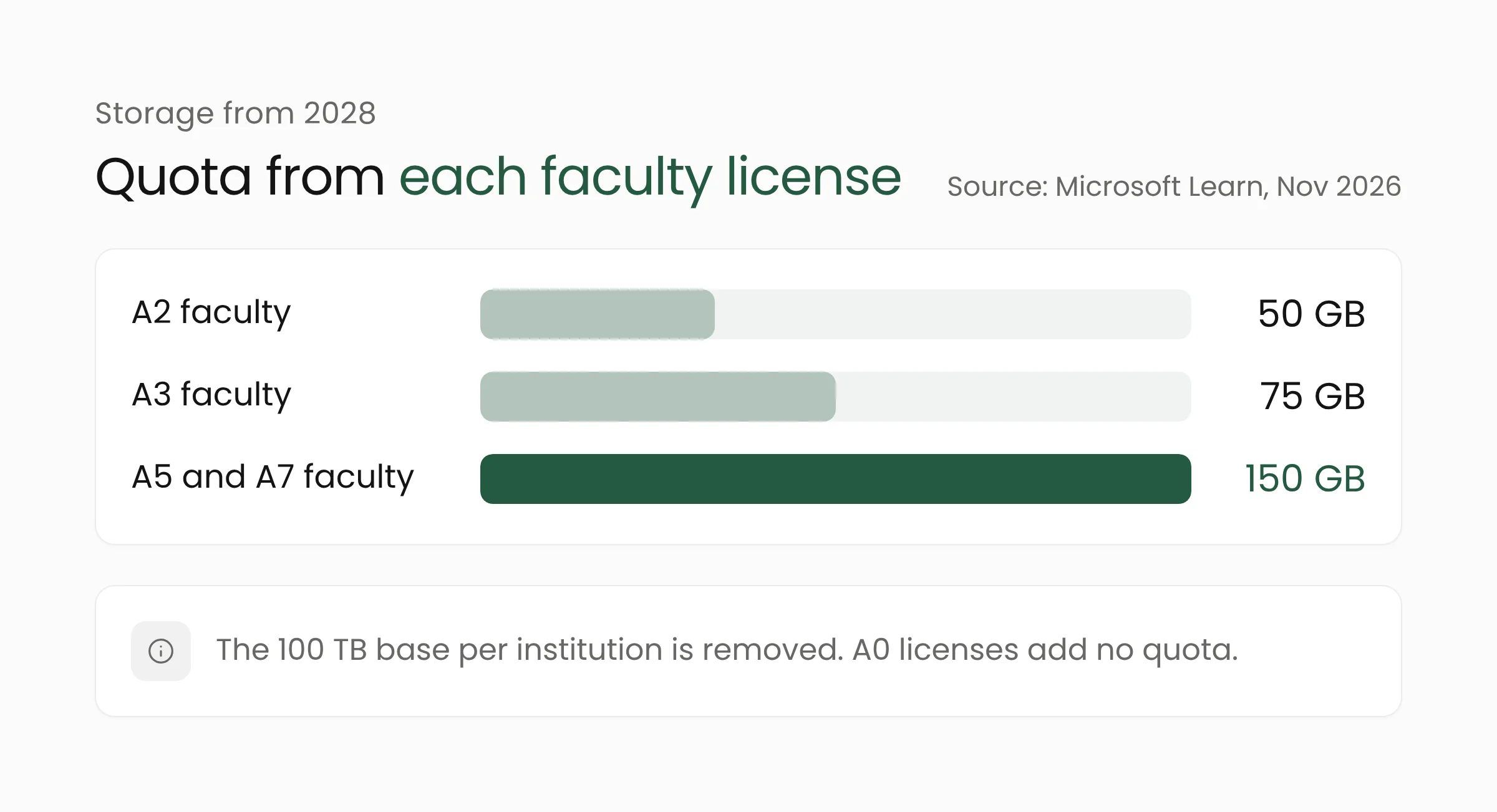
Today, each institution gets a 100 TB base allocation shared by all accounts. From the first renewal or extension on or after January 1, 2028, that base disappears. Storage remains a single shared pool, but its size is calculated only from paid licenses.
Each paid student license adds 4 GB for A2, 8 GB for A3, and 12 GB for A5 or A7. Faculty licenses add 50 GB for A2, 75 GB for A3, and 150 GB for A5 or A7. A0 licenses add nothing, even though A0 students’ files still sit in the same pool.
Consider a simple example: a university with 400 faculty on A2 and 10,000 students. The faculty contribute 400 × 50 GB, or about 20 TB, to the pool. Those faculty licenses also cover up to 8,000 A0 licenses, leaving 2,000 students needing paid licenses. If those students are on A2, they add 2,000 × 4 GB, or about 8 TB, for a pool of roughly 28 TB. If old files in OneDrive and SharePoint already approach 100 TB, that university would exceed its quota on renewal day.
Microsoft lists several ways out: moving to plans with larger entitlements, buying storage packs in 10 TB increments, cutting consumption, or moving rarely used files to Microsoft 365 Archive. These choices tie directly into an institution’s wider cloud computing strategy, including which data should stay in the cloud and which can simply be archived.
What this means for schools and universities
There is still time, but the work is substantial. These are the steps IT teams at schools, foundations, and universities can start on now.
- Check the renewal date. Find out whether licenses were bought directly, through a CSP partner, or through Volume Licensing, and note the next renewal date. That date decides when the May 2027 pricing rule and the 2028 licensing rules reach your institution.
- Count users by license type. Separate teaching staff, administrative staff, active students, and alumni. Flag the students who genuinely need official email, Teams, or Classroom, and those who only need Office apps.
- Measure current storage use. Review total OneDrive, SharePoint, and mailbox usage in the Microsoft 365 admin center, then compare it with the projected new entitlement. Count alumni and graduated students’ accounts separately.
- Set a policy for graduates’ data. Decide how long their accounts and files are kept, when they are deleted, and how graduates can download their own files before an account closes.
- Compare options early. Ask an authorized Microsoft partner for written quotes on several license mixes, for example A2 for faculty and final-year students and A0 for everyone else. Weigh them against other platforms the school already uses.
Merakit helps schools and universities map their systems and plan migrations like this through its education technology solutions. Google has also changed its policies for student accounts, as covered in our piece on Gemini and Search being turned off for students.
Frequently asked questions
Will a school’s Office 365 A1 accounts stop working on January 1, 2028?
Not immediately. Existing licenses stay valid until the current contract or Enrollment term ends. At the first renewal or extension on or after January 1, 2028, A1 users who still need service must move to a replacement license.
Can students still use Word, Excel, and PowerPoint for free?
Yes, through Microsoft 365 Education A0, provided the conditions are met. The institution must have paid licenses at A2 or higher for all faculty, and students must actively use Windows devices for their education. A0 includes desktop and web Office apps, but not Exchange Online email, SharePoint Online, or Teams.
Does Microsoft Classroom replace Teams?
No. Microsoft says Teams for Education remains available. Classroom is included in A2 through A7 and works alongside Teams, other collaboration platforms, or an LMS.
Conclusion
The retirement of Office 365 A1 ends the period when schools and universities could give every student email, Teams, and generous storage without a license fee. The impact will only be felt at renewal, but institutions that start counting users, storage, and budgets now will have more options. If your school or university wants to build a realistic transition plan, the Merakit team is ready to talk it through.
Sources
- Microsoft 365 Education portfolio evolution (Microsoft Learn, updated November 6, 2026)
- Microsoft 365 Education frequently asked questions (Microsoft Learn, updated November 10, 2026)
- Microsoft teaches schools that free email was just a phase (The Register, November 10, 2026)
- Microsoft unveils Classroom as Office 365 A1 retires from 2028 (EdTech Innovation Hub, November 11, 2026)