Blog Databases
PostgreSQL 19 Arrives as PostgreSQL 14 Reaches End of Life
On this page· 7 sections
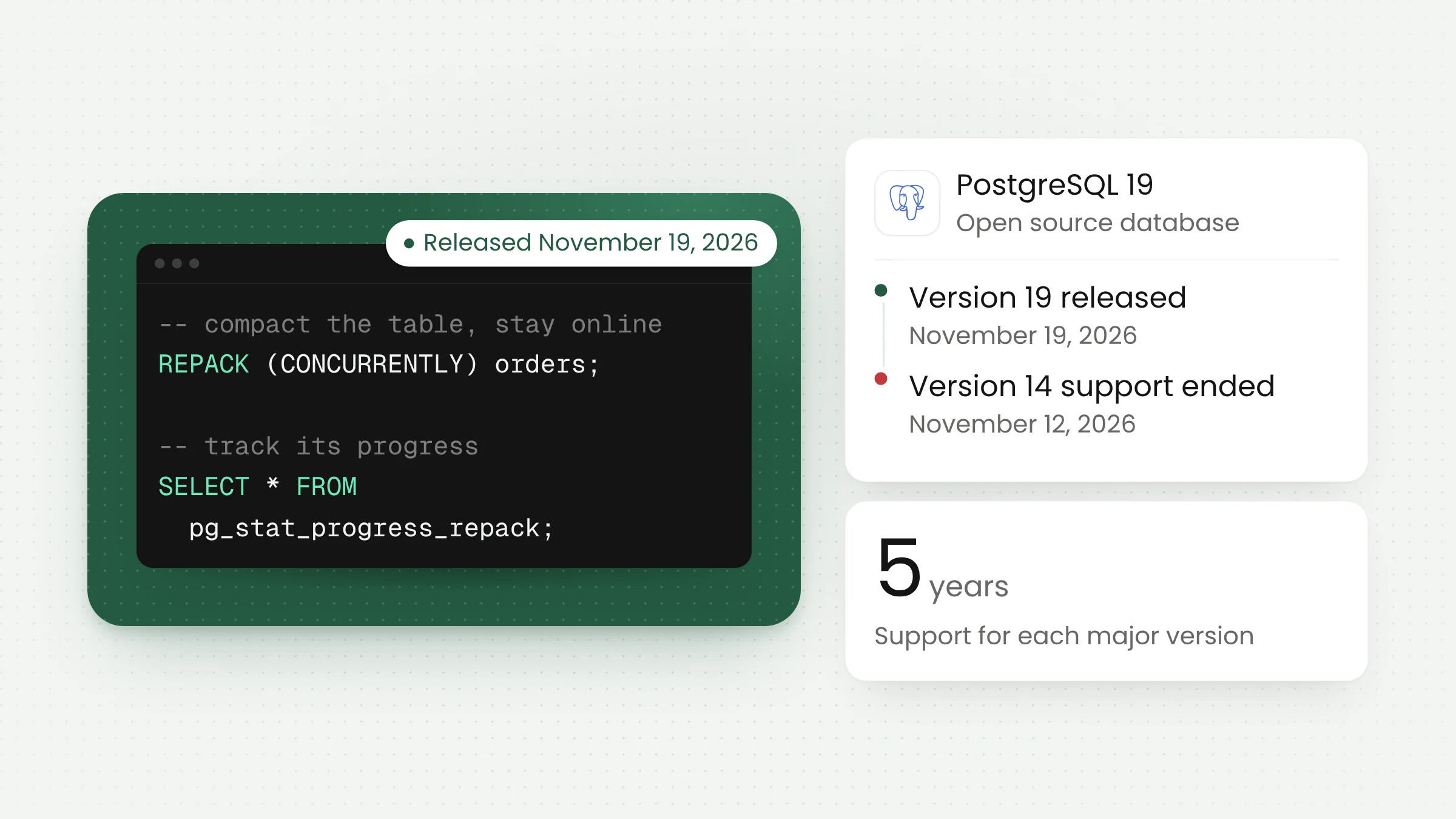
PostgreSQL 19 was released on November 19, 2026 with a REPACK command that compacts tables while applications keep running. One week earlier, PostgreSQL 14 received its final update. Database teams now have to evaluate the new version and move off one that is no longer supported.
A November 19 release after two release candidates
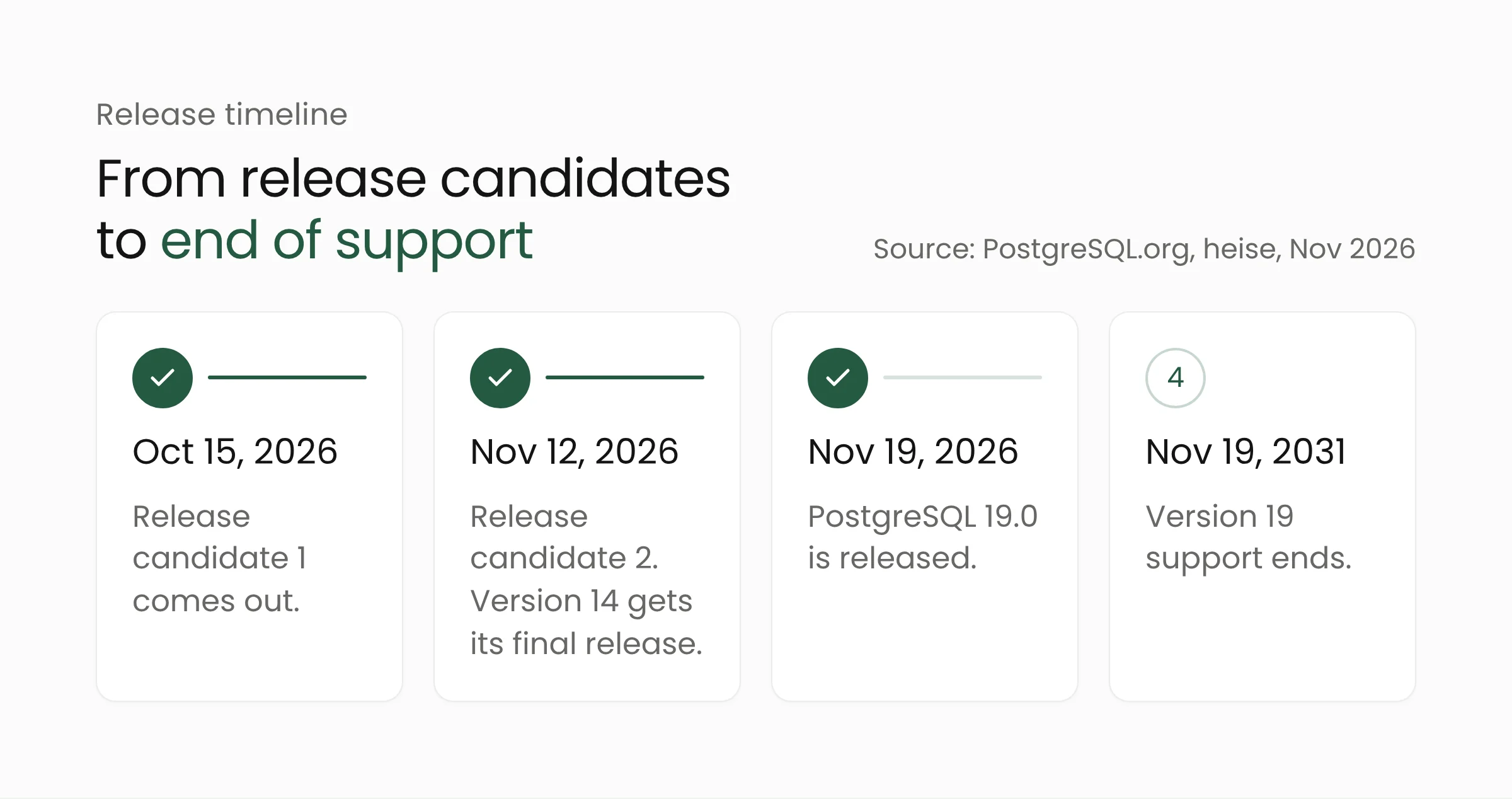
PostgreSQL is an open source database used by many web applications, government systems, and data warehouses. A new major version normally appears once a year. The official release notes list November 19, 2026 as the release date for PostgreSQL 19.
According to heise online, the first release candidate came out on October 15 and the second on November 12, 2026. The outlet reports that the final release arrived about eight weeks later than usual and three weeks later than planned because of the number of bug fixes.
Several features were also pulled during the beta period. Heise puts the number at eight to ten major features, including SQL/PGQ graph queries and the UPDATE/DELETE … FOR PORTION OF syntax for temporal data.
PostgreSQL 14 support has ended
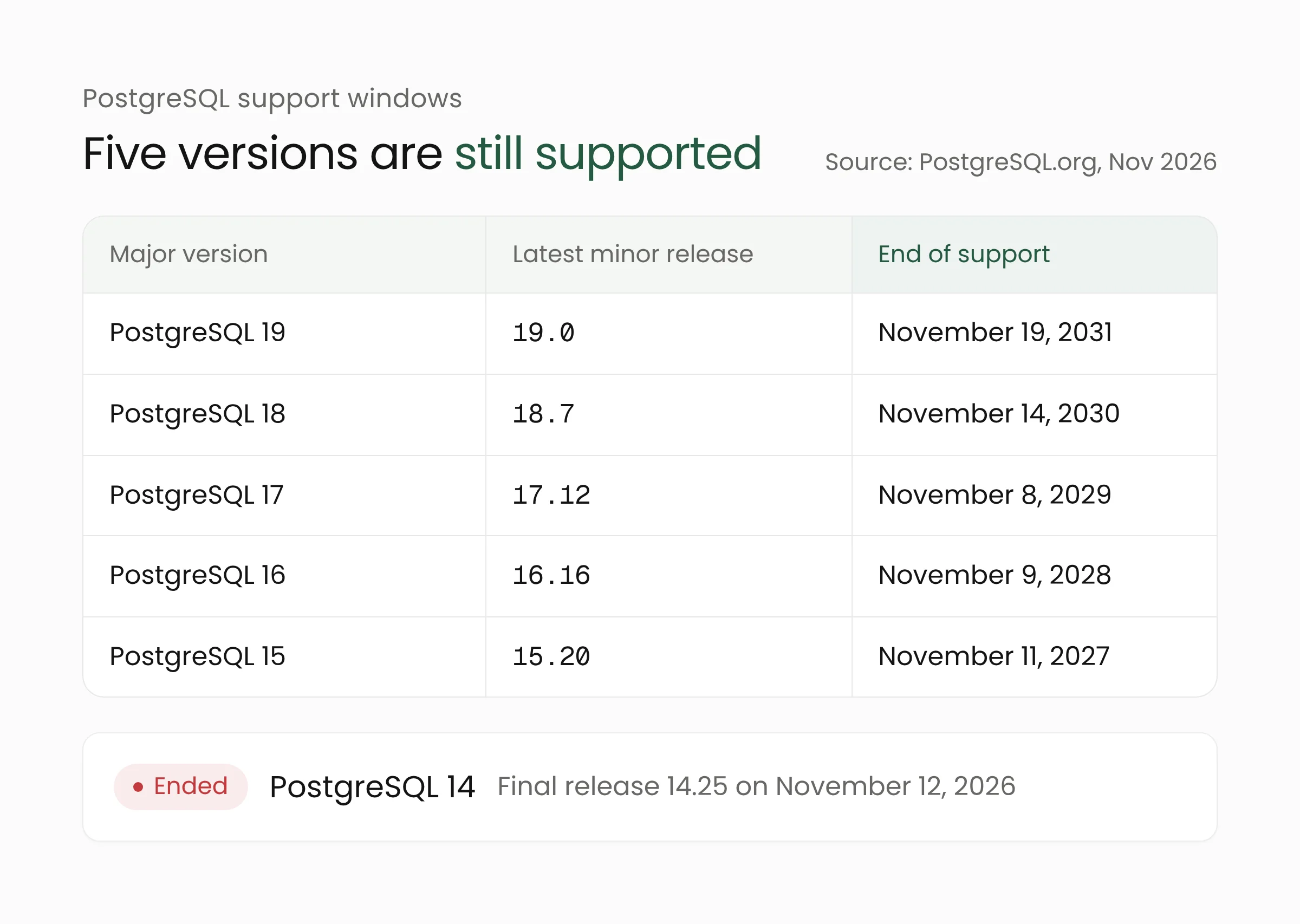
For many teams, the more pressing date fell a week before the release. The PostgreSQL versioning policy states that each major version is supported for five years after its initial release. PostgreSQL 14 first shipped on September 30, 2021 and received its final release, 14.25, on November 12, 2026. The project will issue no further bug fixes or security updates for it.
Five versions are now supported: 15 through 19. PostgreSQL 15 is the oldest of them, with support ending on November 11, 2027. PostgreSQL 19 will be supported until November 19, 2031.
Key PostgreSQL 19 features for database administrators
Most headline features target operational work such as table maintenance, replication, and query stability.
REPACK compacts tables without taking the service down
Tables that see frequent updates and deletes accumulate dead space, and the file on disk stays large even after the row count drops. Until now, the built-in ways to return that space were VACUUM FULL and CLUSTER, and both lock the table for the duration. On an online store’s orders table, that means transactions stop for a while.
PostgreSQL 19 introduces a REPACK command that combines the two. The older commands remain for compatibility. According to the REPACK documentation, the command rewrites the entire table into a new file with no extra space, so unused space can be returned to the operating system. With USING INDEX, rows are also physically reordered to follow an index.
With REPACK (CONCURRENTLY), the bulk of the work runs under a lighter lock that still permits reads and writes. An exclusive lock is taken only in the final phase, when the table and index files are swapped, and it is typically held briefly. The pg_stat_progress_repack system view reports progress.
The same documentation lists requirements and limits:
- The disk needs free space at least equal to the size of the table plus its indexes.
- The table must have a primary key or an index-based replica identity.
- Partitioned tables and
UNLOGGEDtables cannot be processed with this option. - The command fails if more than about 104 million rows are updated or deleted while it runs.
- The option is not MVCC-safe. Other transactions using a snapshot taken before the repack started will see the table as empty once it completes.
That last point matters for systems that run long reports. Schedule the command outside the hours when lengthy report or export jobs run.
Logical replication without a server restart
Logical replication copies data changes table by table to another server, commonly to move data to a new version or to feed an analytics database. Previously, an administrator had to set wal_level to logical and restart the server. In PostgreSQL 19, a server running with wal_level set to replica raises the level on its own when the first logical replication slot is created. A new effective_wal_level variable reports the level currently in effect.
Sequence values, the counters that usually populate ID columns, are now replicated as well. A publication can cover all of them through ALL SEQUENCES.
Reading fresh data from a standby
Many applications write to a primary server and read from a standby to spread the load. Newly saved data sometimes has not reached the standby by the time the user reloads the page. With the new WAIT FOR LSN command, the application records the log position after writing, then asks the standby to wait until that position has been processed before reading.
Query plans that can be steered
A new extension, pg_plan_advice, gives administrators a way to direct and stabilize query planner decisions. Its companion, pg_stash_advice, applies that advice automatically based on the query identifier, with no change to application code.
Performance and developer features
Foreign key checks are faster. According to InfoQ, the PostgreSQL project’s own testing showed bulk inserts running nearly twice as fast. That figure has not been independently verified, and results will depend on each application’s schema.
Autovacuum, the automatic cleanup process, can now clean indexes in parallel through autovacuum_max_parallel_workers and orders tables using a scoring system. The number of I/O worker processes adjusts to the load. For developers, there is INSERT … ON CONFLICT DO SELECT for the “get or create” pattern in a single statement, an IGNORE NULLS option on window functions such as lag() and lead(), and JSON output from COPY.
Changes to check before upgrading
The release notes list changes that are incompatible with earlier versions. Some can halt an upgrade or keep the server from starting.
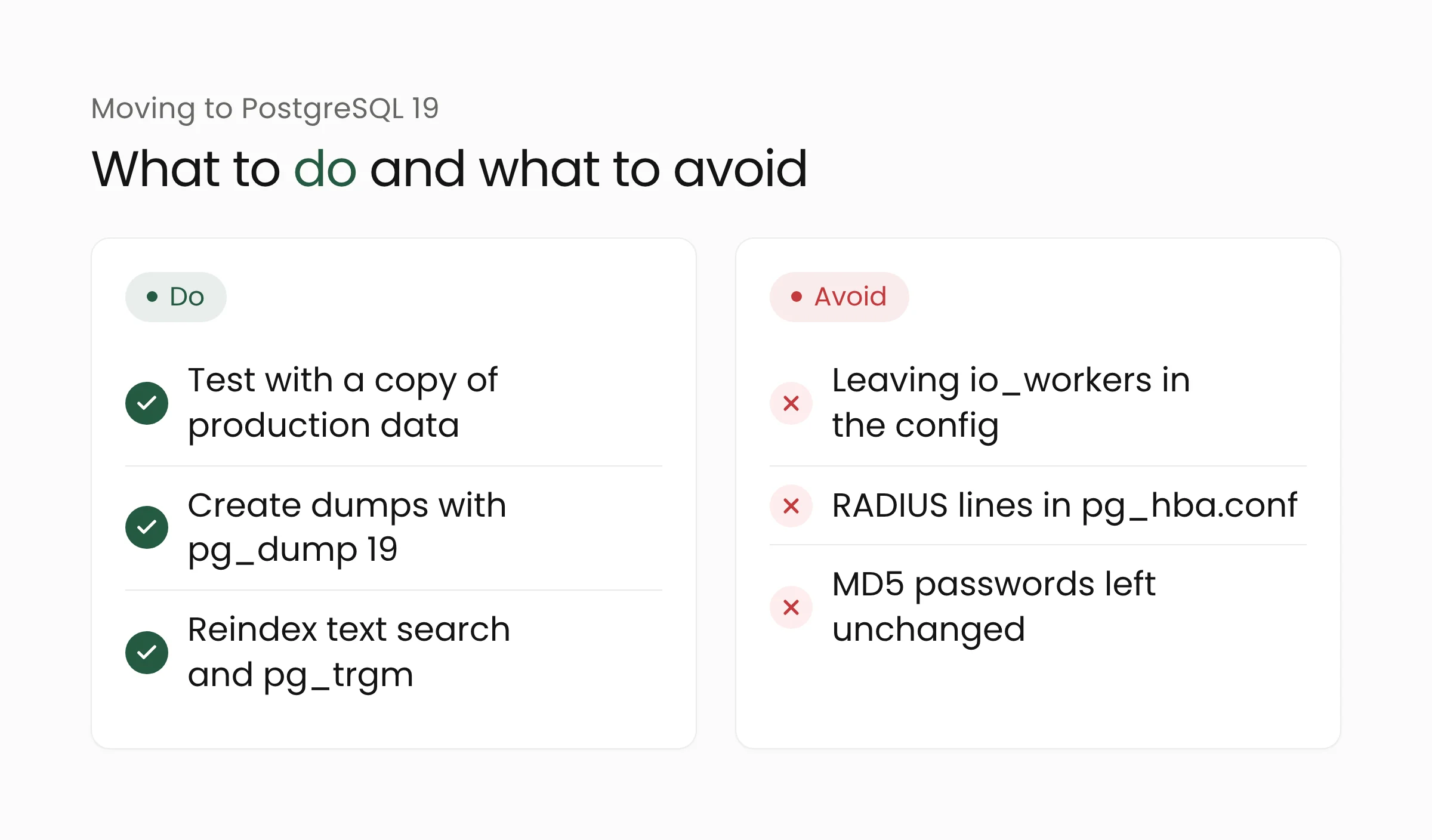
io_workershas been removed. It is replaced byio_min_workers,io_max_workers,io_worker_idle_timeout, andio_worker_launch_interval. Heise notes that the server will not start if the configuration file still containsio_workers.- RADIUS authentication has been removed. PostgreSQL only supported RADIUS over UDP, which the project considers impossible to secure. Any RADIUS line in
pg_hba.confhas to be replaced before upgrading. - MD5 passwords trigger a warning. MD5 has been deprecated since PostgreSQL 18. Version 19 warns after every successful MD5 authentication. InfoQ reports that MD5 is planned for removal and that SCRAM is the recommended replacement.
- JIT is off by default. Systems that run many large analytical queries need to enable it themselves.
standard_conforming_stringsis always on. Dumps made by an olderpg_dumpwith this setting turned off will not load properly. Create dumps with the version 19 tools.pg_upgraderefuses two conditions. These are abtree_gistindex on aninetorcidrcolumn, and a database, role, or tablespace name containing a line break.- Text search indexes need rebuilding. Character classification now follows the database’s locale provider, so full text search and
pg_trgmindexes should be reindexed after the upgrade.
What this means for database teams
Start by finding out which version is running with SELECT version();. From there, the work splits by situation.
Still on PostgreSQL 14 or older. Plan the upgrade now, because vulnerabilities found after November 12, 2026 will not be patched in that version. The destination can also be PostgreSQL 17 or 18, which have been through many minor releases and remain supported for years.
On PostgreSQL 15 through 18. Make sure the latest minor release is installed: 15.20, 16.16, 17.12, or 18.7. Version 15 users have until November 2027 to schedule a move.
Interested in PostgreSQL 19. Install it in a test environment first, using a copy of production data. In community discussion cited by InfoQ, some users advised critical production systems to wait for 19.1.
Four more items belong on the checklist:
- Choose an upgrade path. The release notes name three: dump and restore with
pg_dumpall,pg_upgrade, or logical replication. Logical replication offers the shortest downtime. - Check extensions and libraries. Confirm that your extensions, ORM, and driver support the target version.
- Ask your provider about its schedule. Managed database users depend on the provider’s timeline for version 19 availability and for the version 14 cutoff.
- Move MD5 passwords to SCRAM. This can start on any version and reduces the workload when the upgrade comes.
Databases behind dashboards and reports are often the last to be upgraded. In data analytics work, the database version belongs in the inventory alongside other data sources, so its end-of-support date is visible well in advance. Teams that recently reworked their applications for PHP 8.6 can schedule database testing in the same cycle.
Frequently asked questions
Is PostgreSQL 19 ready for production?
PostgreSQL 19.0 is an official stable release. Some users in the community advise critical systems to wait for the first minor release and to spend that time testing applications and extensions.
Does REPACK replace VACUUM?
No. Regular VACUUM and autovacuum remain the routine maintenance tools. REPACK replaces VACUUM FULL and CLUSTER, the heavy operations that rewrite a whole table to return disk space or reorder rows.
What is the risk of staying on PostgreSQL 14?
The database keeps running as before. Over time, new bugs and vulnerabilities go unfixed by the PostgreSQL project, and libraries and extensions gradually stop testing against that version.
Closing
PostgreSQL 19 brings improvements operations teams will notice, particularly online table maintenance and simpler replication setup. For many organizations, the nearer task is leaving version 14. If you need help mapping database versions or planning an upgrade, Merakit’s web development team is available to talk.
Sources
- PostgreSQL 19 Release Notes, PostgreSQL Global Development Group, November 19, 2026
- Versioning Policy, PostgreSQL Global Development Group, accessed November 25, 2026
- REPACK and WAIT, PostgreSQL 19 documentation, accessed November 25, 2026
- PostgreSQL 19.0: What the new database release brings for developers and admins, heise online, November 20, 2026
- PostgreSQL 19 Released with Online Table Repacking and Query Planning Controls, InfoQ, November 22, 2026