Blog WhatsApp
WhatsApp Scheduled Messages: How It Works and Its Limits
On this page· 7 sections
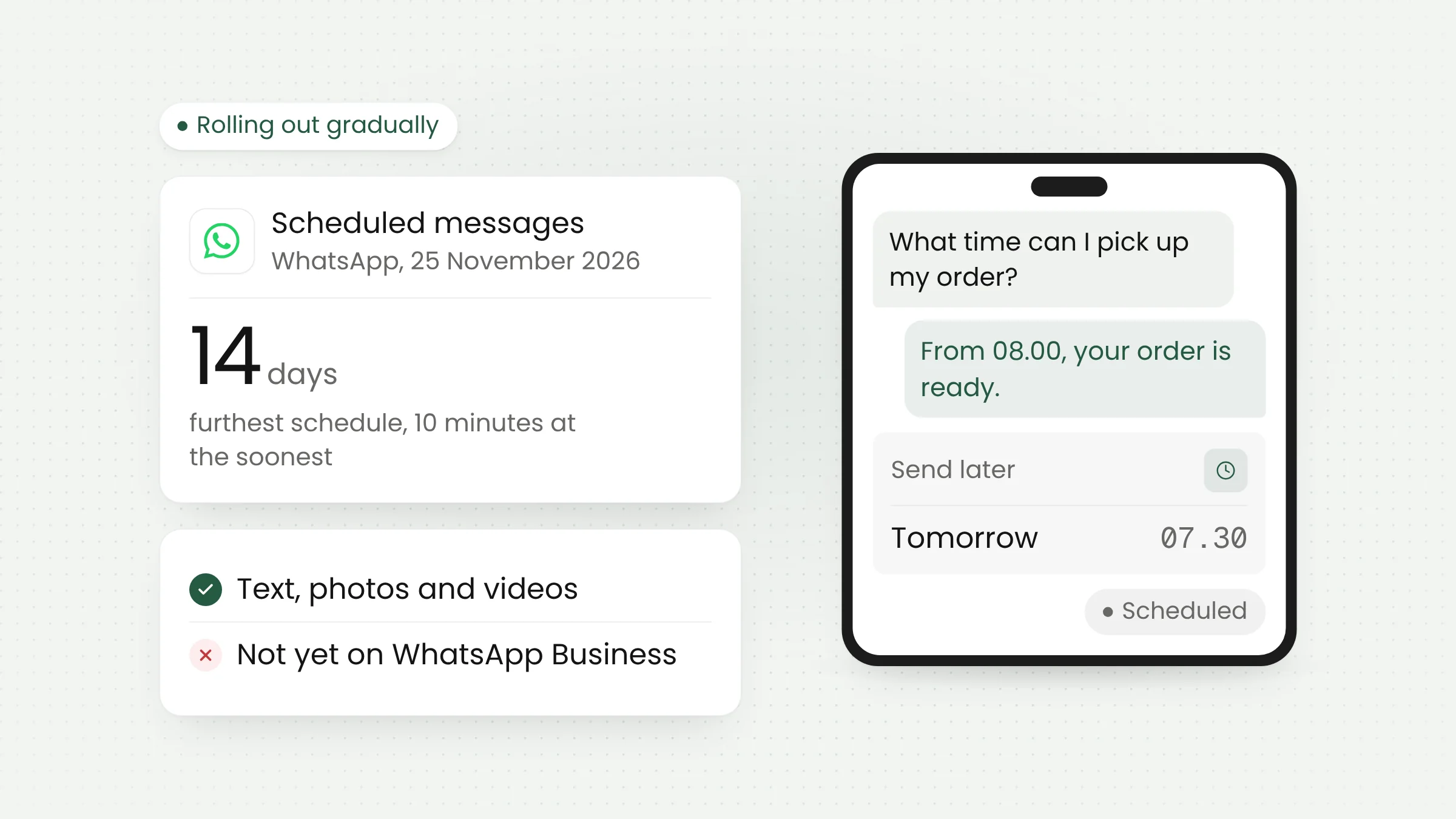
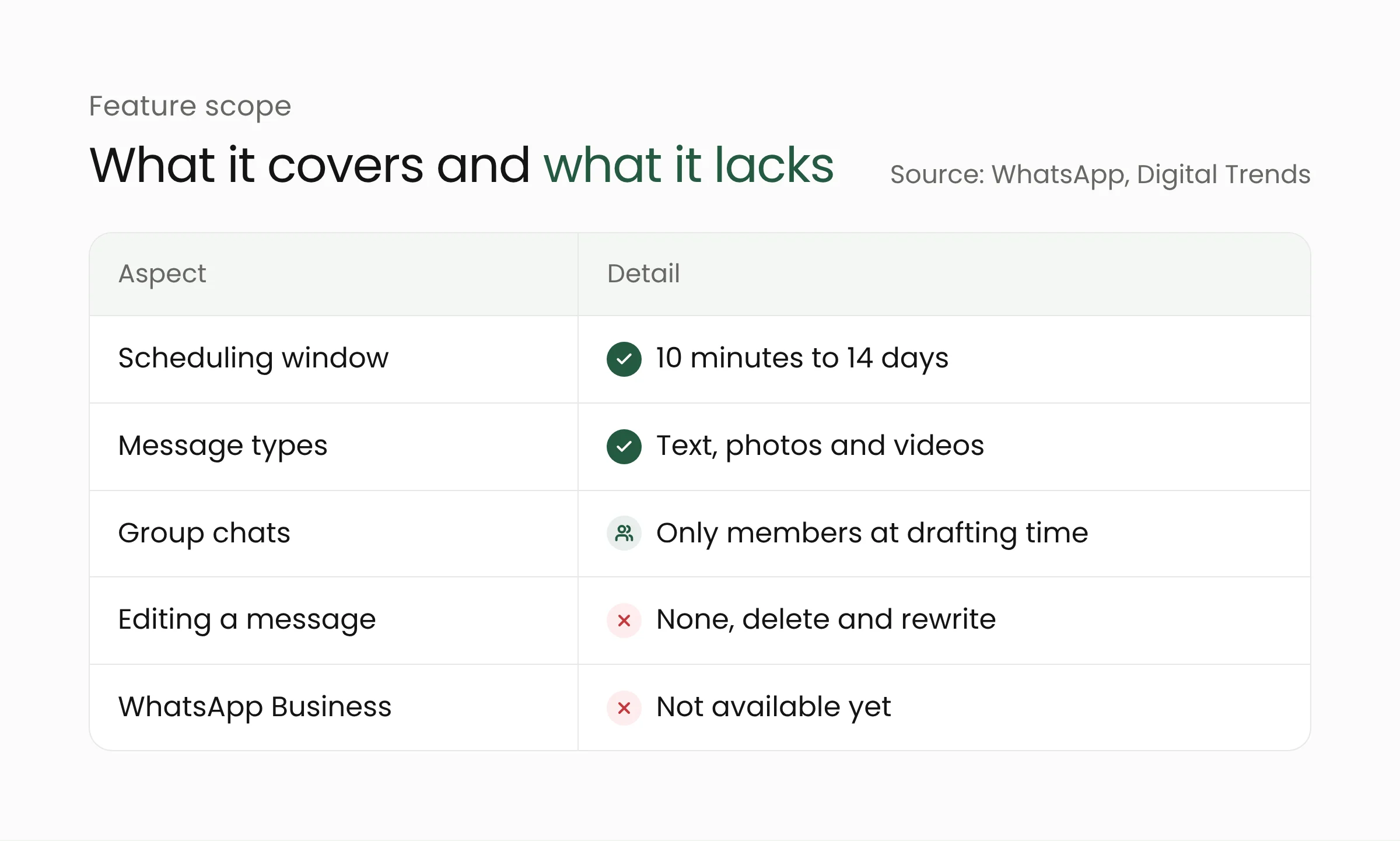
WhatsApp announced scheduled messages on 25 November 2026. Users can write a message now and set it to send later, from 10 minutes to 14 days ahead. The feature is rolling out gradually on Android and iOS, but it is not yet available in the WhatsApp Business app.
That exception matters in Indonesia, where many shops and small businesses serve customers over WhatsApp. This article covers how WhatsApp scheduled messages work, the limits of the first release, and what business owners should consider before relying on them.
What WhatsApp announced
In a post on its official blog, WhatsApp described scheduled messages as one of its most requested features. The examples it gave are personal ones, such as a birthday greeting that arrives at midnight in the recipient’s time zone, or a good-luck note before an exam.
Scheduling works in one-on-one and group chats, for text, photos and videos. WABetaInfo, a site that tracks WhatsApp test builds, adds that links can be scheduled as well. The window runs from 10 minutes to 14 days after the message is written.
Recipients see a scheduled message like any other, with no sign that it was queued in advance. WhatsApp said the feature is reaching users worldwide over the coming weeks, so some accounts do not have it yet. CNN Indonesia likewise noted that it may not appear on every account. No specific availability date for Indonesia has been announced.
The feature has been a long time coming. According to Digital Trends, it was first spotted in February and then tested with a limited group on the Android beta in October. The outlet also pointed out that Telegram and Signal have offered message scheduling for some time.
How to schedule a message
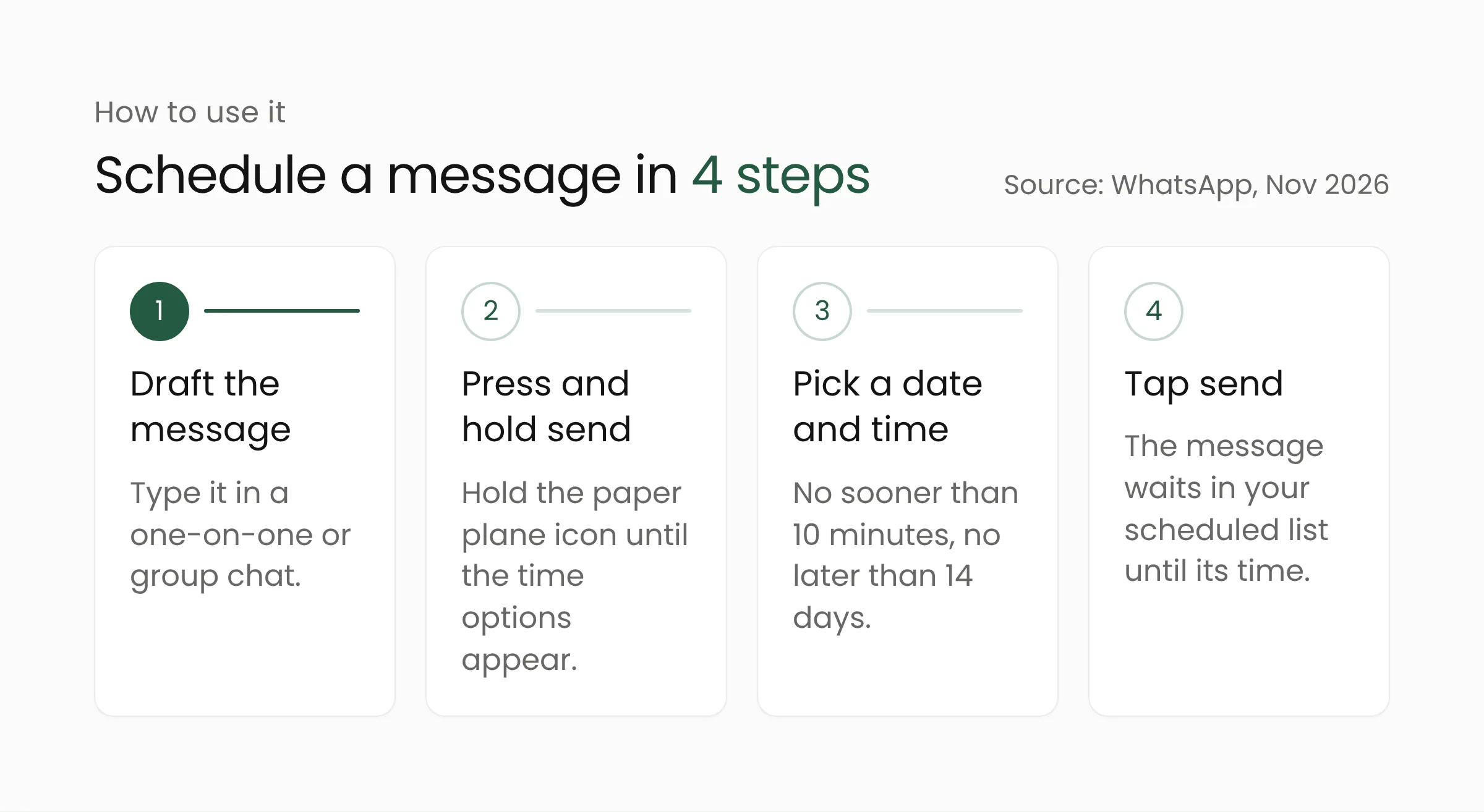
The WhatsApp Help Center lists four steps. Draft the message, press and hold the paper plane send icon, scroll to choose a date and time, then tap send. 9to5Mac reported that users need the latest WhatsApp app update, released on the day of the announcement.
Reviewing and deleting scheduled messages
Queued messages can be reviewed. The Help Center says the list opens by tapping your profile picture and choosing “Scheduled messages”. To cancel one, press and hold it in that list and select delete.
Sources differ on where the list sits. WABetaInfo wrote that scheduled messages appear in the chat info screen, and Digital Trends noted that beta testers in October found them in the same place. The menu location may vary between versions while the rollout continues. WABetaInfo also reported that deleting a scheduled message does not notify the recipient.
Limits of the first release
WhatsApp’s announcement is brief, and several limits only show up on the Help Center page and in press coverage.
Groups, editing and message types
In a group, a scheduled message goes only to people who were members when it was drafted. The Help Center says members who join later will not see it. Anyone running a customer group or a class group should factor this in if membership changes often.
Scheduled messages cannot be edited either. Digital Trends wrote that users who want to change the content have to delete the message and write a new one. The official announcement mentions only viewing and deleting.
The message types WhatsApp named are text, photos and videos. Documents, voice messages and locations are not mentioned in the announcement or the Help Center, so their status has not been announced.
Not available in WhatsApp Business
The Help Center page carries one sentence that settles the question for businesses: “This feature is currently not available for WhatsApp Business.” WhatsApp has not said when the Business app will get it.
Digital Trends concluded that business accounts will have to keep sending reminders by hand for now. A business that sells through the regular WhatsApp app will receive the feature like any other user, once its account is included in the rollout.
Delivery with the phone off, and encryption
WhatsApp said scheduled messages are sent on time even if the sender’s phone is switched off or out of battery. WABetaInfo gave a short description of the flow. When a message is scheduled, the app sends it to the server, and the server delivers it to the recipient at the chosen time.
WhatsApp also said scheduled messages remain protected by end-to-end encryption, which means only the sender and the recipient can read the content. The Help Center states that no one outside the chat, WhatsApp included, can read them, and points readers to the privacy policy for details on scheduled messages.
These statements come from WhatsApp. The announcement and the coverage we read do not explain how an encrypted message is held on a server for up to 14 days, and no independent researcher has reviewed it yet. Organisations that send sensitive information over WhatsApp may want to wait for that technical explanation before scheduling such messages.
What this means for shop owners
The Digital 2027 report found that 92.7% of Indonesian internet users use WhatsApp, as covered in our article on 231 million internet users and what they mean for retail. For many shops the app is where orders are confirmed and stock questions are answered. The points below help put the new feature in proportion.
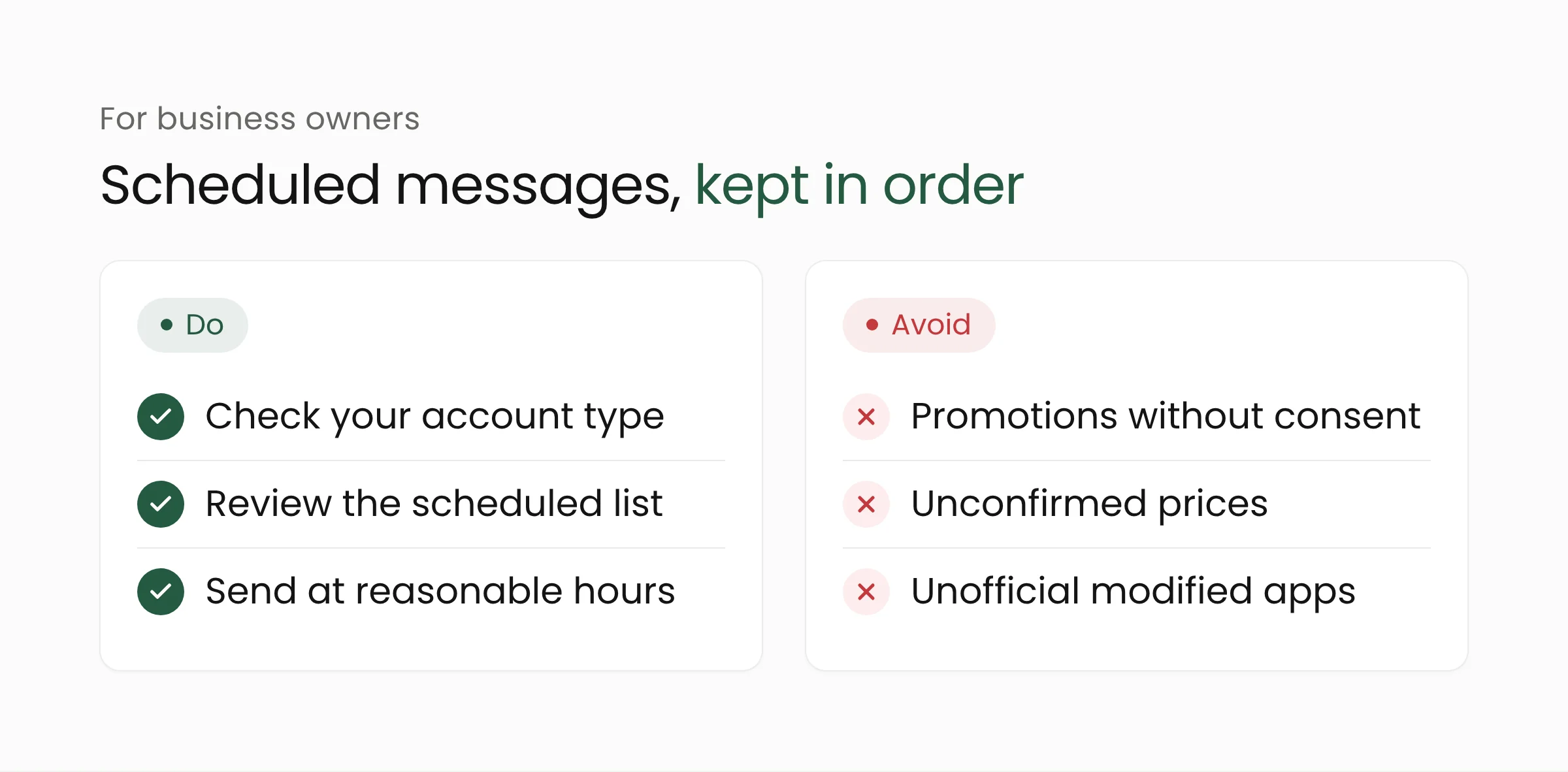
Check which account type you use. Shops on WhatsApp Business do not have scheduled messages yet. Moving a business number to the regular app only for this feature is a poor trade, because the business tools in the Business app do not carry over to the regular app.
Use it for messages whose content is settled. Pickup reminders, holiday greetings to returning customers and opening-hours notices are good candidates. Prices, stock and order status can change before a message goes out, and a scheduled message cannot be edited.
Review the scheduled list regularly. Messages go out on their own, even with the phone off. If plans change, for example when the shop closes unexpectedly, messages that no longer apply have to be deleted from the list.
Respect customers’ time and consent. Scheduling makes it easier to write outside working hours, but the recipient still gets the message at the hour you pick. Send at reasonable hours, and only to customers who have agreed to be contacted.
Avoid unofficial apps. Before this release, some users relied on third-party apps to schedule messages. Unofficial apps that ask for access to an account put customer data at risk.
Know the limits of a built-in feature. Scheduled messages are sent one at a time from a single phone and are not connected to order data. A business handling hundreds of orders a day is better served by a system that sends confirmations and reminders straight from its transaction data, for example through a retail management system or its own mobile app connected to an official channel.
Frequently asked questions
Why is the scheduled messages feature missing from my WhatsApp?
WhatsApp is rolling the feature out worldwide over the weeks following 25 November 2026. Update the app to the latest version from Google Play or the App Store, then press and hold the send button. If no time options appear, your account has not been included yet.
Can the recipient tell that a message was scheduled?
No. WhatsApp says a scheduled message looks like any other message to the person receiving it. WABetaInfo adds that deleting a message before it is sent does not produce a notification.
Can scheduled messages be used in WhatsApp Business?
Not yet. The WhatsApp Help Center says the feature is currently not available for WhatsApp Business, and no date has been announced.
Closing
Scheduled messages fill a long-standing gap in WhatsApp with a simple gesture. The limits of the first release are clear enough: a 14-day window, no editing, special handling for groups, and no support in WhatsApp Business. If your business needs order reminders and confirmations that run automatically from transaction data, the Merakit team is ready to discuss how to design them.
Sources
- Say it at the right time with scheduled messages, WhatsApp Blog, 25 November 2026
- How to schedule a message, WhatsApp Help Center, accessed 27 November 2026
- WhatsApp launches highly requested new feature for sending messages later, 9to5Mac, 25 November 2026
- WhatsApp’s most requested feature is finally official, and it changes how you send texts, Digital Trends, 25 November 2026
- WhatsApp launches scheduled messages on Android and iOS, WABetaInfo, 25 November 2026
- WhatsApp Rilis Fitur Pesan Terjadwal, Ini Cara Pakainya, CNN Indonesia, 27 November 2026