Blog WhatsApp
WhatsApp Guest Calling Lets People Join Without an Account
On this page· 6 sections
WhatsApp announced Guest Calling on October 14, 2026, a feature that lets people without a WhatsApp account join voice and video calls through a link. A WhatsApp user creates the link, and the guest opens it in a computer browser and waits to be admitted.
What was announced and how it works
Meta added Guest Calling so users can invite people who do not use the app. According to PCMag’s report, republished by Yahoo Tech, the rollout began on the day of the announcement. The host, meaning the account holder who starts the call, creates a link from the Calls tab and shares it with guests.
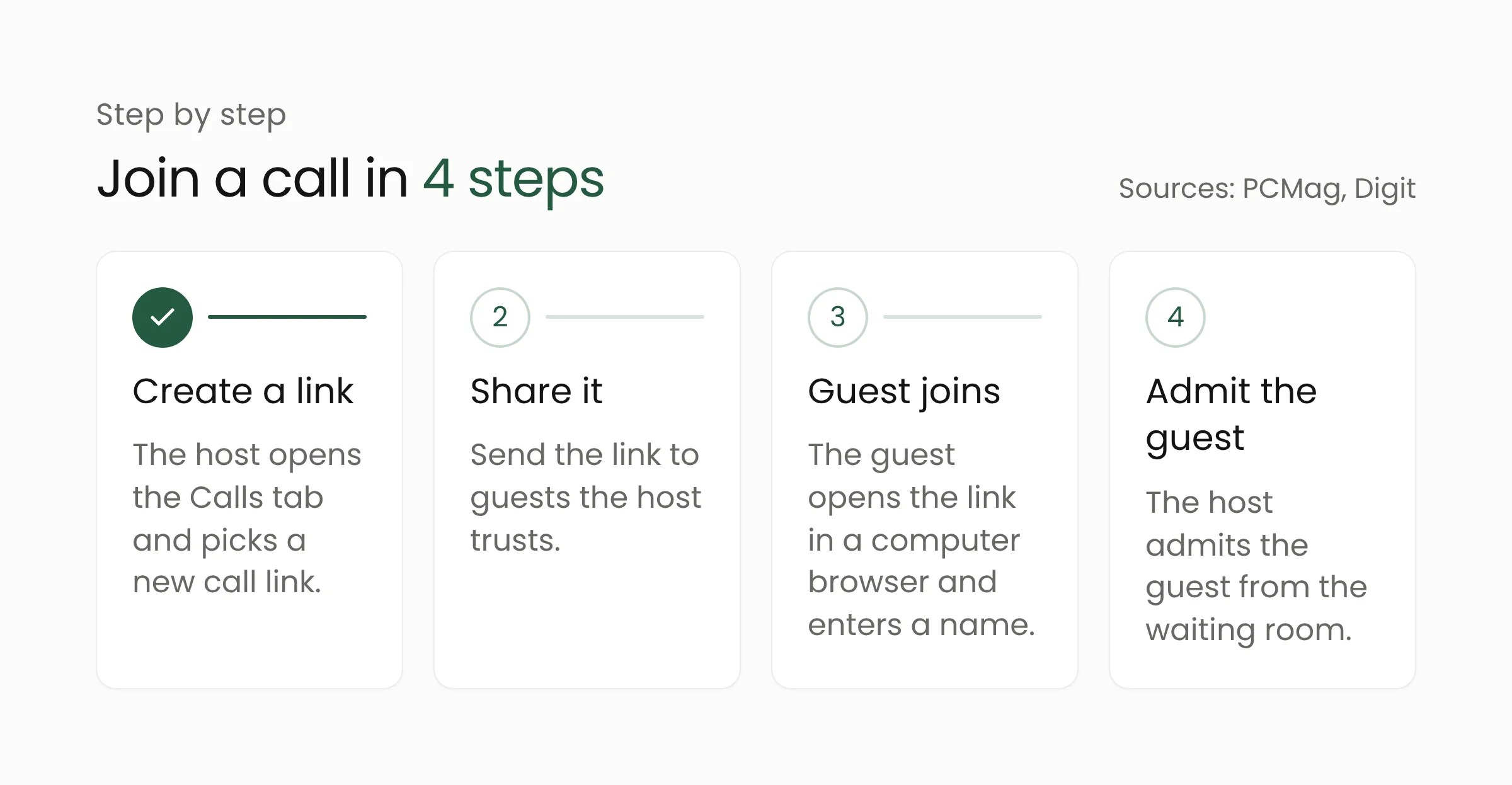
The guest opens the link in a computer browser, enters a name, and waits in a waiting room until the host lets them in. Digit reports that the host can also remove a guest at any time. To create a link, PCMag says, open the Calls tab, tap the plus icon, and choose “New call link.”
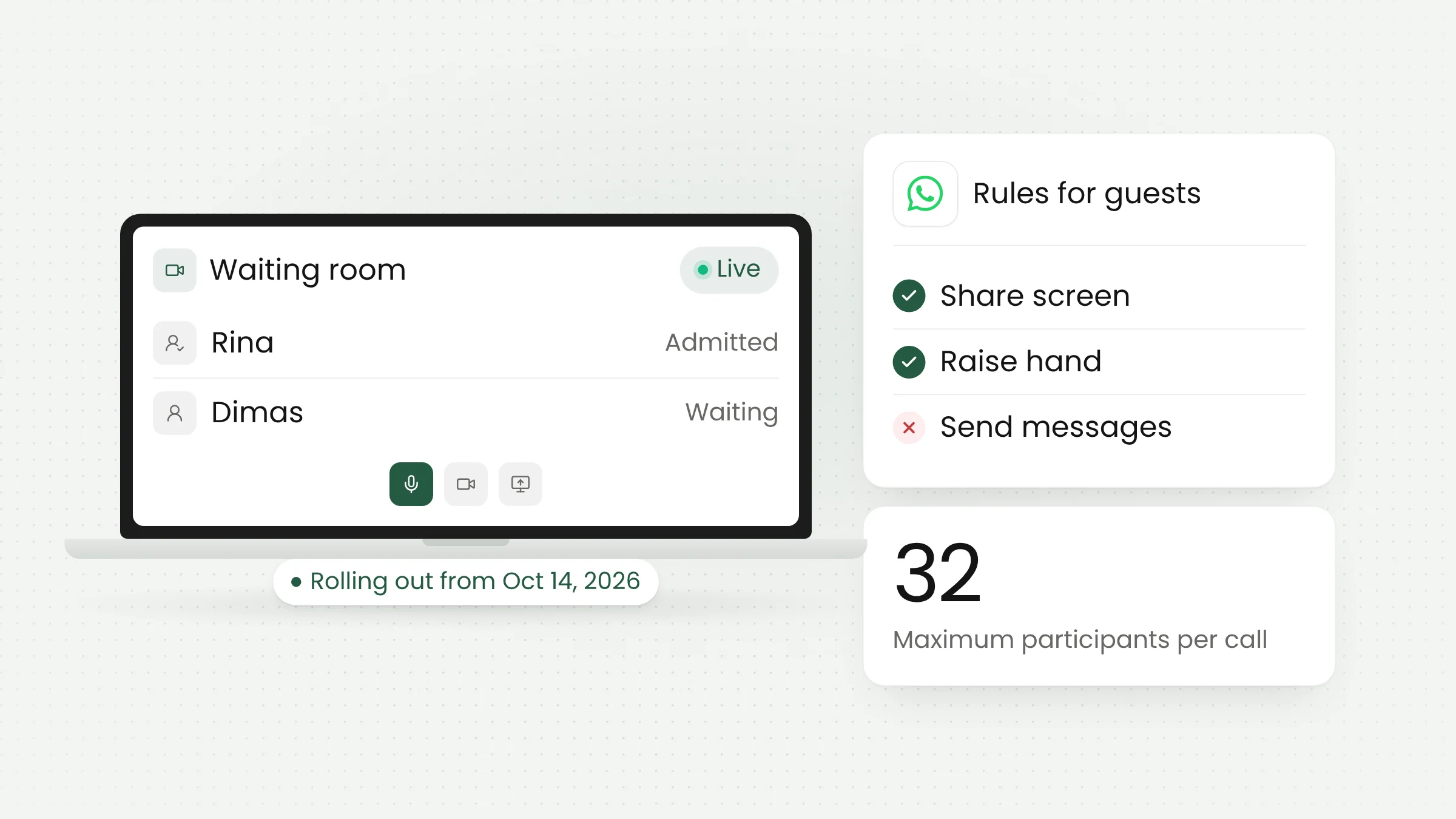
One-to-one and group calls are supported, with up to 32 participants. Both outlets describe the calls as free, end-to-end encrypted, and without a time limit. End-to-end encryption means only the people on the call can hear its content, not anyone in between.
Limits to know about
The feature widens access, but guests get fewer rights than regular users. Only people with a WhatsApp account can start a call, while guests can only accept an invitation.
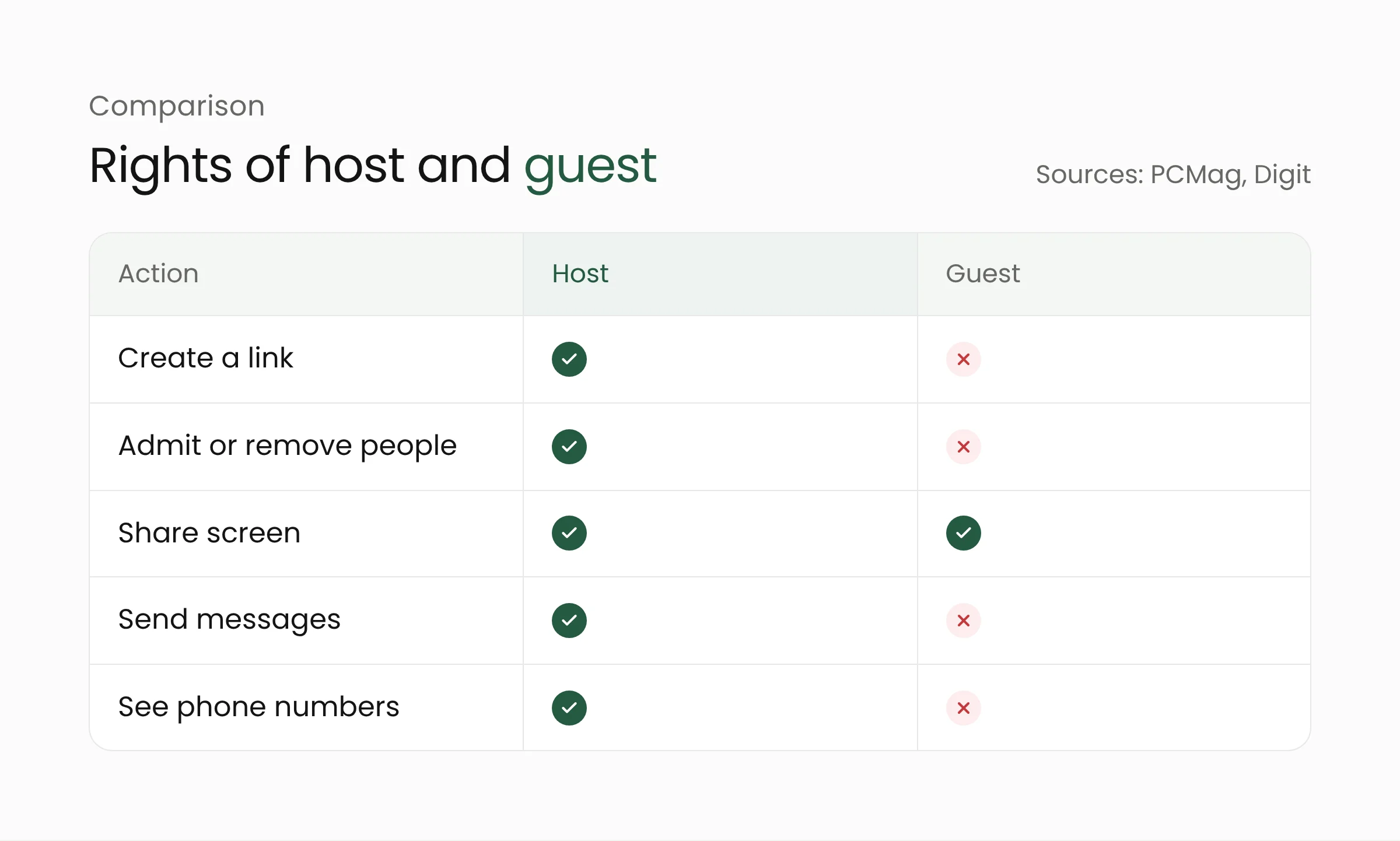
Guests can share their screen, react, and raise a hand. They cannot see other participants’ phone numbers, send messages, or add people to the call. These limits protect participants who use personal numbers, but they also mean written discussion has to happen somewhere else.
iGeeksBlog points to one practical risk: anyone holding the link can try to enter, so the link should go only to people the host trusts. The waiting room acts as a second filter, because the host decides who is admitted.
One consequence of this design deserves a note. Guests do not enter through a verified phone number, and according to the reports reviewed, they only enter a name before waiting. Guests type that name themselves, so a host cannot confirm someone’s identity from the name in the waiting room alone. For services that need certainty about identity, verification has to happen outside the call, for example through an appointment number or a code sent beforehand.
Guest devices and availability
Reports differ on phones. Digit and iGeeksBlog say guests use a computer browser, and iGeeksBlog notes that WhatsApp has not explained how guests on phones can join. PCMag writes that guests on phones can join video calls but cannot share their camera. Until that is settled, treat a computer as the safest path.
On availability, Digit says its source does not name the countries that get the feature, and iGeeksBlog notes that WhatsApp has not confirmed that every account has it. Availability in Indonesia has not been announced. Users can check the Calls tab in their own app.
Background and what comes next
PCMag notes that in July, Meta added voice and video calling to WhatsApp Web, with a waiting room, noise suppression, and a way to move calls between phone and computer. Guest Calling continues that direction. WhatsApp also plans calendar integrations later this year: plug-ins for Google Calendar and Outlook that let a call link be created from a calendar invitation. According to PCMag, invitees can join with or without an account.
iGeeksBlog observes that similar ideas already exist elsewhere. Apple’s FaceTime, for example, lets Android and Windows users join through Chrome or Edge. Guest links are becoming a common feature of calling apps.
What this means for shops, clinics, and service offices
Shops, small clinics, village offices, and schools often talk to people over WhatsApp. With this feature, a customer, patient, resident, or parent can join a video call without first creating an account. The feature only helps if the workflow around it is prepared.
Some reasonable uses, which we drafted ourselves and which do not come from WhatsApp: a shop can show products to a prospective buyer who has not installed the app, such as the procurement staff of an agency ordering office supplies. A clinic can answer a short question from a patient borrowing a relative’s computer. A village or district office can explain service requirements to several residents in one group call, and a school can invite parents to a class meeting.
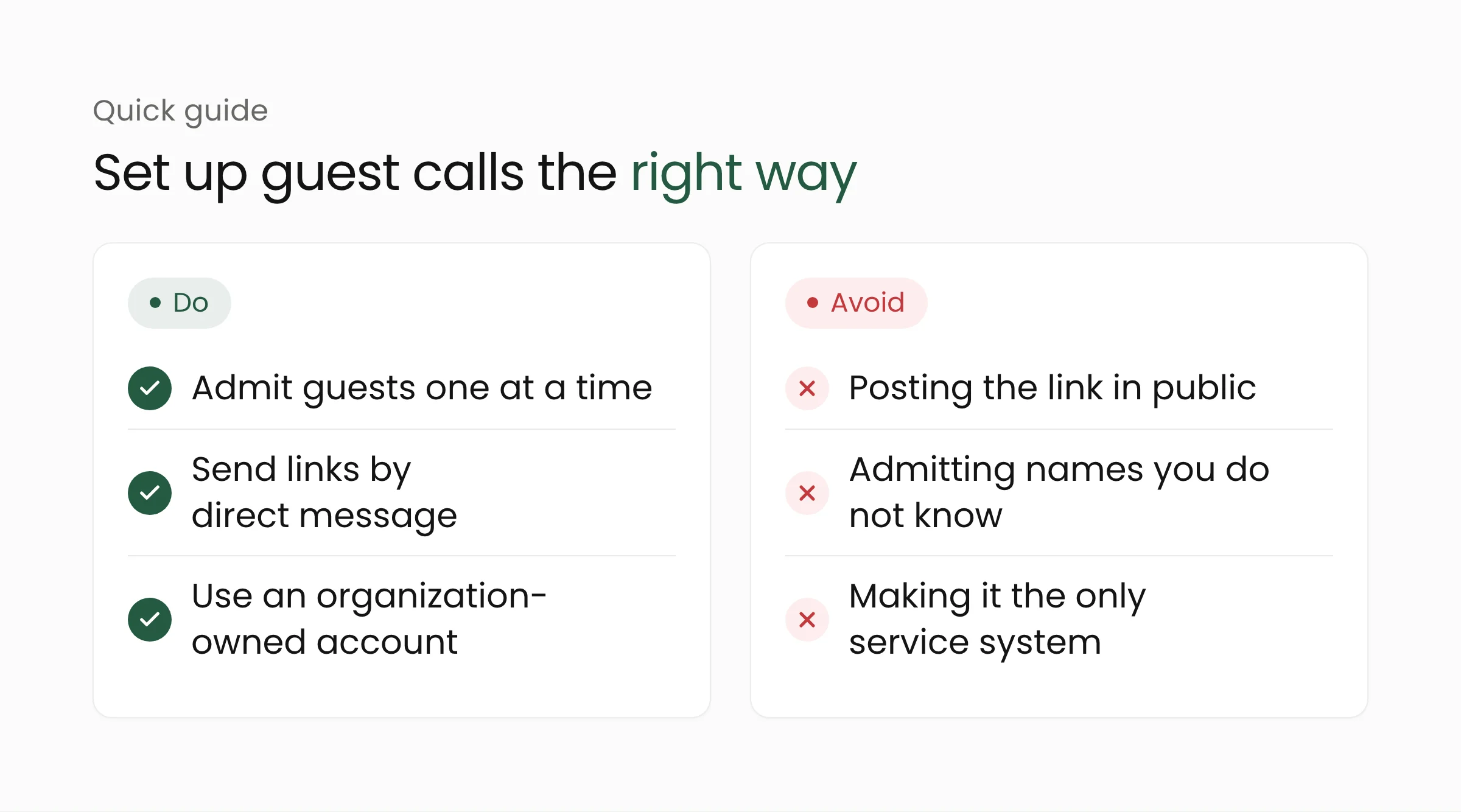
First, decide who may act as host. A call started from a staff member’s personal account ties that personal number to the service, so an organization-owned account and device is better. Second, share the link through a clear channel, such as a direct message to the intended recipient rather than a public post. Third, admit guests one at a time and match the name that appears against the appointment.
Fourth, prepare another route for what guests cannot do. Because guests cannot send messages, documents and forms need a separate system. For consultations involving health or other personal data, organizations remain bound by Indonesia’s Law No. 27 of 2022 on Personal Data Protection, and call encryption does not replace that duty. Record-keeping, consent, and data storage fall outside this feature.
Group calls with many guests also need a division of labor. One staff member should handle only the waiting room while another leads the conversation. With a cap of 32 participants, this keeps guests from waiting a long time in the lobby while the discussion is already under way.
Before making it an official channel, run a two-week trial with a small group. Record how many guests managed to join, how long they waited, and which technical problems came up, especially from guests who only have a phone. Those results are more useful than assumptions about customer readiness.
Finally, treat Guest Calling as a complement. Organizations that serve many people every day usually need scheduling, service history, and records that connect to their own systems. That need can be met through web development and mobile app development, with WhatsApp as one entry point for customers. Examples of how this applies to businesses are on the retail management solutions page, and for health facilities on the healthcare solutions page.
Frequently asked questions
Do guests need to install WhatsApp?
No. Guests open the link in a computer browser, enter a name, and wait to be admitted. The host still needs a WhatsApp account.
How many people can join, and is there a time limit?
Calls support up to 32 participants and have no time limit, according to Digit and PCMag. Calls are also free and end-to-end encrypted.
Is Guest Calling available in Indonesia yet?
It has not been announced. The sources reviewed do not list countries, and the rollout was reported to have started on the day of the announcement. Check the Calls tab in the app to see whether your account has it.
Closing
Guest Calling lowers the barrier to inviting people into a call, with control staying in the host’s hands. Organizations that want to tidy up customer service, appointments, or online consultations can talk to the Merakit team through the web development services page.
Sources
- PCMag via Yahoo Tech: Don’t Have WhatsApp? No Problem, You Can Now Join Calls As a Guest, October 14, 2026
- Digit: WhatsApp introduces Guest Calling, lets people join calls without an account, October 15, 2026
- iGeeksBlog: WhatsApp guest calling lets people without an account join a call, October 2026